
MDscan: Batch Scanner
Scan, Enhance & Export PDFs
iPhone için tasarlandı
Ücretsiz · Uygulama içi satın alma
- Yaş sınırı4+
- KategoriÜretkenlik
- Geliştirici晖 容
- Dillerİngilizce+ 1 dil daha
- Boyut3,8 MB
Resmi App Store sayfasına bağlanır
Download.org, MDscan: Batch Scanner için hiçbir dosya barındırmaz. Düğme, uygulamanın App Store üzerindeki sayfasını açar; uygulamayı orada 晖 容 yayınlar. Sayfanın son kontrolü: 22.11.2026.
Ekran görüntüleri
Hakkında
Geliştirici bu metni dilinizde sunmamış.
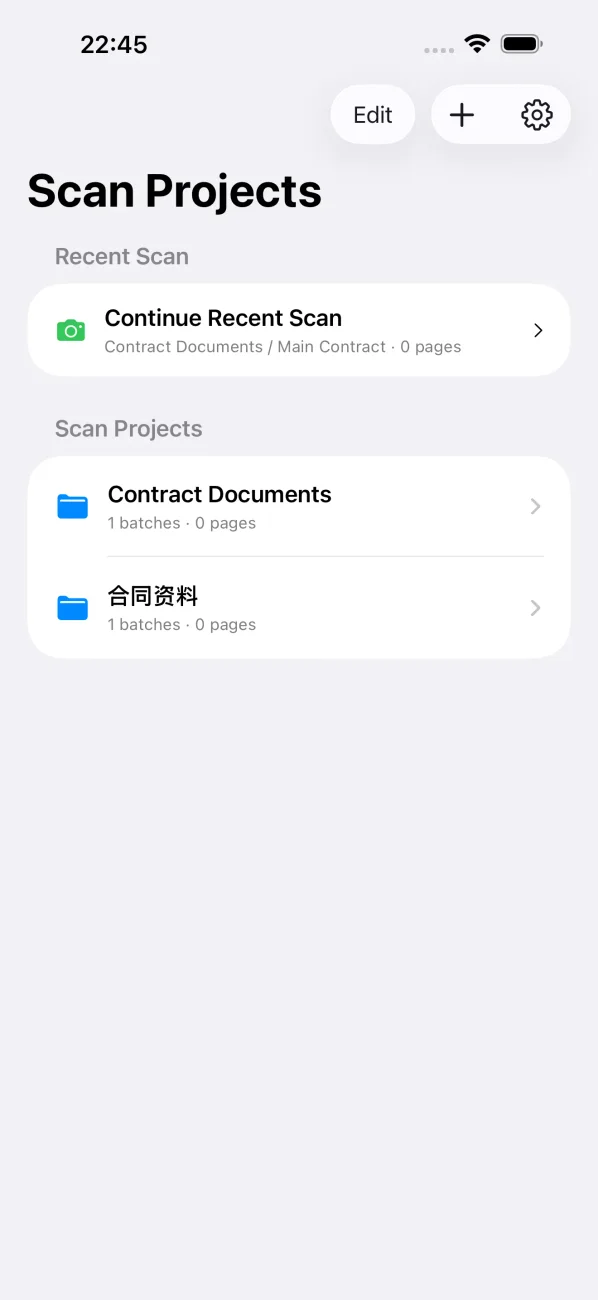
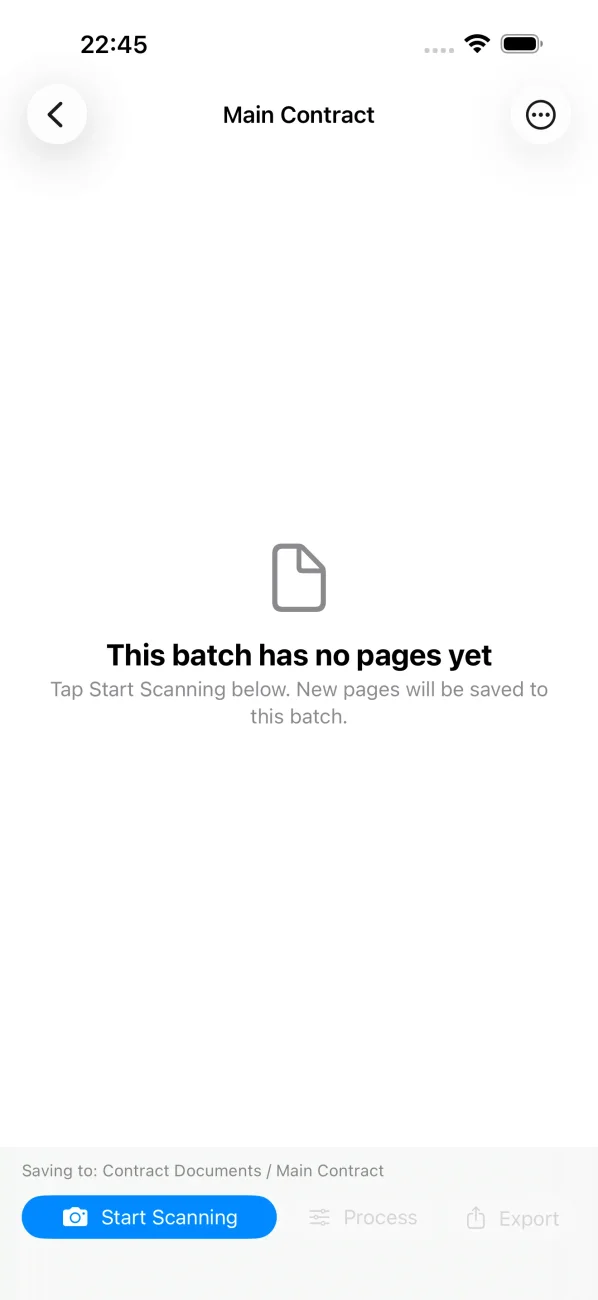
Turn your iPhone into a document scanner for quick handheld captures or larger batches with a phone stand. Capture one page at a time when you only have a few documents, or use continuous capture for larger scanning sessions.
A clear workflow from capture to export:
• Organize documents, archives, and books as Projects → Batches → Pages.
• Create a project and its first batch in one flow, or continue scanning directly from an existing batch.
• See the current project, batch, and saved page count while capturing.
• Finish scanning and go directly to page review, image processing, and export.
• Use grouped capture and merging for bound books.
Keep your originals:
Apply batch image adjustments and processing modes, including color, grayscale, and black and white. Processing and export do not overwrite your original captures.
Export for use and sharing:
Export original images, processed JPEG or PNG images, or PDFs. Exported files are saved locally. Save a copy through Apple’s Files app or share a PDF.
On-device processing and privacy:
No account is required. MDscan has no advertising or cross-app tracking. Scans are processed on your iPhone and are not uploaded to the developer’s servers.
Free to download, with a user-initiated three-day full trial. The trial does not charge you or renew automatically. After it expires, you can still view, organize, and delete existing scans and export original images. New scanning, rescanning, batch image processing, and processed image/PDF exports require a one-time lifetime unlock. No subscription.
Yenilikler
Sürüm 1.3 · 10.10.2026
A clearer scanning workflow, with every page saved where you expect it.
• Organize your scans as Projects → Batches → Pages, and create a new scan directly from the home screen.
• Start or continue scanning from a batch without returning to the home screen.
• See the current project, batch, and saved page count while capturing. Single-page and continuous capture both save to your selected batch.
• Finish scanning and go directly to the same batch to review, process, and export.
• Continue your most recently selected batch, while keeping access to existing scans.
Uygulama gizliliği
Bu uygulamanın verileri nasıl işlediği hakkında 晖 容 tarafından App Store üzerinde yapılan beyan.
-
Veri toplanmıyor
Geliştirici bu uygulamadan hiçbir veri toplamıyor.
Gizlilik uygulamaları, örneğin kullandığınız özelliklere veya yaşınıza göre değişiklik gösterebilir.
Bilgiler
- Satıcı
- 晖 容
- Kategori
- Üretkenlik
- Sürüm
- 1.3
- Güncellendi
- 10.10.2026
- Yayın tarihi
- 04.08.2026
- Boyut
- 3,8 MB
- Gereksinim
- iOS 17.0 veya sonrası
- Yaş sınırı
- 4+
- Fiyat
- Ücretsiz
- Uygulama içi satın alma
- Evet
- Diller
- İngilizce, Basitleştirilmiş Çince
- Telif hakkı
- © 2026 Hui Rong
Bunları da beğenebilirsiniz
-
 ScanLark - PDF ScannerÜretkenlik
-
 TimeTracketeÜretkenlik
-
 LensFix PDF TarayıcıOCR, Görsel ve Formatlar
-
 PDF Image Extract-PDF to ImageÜretkenlik
-
 不玩手机-自律习惯养成记Üretkenlik
-
 Steel weight calculatorÜretkenlik
-
 Scanner Mini – Scan PDF & FaxÜretkenlik
-
 PDF Reader – PDFelementÜretkenlik
-
 Turbo VPN Private BrowserGüvenli ve Özel Web Tarama