
MDscan: Batch Scanner
Scan, Enhance & Export PDFs
Diseñada para iPhone
Gratis · Compras en la aplicación
- Clasificación por edad4+
- CategoríaProductividad
- Desarrollador晖 容
- IdiomasInglés+ 1 más
- Tamaño3,8 MB
Enlaza a la página oficial de App Store
Download.org no aloja ningún archivo de MDscan: Batch Scanner. El botón abre la página de la aplicación en App Store, donde la publica 晖 容. Ficha comprobada por última vez el 22/11/2026.
Capturas de pantalla
Acerca de
El desarrollador no ha proporcionado este texto en tu idioma.
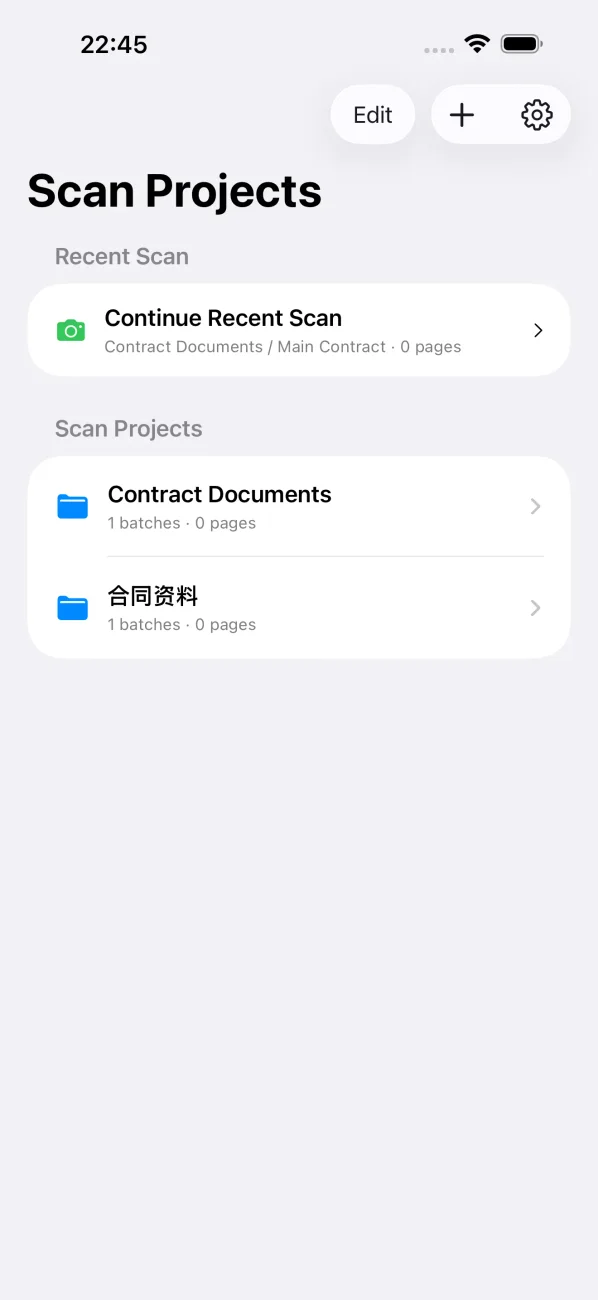
Turn your iPhone into a document scanner for quick handheld captures or larger batches with a phone stand. Capture one page at a time when you only have a few documents, or use continuous capture for larger scanning sessions.
A clear workflow from capture to export:
• Organize documents, archives, and books as Projects → Batches → Pages.
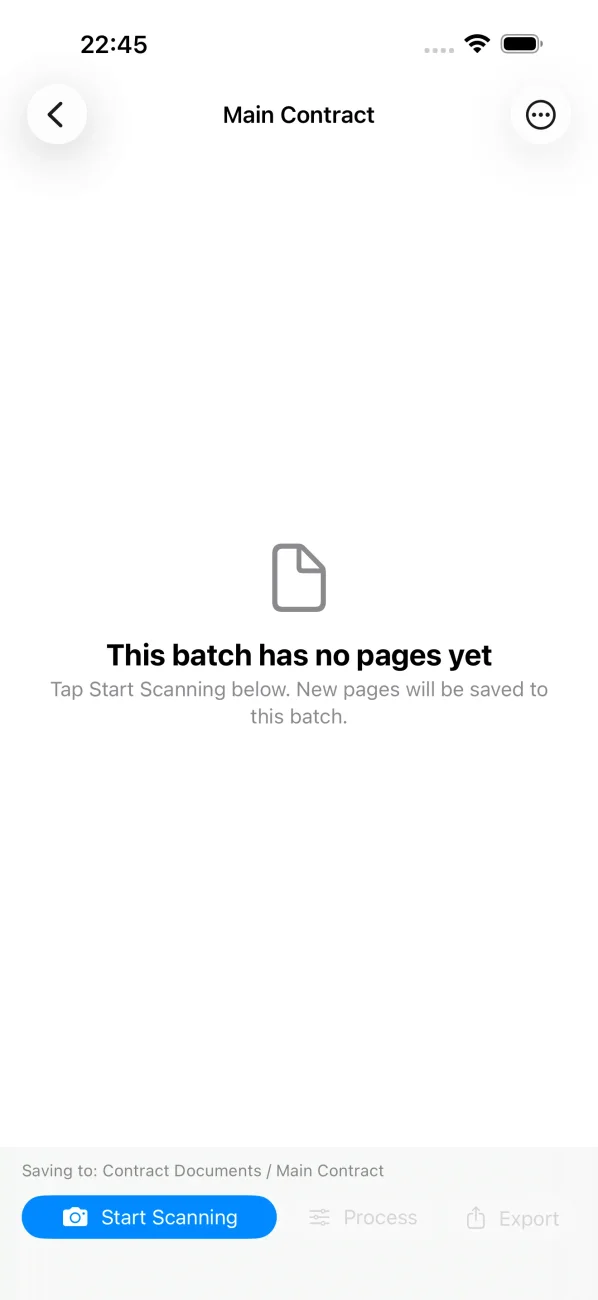
• Create a project and its first batch in one flow, or continue scanning directly from an existing batch.
• See the current project, batch, and saved page count while capturing.
• Finish scanning and go directly to page review, image processing, and export.
• Use grouped capture and merging for bound books.
Keep your originals:
Apply batch image adjustments and processing modes, including color, grayscale, and black and white. Processing and export do not overwrite your original captures.
Export for use and sharing:
Export original images, processed JPEG or PNG images, or PDFs. Exported files are saved locally. Save a copy through Apple’s Files app or share a PDF.
On-device processing and privacy:
No account is required. MDscan has no advertising or cross-app tracking. Scans are processed on your iPhone and are not uploaded to the developer’s servers.
Free to download, with a user-initiated three-day full trial. The trial does not charge you or renew automatically. After it expires, you can still view, organize, and delete existing scans and export original images. New scanning, rescanning, batch image processing, and processed image/PDF exports require a one-time lifetime unlock. No subscription.
Novedades
Versión 1.3 · 10/10/2026
A clearer scanning workflow, with every page saved where you expect it.
• Organize your scans as Projects → Batches → Pages, and create a new scan directly from the home screen.
• Start or continue scanning from a batch without returning to the home screen.
• See the current project, batch, and saved page count while capturing. Single-page and continuous capture both save to your selected batch.
• Finish scanning and go directly to the same batch to review, process, and export.
• Continue your most recently selected batch, while keeping access to existing scans.
Privacidad de la aplicación
Lo que 晖 容 declara en App Store sobre cómo esta aplicación gestiona los datos.
-
No se recopilan datos
El desarrollador no recopila ningún dato de esta aplicación.
Las prácticas de privacidad pueden variar, por ejemplo, según las funciones que uses o tu edad.
Información
- Vendedor
- 晖 容
- Categoría
- Productividad
- Versión
- 1.3
- Actualizado
- 10/10/2026
- Publicado
- 4/8/2026
- Tamaño
- 3,8 MB
- Requiere
- iOS 17.0 o posterior
- Clasificación por edad
- 4+
- Precio
- Gratis
- Compras en la aplicación
- Sí
- Idiomas
- Inglés, Chino simplificado
- Copyright
- © 2026 Hui Rong
Quizá también te guste
-
 ScanLark - PDF ScannerEscanea, ordena y extrae texto
-
 TimeTracketeProductividad
-
 LensFix Escáner PDFOCR, imágenes y formatos
-
 PDF Image Extract-PDF to ImagePDF to Long Image Converter
-
 不玩手机-自律习惯养成记Productividad
-
 Steel weight calculatorProductividad
-
 Scanner Mini – Escanea a PDFDocumentos, fotos y facturas
-
 Lector de PDF – PDFelementVisor de PDF, anotar PDF
-
 Turbo VPN Navegador PrivadoConexión segura y privada