
PlainPaste - Clipboard Cleaner
Remove Text Formatting
Entwickelt für iPhone, iPad, iPod touch
Kostenlos · In-App-Käufe
- Altersfreigabe4+
- KategorieDienstprogramme
- EntwicklerTakao Ichimura
- SprachenEnglisch+ 1 weitere
- Größe9,8 MB
Verlinkt auf die offizielle App Store-Seite
Download.org hostet keine Datei von PlainPaste - Clipboard Cleaner. Die Schaltfläche öffnet die App-Seite bei App Store, wo Takao Ichimura die App veröffentlicht. Eintrag zuletzt geprüft am 20.11.2026.
Screenshots
Info
Der Entwickler hat diesen Text nicht in Ihrer Sprache bereitgestellt.
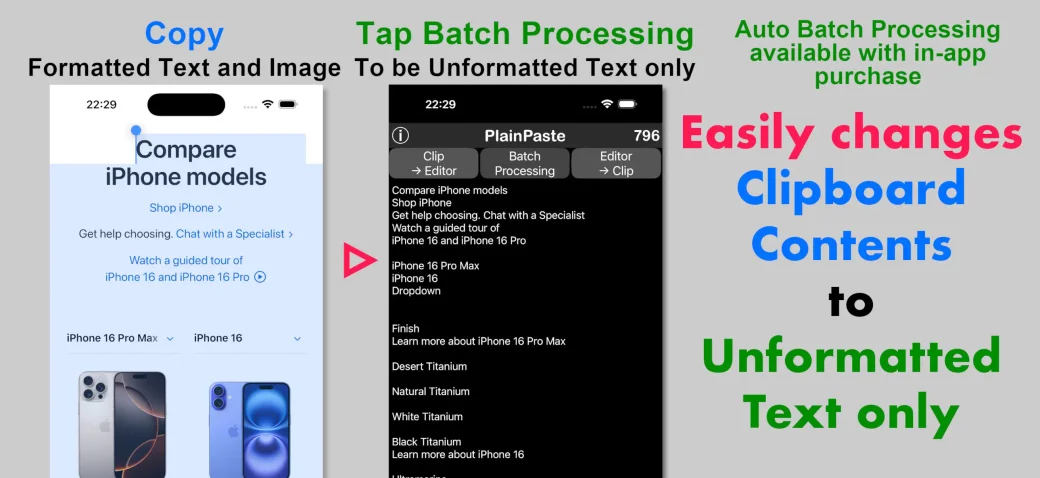
Have you ever had trouble copying and pasting text because unwanted images or photos were included, or the text had size and color restrictions?
"PlainPaste - Clipboard Cleaner" is an app that solves these problems.
This app lets you easily remove non-text content, such as images and photos, from your clipboard, as well as remove text formatting.
An indispensable app for editing on iPhone, iPad, and Mac!
[How to use]
∙ Tapping "Clip → Editor" button will place the text in the clipboard into the PlainPaste editor, and the text formatting will be removed.
∙ Tapping "Editor → Clip" button will place the text in the editor into the clipboard.
∙ With the above operation, the contents of the clipboard will be only the unformatted text.
∙ Tapping "Batch Processing" button, the above two button processes will be performed continuously.
∙ If you turn on Auto Batch Processing, Batch Processing will be performed when this app is brought to the foreground. (Auto Batch Processing requires an in-app purchase)
∙ You can edit text in the editor.
∙ On iPhone or iPad, tap editor screen to show the keyboard.
∙ The number of characters in the editor is displayed at the top right of the screen.
∙ Paste Permission Dialog will not appear if you select "Allow" from "Settings" > "Apps" > "PlainPaste" > "Paste from Other Apps.
∙ Tap "ⓘ" button at the top left of the screen to open the information.
The developer assumes no responsibility for any accident, violation, loss or claims by third parties which may arise from the use of this app.
Terms of Use:
This application is provided under the Apple Standard End User License Agreement (EULA).
https://www.apple.com/legal/internet-services/itunes/dev/stdeula/
Neue Funktionen
Version 7.0.1 · 15.11.2026
Updated screenshots.
App-Datenschutz
Was Takao Ichimura im App Store zum Umgang dieser App mit Daten angibt.
-
Daten, die zum Tracking Ihrer Person verwendet werden
Können verwendet werden, um Sie über Apps und Websites anderer Unternehmen hinweg zu verfolgen.
- Standort
- Kennungen
- Nutzungsdaten
-
Nicht mit Ihnen verknüpfte Daten
Können erfasst werden, sind aber nicht mit Ihrer Identität verknüpft.
- Standort
- Kennungen
- Nutzungsdaten
Die Datenschutzpraktiken können variieren, zum Beispiel je nach den von Ihnen verwendeten Funktionen oder Ihrem Alter.
Informationen
- Anbieter
- Takao Ichimura
- Kategorie
- Dienstprogramme
- Version
- 7.0.1
- Aktualisiert
- 15.11.2026
- Veröffentlicht
- 04.12.2020
- Größe
- 9,8 MB
- Erfordert
- iOS 15.0 oder neuer
- Altersfreigabe
- 4+
- Preis
- Kostenlos
- In-App-Käufe
- Ja
- Sprachen
- Englisch, Japanisch
- Copyright
- © 2020 Takao Ichimura
Das könnte Ihnen auch gefallen
-
 EasyNote - Plain Text NotesDienstprogramme
-
 Text Workflow: Clean any TextText bereinigen & umwandeln
-
 Vivaldi, der starke WebbrowserWebbrowser, der sich anpasst
-
 RustDesk Remote DesktopDienstprogramme
-
 Transkriptor Sprache zu TextTranskribieren, Sprachmemos
-
 Paste KeyboardDienstprogramme
-
 Battery LifeLade-Alarme & Geräte-Widgets
-
 Ad Blocker von 1BlockerWerbeblocker: Web und YouTube
-
 Speedify: Bond Satellite + 5GUnzerstörbarer Net-Combiner
-
 Transcribe - Sprache zu TextAudio & Video transkribieren