
PlainPaste - Clipboard Cleaner
Remove Text Formatting
Designed for iPhone, iPad, iPod touch
Free · In-app purchases
- Age rating4+
- CategoryUtilities
- DeveloperTakao Ichimura
- LanguagesEnglish+ 1 more
- Size9.8 MB
Links to the official App Store page
Download.org hosts no file of PlainPaste - Clipboard Cleaner. The button opens its official App Store page, published by Takao Ichimura. Listing last checked on Nov 20, 2026.
Screenshots
About
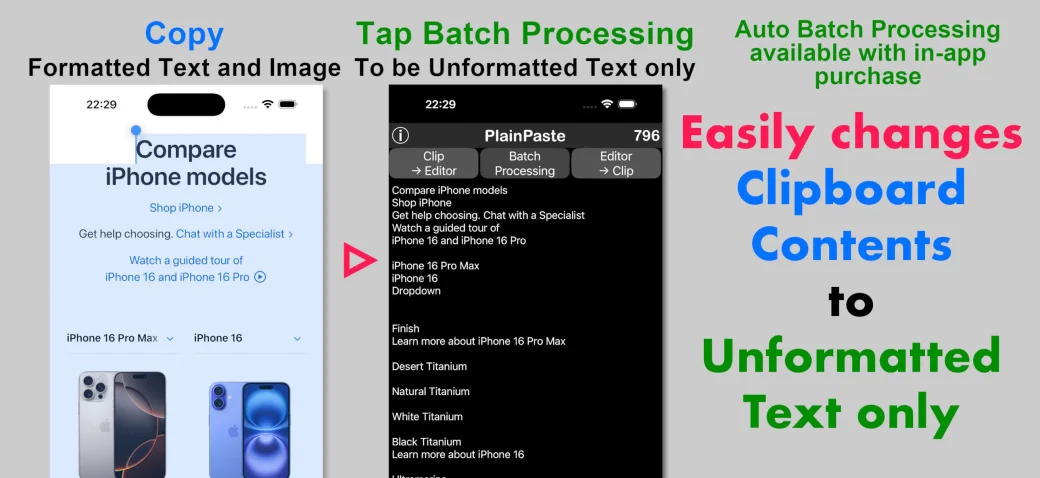
Have you ever had trouble copying and pasting text because unwanted images or photos were included, or the text had size and color restrictions?
"PlainPaste - Clipboard Cleaner" is an app that solves these problems.
This app lets you easily remove non-text content, such as images and photos, from your clipboard, as well as remove text formatting.
An indispensable app for editing on iPhone, iPad, and Mac!
[How to use]
∙ Tapping "Clip → Editor" button will place the text in the clipboard into the PlainPaste editor, and the text formatting will be removed.
∙ Tapping "Editor → Clip" button will place the text in the editor into the clipboard.
∙ With the above operation, the contents of the clipboard will be only the unformatted text.
∙ Tapping "Batch Processing" button, the above two button processes will be performed continuously.
∙ If you turn on Auto Batch Processing, Batch Processing will be performed when this app is brought to the foreground. (Auto Batch Processing requires an in-app purchase)
∙ You can edit text in the editor.
∙ On iPhone or iPad, tap editor screen to show the keyboard.
∙ The number of characters in the editor is displayed at the top right of the screen.
∙ Paste Permission Dialog will not appear if you select "Allow" from "Settings" > "Apps" > "PlainPaste" > "Paste from Other Apps.
∙ Tap "ⓘ" button at the top left of the screen to open the information.
The developer assumes no responsibility for any accident, violation, loss or claims by third parties which may arise from the use of this app.
Terms of Use:
This application is provided under the Apple Standard End User License Agreement (EULA).
https://www.apple.com/legal/internet-services/itunes/dev/stdeula/
What’s new
Version 7.0.1 · Nov 15, 2026
Updated screenshots.
App privacy
What Takao Ichimura declares on the App Store about how this app handles data.
-
Data used to track you
May be used to track you across apps and websites owned by other companies.
- Location
- Identifiers
- Usage data
-
Data not linked to you
May be collected but is not linked to your identity.
- Location
- Identifiers
- Usage data
Privacy practices may vary, for example with the features you use or your age.
Information
- Seller
- Takao Ichimura
- Category
- Utilities
- Version
- 7.0.1
- Updated
- Nov 15, 2026
- Released
- Dec 4, 2020
- Size
- 9.8 MB
- Requires
- iOS 15.0 or later
- Age rating
- 4+
- Price
- Free
- In-app purchases
- Yes
- Languages
- English, Japanese
- Copyright
- © 2020 Takao Ichimura
You might also like
-
 EasyNote - Plain Text NotesLocal or cloud, always synced
-
 Text Workflow: Clean any TextConvert, format & automate
-
 Vivaldi Powerful Web BrowserWeb Browser that adapts to you
-
 RustDesk Remote DesktopRemote access and control
-
 Transcribe Audio to Text NotesAI Note Taker & Transcription
-
 Paste KeyboardSuper Easy Copy&Paste Keyboard
-
 Battery Life - check runtimesCharge alerts & device widgets
-
 1Blocker: Ad BlockerBetter browsing in Safari
-
 Speedify: Bond Satellite + 5GUnbreakable Internet Bonding
-
 Transcribe - Speech to TextAI Note Taker, Audio & Video