
PlainPaste - Clipboard Cleaner
Remove Text Formatting
Diseñada para iPhone, iPad, iPod touch
Gratis · Compras en la aplicación
- Clasificación por edad4+
- CategoríaUtilidades
- DesarrolladorTakao Ichimura
- IdiomasInglés+ 1 más
- Tamaño9,8 MB
Enlaza a la página oficial de App Store
Download.org no aloja ningún archivo de PlainPaste - Clipboard Cleaner. El botón abre la página de la aplicación en App Store, donde la publica Takao Ichimura. Ficha comprobada por última vez el 20/11/2026.
Capturas de pantalla
Acerca de
El desarrollador no ha proporcionado este texto en tu idioma.
Have you ever had trouble copying and pasting text because unwanted images or photos were included, or the text had size and color restrictions?
"PlainPaste - Clipboard Cleaner" is an app that solves these problems.
This app lets you easily remove non-text content, such as images and photos, from your clipboard, as well as remove text formatting.
An indispensable app for editing on iPhone, iPad, and Mac!
[How to use]
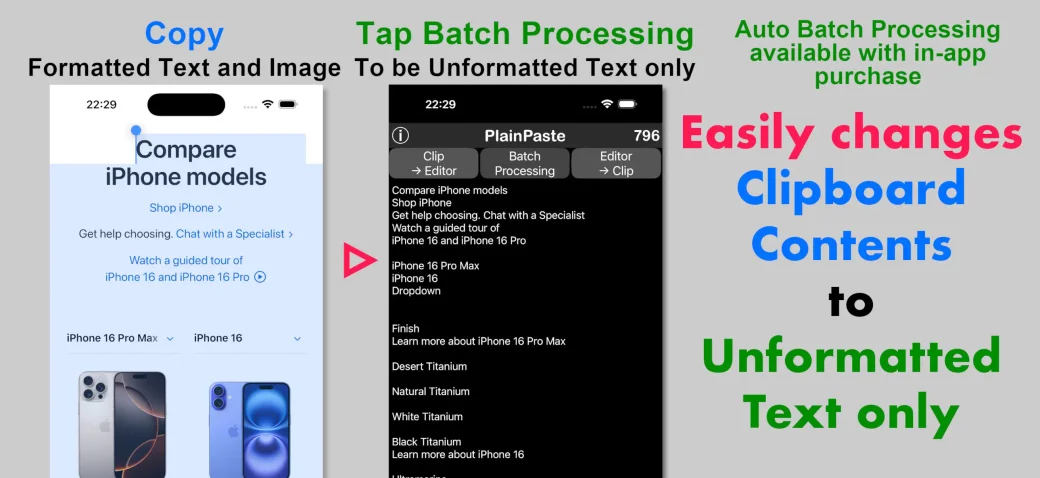
∙ Tapping "Clip → Editor" button will place the text in the clipboard into the PlainPaste editor, and the text formatting will be removed.
∙ Tapping "Editor → Clip" button will place the text in the editor into the clipboard.
∙ With the above operation, the contents of the clipboard will be only the unformatted text.
∙ Tapping "Batch Processing" button, the above two button processes will be performed continuously.
∙ If you turn on Auto Batch Processing, Batch Processing will be performed when this app is brought to the foreground. (Auto Batch Processing requires an in-app purchase)
∙ You can edit text in the editor.
∙ On iPhone or iPad, tap editor screen to show the keyboard.
∙ The number of characters in the editor is displayed at the top right of the screen.
∙ Paste Permission Dialog will not appear if you select "Allow" from "Settings" > "Apps" > "PlainPaste" > "Paste from Other Apps.
∙ Tap "ⓘ" button at the top left of the screen to open the information.
The developer assumes no responsibility for any accident, violation, loss or claims by third parties which may arise from the use of this app.
Terms of Use:
This application is provided under the Apple Standard End User License Agreement (EULA).
https://www.apple.com/legal/internet-services/itunes/dev/stdeula/
Novedades
Versión 7.0.1 · 15/11/2026
Updated screenshots.
Privacidad de la aplicación
Lo que Takao Ichimura declara en App Store sobre cómo esta aplicación gestiona los datos.
-
Datos usados para rastrearte
Pueden usarse para rastrearte en aplicaciones y sitios web propiedad de otras empresas.
- Ubicación
- Identificadores
- Datos de uso
-
Datos no vinculados a ti
Pueden recopilarse, pero no se vinculan a tu identidad.
- Ubicación
- Identificadores
- Datos de uso
Las prácticas de privacidad pueden variar, por ejemplo, según las funciones que uses o tu edad.
Información
- Vendedor
- Takao Ichimura
- Categoría
- Utilidades
- Versión
- 7.0.1
- Actualizado
- 15/11/2026
- Publicado
- 4/12/2020
- Tamaño
- 9,8 MB
- Requiere
- iOS 15.0 o posterior
- Clasificación por edad
- 4+
- Precio
- Gratis
- Compras en la aplicación
- Sí
- Idiomas
- Inglés, Japonés
- Copyright
- © 2020 Takao Ichimura
Quizá también te guste
-
 EasyNote - Plain Text NotesUtilidades
-
 Text Workflow - Text ToolkitTranform your text
-
 Vivaldi Powerful Web BrowserUtilidades
-
 RustDesk Remote DesktopUtilidades
-
 Transcribir Audio a TextoSpeech To Text Dictation
-
 Teclado de PegarSuper fácil for copiar y pegar
-
 Battery LifeAlertas de carga y widgets
-
 1Blocker - Adblock para SafariBloqueador de anuncios
-
 Speedify: Bond Satellite + 5GVínculo online irrompible
-
 Transcribe – Voz a textoTranscripción de audio y vídeo