
PlainPaste - Clipboard Cleaner
Remove Text Formatting
Được thiết kế cho iPhone, iPad, iPod touch
Miễn phí · Mua hàng trong ứng dụng
- Độ tuổi4+
- Danh mụcTiện Ích
- Nhà phát triểnTakao Ichimura
- Ngôn ngữTiếng Anh+ 1 ngôn ngữ khác
- Kích thước9,8 MB
Liên kết đến trang App Store chính thức
Download.org không lưu trữ tệp nào của PlainPaste - Clipboard Cleaner. Nút này mở trang ứng dụng trên App Store, nơi Takao Ichimura phát hành ứng dụng. Trang được kiểm tra lần cuối: 20/11/2026.
Ảnh chụp màn hình
Giới thiệu
Nhà phát triển chưa cung cấp nội dung này bằng ngôn ngữ của bạn.
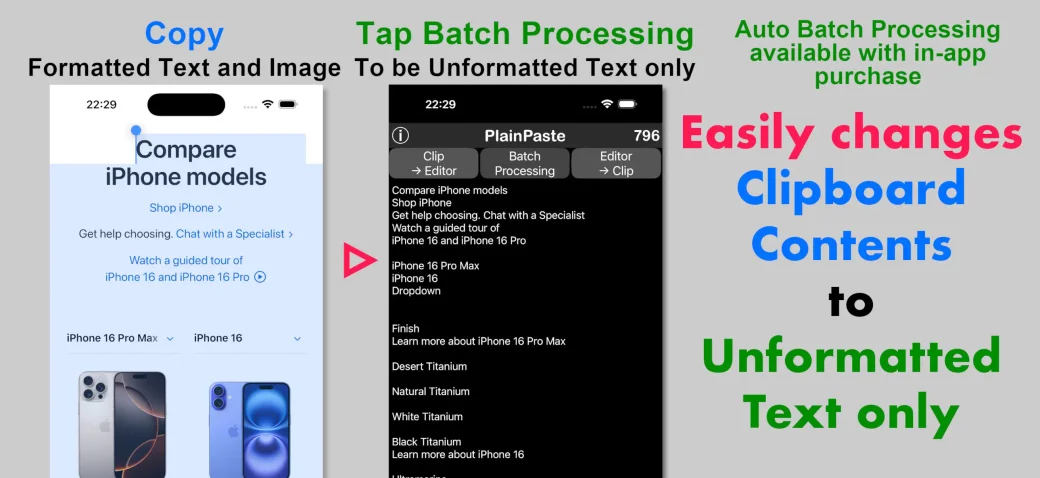
Have you ever had trouble copying and pasting text because unwanted images or photos were included, or the text had size and color restrictions?
"PlainPaste - Clipboard Cleaner" is an app that solves these problems.
This app lets you easily remove non-text content, such as images and photos, from your clipboard, as well as remove text formatting.
An indispensable app for editing on iPhone, iPad, and Mac!
[How to use]
∙ Tapping "Clip → Editor" button will place the text in the clipboard into the PlainPaste editor, and the text formatting will be removed.
∙ Tapping "Editor → Clip" button will place the text in the editor into the clipboard.
∙ With the above operation, the contents of the clipboard will be only the unformatted text.
∙ Tapping "Batch Processing" button, the above two button processes will be performed continuously.
∙ If you turn on Auto Batch Processing, Batch Processing will be performed when this app is brought to the foreground. (Auto Batch Processing requires an in-app purchase)
∙ You can edit text in the editor.
∙ On iPhone or iPad, tap editor screen to show the keyboard.
∙ The number of characters in the editor is displayed at the top right of the screen.
∙ Paste Permission Dialog will not appear if you select "Allow" from "Settings" > "Apps" > "PlainPaste" > "Paste from Other Apps.
∙ Tap "ⓘ" button at the top left of the screen to open the information.
The developer assumes no responsibility for any accident, violation, loss or claims by third parties which may arise from the use of this app.
Terms of Use:
This application is provided under the Apple Standard End User License Agreement (EULA).
https://www.apple.com/legal/internet-services/itunes/dev/stdeula/
Có gì mới
Phiên bản 7.0.1 · 15/11/2026
Updated screenshots.
Quyền riêng tư của ứng dụng
Những gì Takao Ichimura khai báo trên App Store về cách ứng dụng này xử lý dữ liệu.
-
Dữ liệu được sử dụng để theo dõi bạn
Có thể được sử dụng để theo dõi bạn trên các ứng dụng và trang web do công ty khác sở hữu.
- Vị trí
- Mã định danh
- Dữ liệu sử dụng
-
Dữ liệu không liên kết với bạn
Có thể được thu thập nhưng không liên kết với danh tính của bạn.
- Vị trí
- Mã định danh
- Dữ liệu sử dụng
Phương thức đảm bảo quyền riêng tư có thể khác nhau, chẳng hạn như tuỳ theo các tính năng bạn sử dụng hoặc độ tuổi của bạn.
Thông tin
- Người bán
- Takao Ichimura
- Danh mục
- Tiện Ích
- Phiên bản
- 7.0.1
- Cập nhật
- 15/11/2026
- Phát hành
- 04/12/2020
- Kích thước
- 9,8 MB
- Yêu cầu
- iOS 15.0 trở lên
- Độ tuổi
- 4+
- Giá
- Miễn phí
- Mua hàng trong ứng dụng
- Có
- Ngôn ngữ
- Tiếng Anh, Tiếng Nhật
- Bản quyền
- © 2020 Takao Ichimura
Có thể bạn cũng thích
-
 EasyNote - Plain Text NotesTiện Ích
-
 Text Workflow: Clean any TextTiện Ích
-
 Vivaldi Powerful Web BrowserTiện Ích
-
 RustDesk Remote DesktopTiện Ích
-
 Transcribe Speech to TextAI Note Taker & Transcription
-
 Paste KeyboardTiện Ích
-
 Battery Life: thời lượng pinBáo sạc & tiện ích thiết bị
-
 1Blocker: Ad BlockerTiện Ích
-
 Speedify: Bond Satellite + 5GTiện Ích
-
 Transcribe – Giọng nói ra chữGhi chú thoại & Trình ghi âm