
PlainPaste - Clipboard Cleaner
Remove Text Formatting
Conçue pour iPhone, iPad, iPod touch
Gratuit · Achats intégrés
- Classification d’âge4+
- CatégorieUtilitaires
- DéveloppeurTakao Ichimura
- LanguesAnglais+ 1 de plus
- Taille9,8 Mo
Renvoie vers la page App Store officielle
Download.org n’héberge aucun fichier de PlainPaste - Clipboard Cleaner. Le bouton ouvre la page de l’application sur App Store, où Takao Ichimura la publie. Fiche vérifiée pour la dernière fois le 20/11/2026.
Captures d’écran
À propos
Le développeur n’a pas fourni ce texte dans votre langue.
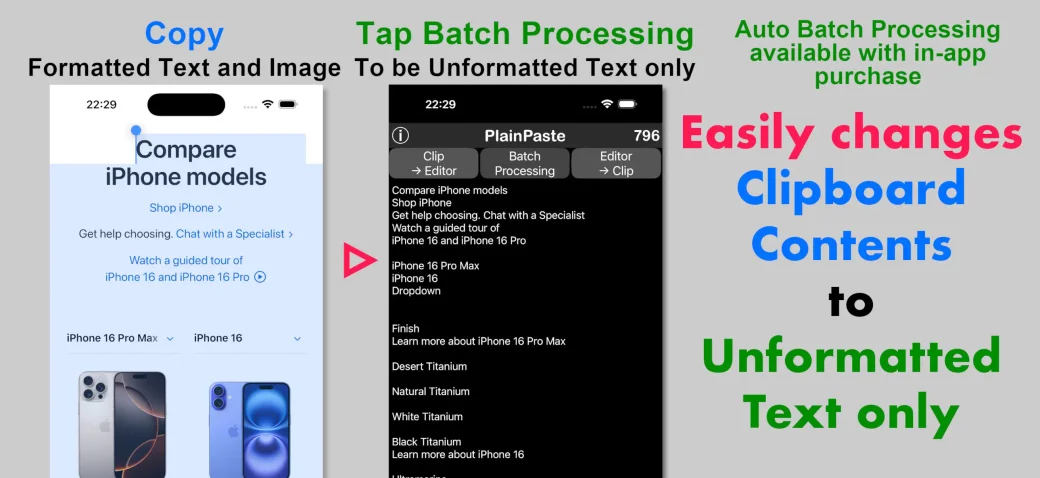
Have you ever had trouble copying and pasting text because unwanted images or photos were included, or the text had size and color restrictions?
"PlainPaste - Clipboard Cleaner" is an app that solves these problems.
This app lets you easily remove non-text content, such as images and photos, from your clipboard, as well as remove text formatting.
An indispensable app for editing on iPhone, iPad, and Mac!
[How to use]
∙ Tapping "Clip → Editor" button will place the text in the clipboard into the PlainPaste editor, and the text formatting will be removed.
∙ Tapping "Editor → Clip" button will place the text in the editor into the clipboard.
∙ With the above operation, the contents of the clipboard will be only the unformatted text.
∙ Tapping "Batch Processing" button, the above two button processes will be performed continuously.
∙ If you turn on Auto Batch Processing, Batch Processing will be performed when this app is brought to the foreground. (Auto Batch Processing requires an in-app purchase)
∙ You can edit text in the editor.
∙ On iPhone or iPad, tap editor screen to show the keyboard.
∙ The number of characters in the editor is displayed at the top right of the screen.
∙ Paste Permission Dialog will not appear if you select "Allow" from "Settings" > "Apps" > "PlainPaste" > "Paste from Other Apps.
∙ Tap "ⓘ" button at the top left of the screen to open the information.
The developer assumes no responsibility for any accident, violation, loss or claims by third parties which may arise from the use of this app.
Terms of Use:
This application is provided under the Apple Standard End User License Agreement (EULA).
https://www.apple.com/legal/internet-services/itunes/dev/stdeula/
Nouveautés
Version 7.0.1 · 15/11/2026
Updated screenshots.
Confidentialité de l’application
Ce que Takao Ichimura déclare sur l’App Store au sujet du traitement des données par cette application.
-
Données utilisées pour vous suivre
Peuvent être utilisées pour vous suivre sur des applications et des sites web appartenant à d’autres sociétés.
- Emplacement
- Identifiants
- Données d’utilisation
-
Données n’établissant aucun lien avec vous
Peuvent être collectées, mais ne sont pas liées à votre identité.
- Emplacement
- Identifiants
- Données d’utilisation
Les pratiques en matière de confidentialité peuvent varier, notamment en fonction des fonctionnalités que vous utilisez ou de votre âge.
Informations
- Vendeur
- Takao Ichimura
- Catégorie
- Utilitaires
- Version
- 7.0.1
- Mis à jour
- 15/11/2026
- Publié
- 04/12/2020
- Taille
- 9,8 Mo
- Nécessite
- iOS 15.0 ou version ultérieure
- Classification d’âge
- 4+
- Prix
- Gratuit
- Achats intégrés
- Oui
- Langues
- Anglais, Japonais
- Copyright
- © 2020 Takao Ichimura
Vous aimerez peut-être aussi
-
 EasyNote - Plain Text NotesUtilitaires
-
 Text Workflow - Convert TextEdit, Transform any text
-
 Vivaldi, navigateur performantUn navigateur très flexible
-
 RustDesk Remote DesktopUtilitaires
-
 Transcripteur Audio TexteTranscription Vocale Rapide
-
 Paste KeyboardUtilitaires
-
 Battery LifeAlertes de charge & widgets
-
 AdBlocker par 1BlockerBloqueur de pub Web et YouTube
-
 Speedify: Bond Satellite + 5GLien Internet indéfectible
-
 Transcribe – Voix en texteRetranscription audio & vidéo