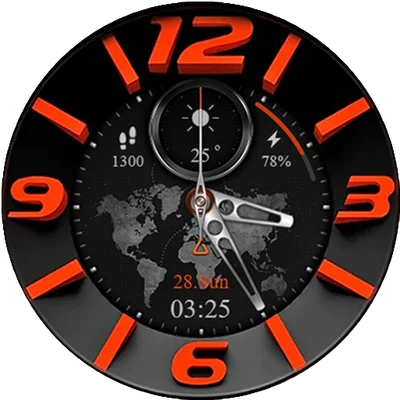
Orange 3D Watch Face
RADU GHEORGHE TURCU- PEGI 3Clasificación por edad
- PersonalizaciónCategoría
- 9/9/2025Actualizado
- 1,19 €Precio
Enlaza a la ficha oficial de com.turcuradu.orange3dwatchface en Google Play. Última comprobación el 28/11/2026.
Acerca de esta aplicación
Traducción automática de Google. Idioma original: Inglés (Estados Unidos).
Prueba este diseño naranja para todos los dispositivos Wear OS
Orange 3D – Esfera Híbrida Dinámica
Dale vida a tu smartwatch con Orange 3D, una esfera audaz y futurista diseñada para brindar estilo y rendimiento.
🔹 Características principales
Dos diseños únicos → Cambia entre dos diseños cuidadosamente diseñados para adaptarse a tu estado de ánimo y estilo.
Información meteorológica → Mantente al día con el tiempo en tiempo real directamente en tu muñeca.
Indicador de batería → Seguimiento claro del nivel de batería para que nunca te pille desprevenido.
Contador de pasos → Podómetro integrado para controlar tu actividad diaria.
Reloj híbrido → Combina el clásico aspecto analógico con una lectura digital de la hora para una máxima comodidad.
Efecto 3D vibrante → Diseño llamativo en naranja y negro con un aspecto deportivo premium.
Perfecto para quienes buscan una esfera funcional, elegante y que destaque. Ya sea en la oficina, el gimnasio o al aire libre, Orange 3D te mantiene informado de un vistazo.
--------------------------------------------------------------------------------------------------------
Notas para la instalación de la esfera del reloj en un reloj inteligente:
La aplicación del teléfono solo sirve como marcador para facilitar la instalación y la búsqueda de la esfera en tu reloj Wear OS. Selecciona tu reloj en el menú desplegable de instalación.
Si descargas la aplicación directamente con el teléfono, abre la aplicación y toca la pantalla o el botón de descarga. La instalación comenzará en el reloj.
Es necesario conectar un reloj Wear OS.
Si no funciona así, copia el enlace en el navegador Chrome de tu teléfono, haz clic en la flecha hacia abajo desde la derecha y selecciona la esfera que deseas instalar.
Después de la instalación, configura la esfera en tu pantalla. Desde la aplicación Wear OS, ve a la sección de esferas descargadas y la encontrarás.
Si tienes algún problema, contáctame en raduturcu03@gmail.com
xxxxxxxxxxxxxxxxxxxxxxxxxxxxxxxxxxxxxxxxxxxxxxxxxxx
SÍGUENOS EN TELEGRAM: https://t.me/TRWatchfaces
SÍGUENOS EN NUESTRA WEB PARA CONSEGUIR CUPONES GRATIS:
https://trwatches.odoo.com/
xxxxxxxxxxxxxxxxxxxxxxxxxxxxxxxxxxxxxxxxxxxxxxxxxxxxxx
Prueba a ver otros diseños en mi perfil de Google.
Mostrar el texto original
Orange 3D – Dynamic Hybrid Watch Face
Bring your smartwatch to life with Orange 3D, a bold and futuristic watch face designed for both style and performance.
🔹 Key Features
Two Unique Designs → Switch between two carefully crafted layouts to match your mood and style.
Weather Information → Stay updated with real-time weather right on your wrist.
Battery Indicator → Clear battery level tracking, so you’re never caught off guard.
Step Counter → Built-in pedometer to keep your daily activity in check.
Hybrid Clock → Combine the classic analog look with a digital time readout for maximum convenience.
Vibrant 3D Effect → Eye-catching orange and black design with a premium, sporty look.
Perfect for users who want a functional yet stylish watch face that stands out. Whether you're at the office, the gym, or outdoors, Orange 3D keeps you informed at a glance.
--------------------------------------------------------------------------------------------------------
Watch face installation notes on smart watch:
Phone app serves only as a placeholder to make it easier to install & find the watch face on your Wear OS watch. You have to select your watch device from the install dropdown menu.
If you download the helper directly with the phone , you need to open application and touch on the display or the download button. -> will start to install on the watch.
A wear os watch need to be connected.
If not working in that way , you can copy that link into your phone chrome browser and click on arrow down from right , and you choose the watch face to install.
..............................................
After installation you need to set that watch face to your screen , from wear OS app , go down at downloaded watch faces and you will find it.
If you have problems , please contact me on raduturcu03@gmail.com
xxxxxxxxxxxxxxxxxxxxxxxxxxxxxxxxxxxxxxxxxxxxxxxx
FOLLOW US AT TELEGRAM : https://t.me/TRWatchfaces
FOLLOW US WEBSITE TO GET FREE COUPONS :
https://trwatches.odoo.com/
xxxxxxxxxxxxxxxxxxxxxxxxxxxxxxxxxxxxxxxxxxxxxxxxx
Try to see others designs in my google profile.
Seguridad de los datos
Lo que RADU GHEORGHE TURCU declara en Google Play sobre los datos que esta aplicación recopila y comparte.
- No se comparten datos con tercerosMás información sobre cómo los desarrolladores declaran lo que comparten
- No se recogen datosMás información sobre cómo los desarrolladores declaran lo que recogen
Novedades
9/9/2025
First Release
Contacto del desarrollador
- Sitio webtrwatches.odoo.com
- Correo electrónicoraduturcu03@gmail.com
- Política de privacidadtrwatches.odoo.com
- DirecciónStr. Eduard Albert Bielz, Nr. 89d, Bl. b1, Sc. f, et.1, Ap. 60 550031 Sibiu Romania
Información
- Ofrecida por
- RADU GHEORGHE TURCU
- Categoría
- Personalización
- Actualizado
- 9/9/2025
- Publicado
- 9/9/2025
- Clasificación por edad
- PEGI 3
- Precio
- 1,19 €
- Nombre del paquete
- com.turcuradu.orange3dwatchface