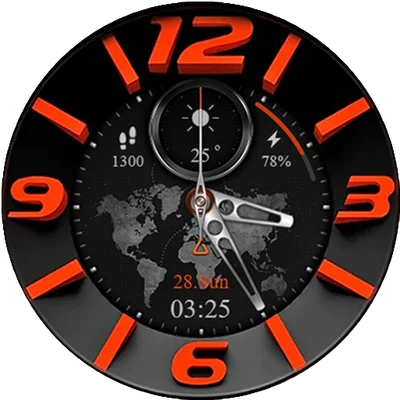
Orange 3D Watch Face
RADU GHEORGHE TURCU- 3 歳以上対象年齢
- カスタマイズカテゴリ
- 2025/9/9更新日
- ¥190価格
com.turcuradu.orange3dwatchfaceのGoogle Play公式ページにリンクしています。最終確認:2026/11/28。
このアプリについて
Googleによる英語 (アメリカ合衆国)からの自動翻訳です。
すべてのWear OSデバイスでこのオレンジ色のデザインをお試しください
Orange 3D – ダイナミックハイブリッドウォッチフェイス
大胆で未来的なデザインが特徴のOrange 3Dウォッチフェイスで、スマートウォッチに活気を与えましょう。スタイルとパフォーマンスの両方を追求したウォッチフェイスです。
🔹 主な機能
2つのユニークなデザイン → 気分やスタイルに合わせて、精巧にデザインされた2つのレイアウトを切り替えられます。
天気情報 → 手首の上でリアルタイムの天気情報を確認できます。
バッテリーインジケーター → バッテリー残量をわかりやすく表示し、いつでもどこでも安心です。
歩数計 → 歩数計を内蔵し、毎日のアクティビティを把握できます。
ハイブリッド時計 → クラシックなアナログ表示とデジタル時刻表示を組み合わせ、利便性を最大限に高めています。
鮮やかな3D効果 → 目を引くオレンジとブラックのデザインと、高級感とスポーティさを兼ね備えています。
機能的でありながらスタイリッシュなウォッチフェイスを求める方に最適です。オフィス、ジム、アウトドアなど、どんな場所でもOrange 3Dなら一目で必要な情報を確認できます。
--------------------------------------------------------------------------------------------------------
スマートウォッチへのウォッチフェイスのインストールに関する注意事項:
スマートフォンアプリは、Wear OSウォッチへのウォッチフェイスのインストールと検索を容易にするためのプレースホルダーとしてのみ機能します。インストールのドロップダウンメニューからウォッチデバイスを選択してください。
スマートフォンでヘルパーを直接ダウンロードする場合は、アプリケーションを開き、画面またはダウンロードボタンをタッチしてください。-> ウォッチへのインストールが開始されます。
Wear OSウォッチを接続する必要があります。
この方法でインストールできない場合は、リンクをスマートフォンのChromeブラウザにコピーし、右から下矢印をクリックして、インストールするウォッチフェイスを選択してください。
.............................................
インストール後、ウォッチフェイスを画面に設定する必要があります。Wear OSアプリからダウンロードしたウォッチフェイスを下にスクロールすると見つかります。
何か問題がございましたら、raduturcu03@gmail.com までご連絡ください。
xxxxxxxxxxxxxxxxxxxxxxxxxxxxxxxxxxxxxxxxxxxxxxxxxxx
Telegram でフォローしてください: https://t.me/TRWatchfaces
無料クーポンをゲットするには、当社のウェブサイトをフォローしてください:
https://trwatches.odoo.com/
xxxxxxxxxxxxxxxxxxxxxxxxxxxxxxxxxxxxxxxxxxxxxxxxxxxxxx
他のデザインは、私の Google プロフィールでご覧ください。
原文を表示
Orange 3D – Dynamic Hybrid Watch Face
Bring your smartwatch to life with Orange 3D, a bold and futuristic watch face designed for both style and performance.
🔹 Key Features
Two Unique Designs → Switch between two carefully crafted layouts to match your mood and style.
Weather Information → Stay updated with real-time weather right on your wrist.
Battery Indicator → Clear battery level tracking, so you’re never caught off guard.
Step Counter → Built-in pedometer to keep your daily activity in check.
Hybrid Clock → Combine the classic analog look with a digital time readout for maximum convenience.
Vibrant 3D Effect → Eye-catching orange and black design with a premium, sporty look.
Perfect for users who want a functional yet stylish watch face that stands out. Whether you're at the office, the gym, or outdoors, Orange 3D keeps you informed at a glance.
--------------------------------------------------------------------------------------------------------
Watch face installation notes on smart watch:
Phone app serves only as a placeholder to make it easier to install & find the watch face on your Wear OS watch. You have to select your watch device from the install dropdown menu.
If you download the helper directly with the phone , you need to open application and touch on the display or the download button. -> will start to install on the watch.
A wear os watch need to be connected.
If not working in that way , you can copy that link into your phone chrome browser and click on arrow down from right , and you choose the watch face to install.
..............................................
After installation you need to set that watch face to your screen , from wear OS app , go down at downloaded watch faces and you will find it.
If you have problems , please contact me on raduturcu03@gmail.com
xxxxxxxxxxxxxxxxxxxxxxxxxxxxxxxxxxxxxxxxxxxxxxxx
FOLLOW US AT TELEGRAM : https://t.me/TRWatchfaces
FOLLOW US WEBSITE TO GET FREE COUPONS :
https://trwatches.odoo.com/
xxxxxxxxxxxxxxxxxxxxxxxxxxxxxxxxxxxxxxxxxxxxxxxxx
Try to see others designs in my google profile.
データ セーフティ
このアプリが収集・共有するデータについて、RADU GHEORGHE TURCUがGoogle Playで申告している内容です。
- 第三者と共有されるデータはありません詳しくは、デベロッパーが共有を申告する方法についての説明をご覧ください
- データは収集されません詳しくは、デベロッパーが収集を申告する方法についての説明をご覧ください
新機能
2025/9/9
First Release
開発元の連絡先
- ウェブサイトtrwatches.odoo.com
- メールraduturcu03@gmail.com
- プライバシーポリシーtrwatches.odoo.com
- 住所Str. Eduard Albert Bielz, Nr. 89d, Bl. b1, Sc. f, et.1, Ap. 60 550031 Sibiu Romania
情報
- 提供元
- RADU GHEORGHE TURCU
- カテゴリ
- カスタマイズ
- 更新日
- 2025/9/9
- リリース
- 2025/9/9
- 対象年齢
- 3 歳以上
- 価格
- ¥190
- パッケージ名
- com.turcuradu.orange3dwatchface