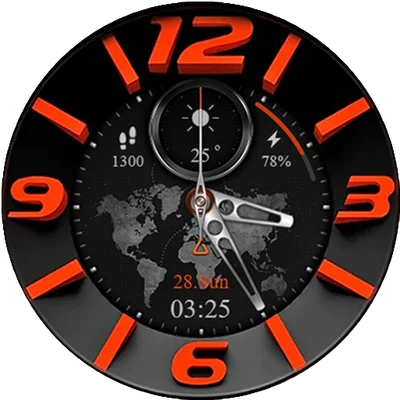
Orange 3D Watch Face
RADU GHEORGHE TURCU- PEGI 3Yaş sınırı
- KişiselleştirmeKategori
- 09.09.2025Güncellendi
- ₺56,99Fiyat
com.turcuradu.orange3dwatchface için resmi Google Play sayfasına bağlanır. Son kontrol: 28.11.2026.
Bu uygulama hakkında
Google tarafından otomatik çeviri. Orijinal dil: İngilizce (Amerika Birleşik Devletleri).
Tüm Wear OS cihazlarınız için bu turuncu tasarımı deneyin
Orange 3D – Dinamik Hibrit Saat Kadranı
Akıllı saatinize hem şık hem de performans odaklı, cesur ve fütüristik bir saat kadranı olan Orange 3D ile hayat verin.
🔹 Temel Özellikler
İki Benzersiz Tasarım → Ruh halinize ve tarzınıza uyum sağlayacak şekilde özenle tasarlanmış iki farklı tasarım arasında geçiş yapın.
Hava Durumu Bilgileri → Bileğinizde gerçek zamanlı hava durumu bilgileriyle güncel kalın.
Pil Göstergesi → Net pil seviyesi takibi, böylece asla hazırlıksız yakalanmazsınız.
Adım Sayacı → Günlük aktivitenizi kontrol altında tutmak için dahili adımsayar.
Hibrit Saat → Maksimum rahatlık için klasik analog görünümü dijital saat göstergesiyle birleştirin.
Canlı 3D Efekti → Birinci sınıf, sportif bir görünüme sahip göz alıcı turuncu ve siyah tasarım.
Öne çıkan, işlevsel ve şık bir saat kadranı isteyen kullanıcılar için mükemmel. İster ofiste, ister spor salonunda veya dışarıda olun, Orange 3D sizi tek bakışta bilgilendirir.
--------------------------------------------------------------------------------------------------------------
Akıllı saatte saat kadranı kurulum notları:
Telefon uygulaması, Wear OS saatinizde saat kadranını kurmayı ve bulmayı kolaylaştırmak için yalnızca bir yer tutucu görevi görür. Kurulum açılır menüsünden saat cihazınızı seçmeniz gerekir.
Yardımcı uygulamayı doğrudan telefonla indirirseniz, uygulamayı açmanız ve ekrandaki veya indirme düğmesine dokunmanız gerekir. -> saate kurulum başlayacaktır.
Bir Wear OS saatin bağlı olması gerekir.
Bu şekilde çalışmıyorsa, bu bağlantıyı telefonunuzun Chrome tarayıcısına kopyalayıp sağdan aşağı oka tıklayarak kurmak istediğiniz saat kadranını seçebilirsiniz.
...............................................
Kurulumdan sonra saat kadranını ekranınıza ayarlamanız gerekiyor. Wear OS uygulamasından indirilen saat kadranlarına gidin ve göreceksiniz.
Sorun yaşarsanız, lütfen raduturcu03@gmail.com adresinden benimle iletişime geçin.
xxxxxxxxxxxxxxxxxxxxxxxxxxxxxxxxxxxxxxxxxxxxxxxx
BİZİ TELEGRAM'DA TAKİP EDİN: https://t.me/TRWatchfaces
ÜCRETSİZ KUPONLAR ALMAK İÇİN WEB SİTEMİZİ TAKİP EDİN:
https://trwatches.odoo.com/
xxxxxxxxxxxxxxxxxxxxxxxxxxxxxxxxxxxxxxxxxxxxxxxxxxx
Google profilimde diğer tasarımları görmeye çalışın.
Orijinal metni göster
Orange 3D – Dynamic Hybrid Watch Face
Bring your smartwatch to life with Orange 3D, a bold and futuristic watch face designed for both style and performance.
🔹 Key Features
Two Unique Designs → Switch between two carefully crafted layouts to match your mood and style.
Weather Information → Stay updated with real-time weather right on your wrist.
Battery Indicator → Clear battery level tracking, so you’re never caught off guard.
Step Counter → Built-in pedometer to keep your daily activity in check.
Hybrid Clock → Combine the classic analog look with a digital time readout for maximum convenience.
Vibrant 3D Effect → Eye-catching orange and black design with a premium, sporty look.
Perfect for users who want a functional yet stylish watch face that stands out. Whether you're at the office, the gym, or outdoors, Orange 3D keeps you informed at a glance.
--------------------------------------------------------------------------------------------------------
Watch face installation notes on smart watch:
Phone app serves only as a placeholder to make it easier to install & find the watch face on your Wear OS watch. You have to select your watch device from the install dropdown menu.
If you download the helper directly with the phone , you need to open application and touch on the display or the download button. -> will start to install on the watch.
A wear os watch need to be connected.
If not working in that way , you can copy that link into your phone chrome browser and click on arrow down from right , and you choose the watch face to install.
..............................................
After installation you need to set that watch face to your screen , from wear OS app , go down at downloaded watch faces and you will find it.
If you have problems , please contact me on raduturcu03@gmail.com
xxxxxxxxxxxxxxxxxxxxxxxxxxxxxxxxxxxxxxxxxxxxxxxx
FOLLOW US AT TELEGRAM : https://t.me/TRWatchfaces
FOLLOW US WEBSITE TO GET FREE COUPONS :
https://trwatches.odoo.com/
xxxxxxxxxxxxxxxxxxxxxxxxxxxxxxxxxxxxxxxxxxxxxxxxx
Try to see others designs in my google profile.
Veri güvenliği
Bu uygulamanın topladığı ve paylaştığı veriler hakkında RADU GHEORGHE TURCU tarafından Google Play üzerinde yapılan beyan.
- Üçüncü taraflarla veri paylaşımı yokGeliştiricilerin, veri paylaşımını nasıl beyan ettikleri hakkında daha fazla bilgi edinin
- Veri toplanamadıGeliştiricilerin, veri toplamayı nasıl beyan ettikleri hakkında daha fazla bilgi edinin
Yenilikler
09.09.2025
First Release
Geliştirici iletişim bilgileri
- Web sitesitrwatches.odoo.com
- E-postaraduturcu03@gmail.com
- Gizlilik politikasıtrwatches.odoo.com
- AdresStr. Eduard Albert Bielz, Nr. 89d, Bl. b1, Sc. f, et.1, Ap. 60 550031 Sibiu Romania
Bilgiler
- Sunan
- RADU GHEORGHE TURCU
- Kategori
- Kişiselleştirme
- Güncellendi
- 09.09.2025
- Yayın tarihi
- 09.09.2025
- Yaş sınırı
- PEGI 3
- Fiyat
- ₺56,99
- Paket adı
- com.turcuradu.orange3dwatchface