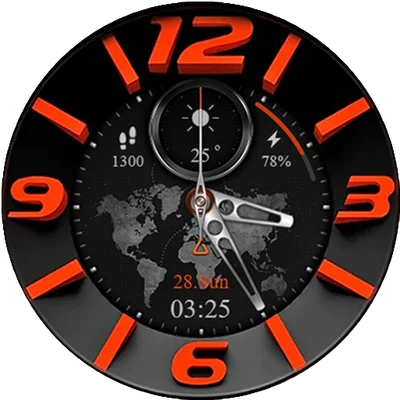
Orange 3D Watch Face
RADU GHEORGHE TURCU- PEGI 3Classification d’âge
- PersonnalisationCatégorie
- 09/09/2025Mis à jour
- 1,19 €Prix
Renvoie vers la fiche Google Play officielle de com.turcuradu.orange3dwatchface. Dernière vérification le 28/11/2026.
À propos de cette application
Traduction automatique par Google. Langue d’origine : Anglais (États-Unis).
Essayez ce design orange pour tous les appareils Wear OS
Orange 3D – Cadran Hybride Dynamique
Donnez vie à votre montre connectée avec Orange 3D, un cadran audacieux et futuriste, alliant style et performance.
🔹 Principales caractéristiques
Deux designs uniques → Choisissez entre deux affichages soigneusement conçus pour s'adapter à votre humeur et à votre style.
Informations météo → Suivez la météo en temps réel directement à votre poignet.
Indicateur de batterie → Suivi clair du niveau de batterie, pour ne jamais être pris au dépourvu.
Compteur de pas → Podomètre intégré pour suivre votre activité quotidienne.
Horloge Hybride → Combinez le look analogique classique avec un affichage numérique pour un confort optimal.
Effet 3D éclatant → Design orange et noir accrocheur pour un look sportif et haut de gamme.
Idéal pour les utilisateurs à la recherche d'un cadran fonctionnel et élégant qui se démarque. Au bureau, à la salle de sport ou en extérieur, Orange 3D vous tient informé en un coup d'œil.
--------------------------------------------------------------------------------------------------------
Notes d'installation du cadran sur une montre connectée :
L'application mobile sert uniquement d'espace réservé pour faciliter l'installation et la recherche du cadran sur votre montre Wear OS. Sélectionnez votre montre dans le menu déroulant d'installation.
Si vous téléchargez l'assistant directement depuis votre téléphone, ouvrez l'application et appuyez sur l'écran ou sur le bouton de téléchargement. -> l'installation commencera.
Une montre Wear OS doit être connectée.
Si ce n'est pas le cas, copiez ce lien dans le navigateur Chrome de votre téléphone et cliquez sur la flèche vers le bas à droite pour choisir le cadran à installer.
................................................
Après l'installation, configurez le cadran sur votre écran. Depuis l'application Wear OS, accédez aux cadrans téléchargés et vous le trouverez.
En cas de problème, veuillez me contacter à l'adresse raduturcu03@gmail.com
xxxxxxxxxxxxxxxxxxxxxxxxxxxxxxxxxxxxxxxxxxxxx
SUIVEZ-NOUS SUR TELEGRAM : https://t.me/TRWatchfaces
SUIVEZ-NOUS SUR NOTRE SITE WEB POUR OBTENIR DES COUPONS GRATUITS :
https://trwatches.odoo.com/
xxxxxxxxxxxxxxxxxxxxxxxxxxxxxxxxxxxxxxxxxxxxxx
Essayez de voir d'autres modèles sur mon profil Google.
Afficher le texte d’origine
Orange 3D – Dynamic Hybrid Watch Face
Bring your smartwatch to life with Orange 3D, a bold and futuristic watch face designed for both style and performance.
🔹 Key Features
Two Unique Designs → Switch between two carefully crafted layouts to match your mood and style.
Weather Information → Stay updated with real-time weather right on your wrist.
Battery Indicator → Clear battery level tracking, so you’re never caught off guard.
Step Counter → Built-in pedometer to keep your daily activity in check.
Hybrid Clock → Combine the classic analog look with a digital time readout for maximum convenience.
Vibrant 3D Effect → Eye-catching orange and black design with a premium, sporty look.
Perfect for users who want a functional yet stylish watch face that stands out. Whether you're at the office, the gym, or outdoors, Orange 3D keeps you informed at a glance.
--------------------------------------------------------------------------------------------------------
Watch face installation notes on smart watch:
Phone app serves only as a placeholder to make it easier to install & find the watch face on your Wear OS watch. You have to select your watch device from the install dropdown menu.
If you download the helper directly with the phone , you need to open application and touch on the display or the download button. -> will start to install on the watch.
A wear os watch need to be connected.
If not working in that way , you can copy that link into your phone chrome browser and click on arrow down from right , and you choose the watch face to install.
..............................................
After installation you need to set that watch face to your screen , from wear OS app , go down at downloaded watch faces and you will find it.
If you have problems , please contact me on raduturcu03@gmail.com
xxxxxxxxxxxxxxxxxxxxxxxxxxxxxxxxxxxxxxxxxxxxxxxx
FOLLOW US AT TELEGRAM : https://t.me/TRWatchfaces
FOLLOW US WEBSITE TO GET FREE COUPONS :
https://trwatches.odoo.com/
xxxxxxxxxxxxxxxxxxxxxxxxxxxxxxxxxxxxxxxxxxxxxxxxx
Try to see others designs in my google profile.
Sécurité des données
Ce que RADU GHEORGHE TURCU déclare sur Google Play au sujet des données que cette application collecte et partage.
- Aucune donnée partagée avec des tiersEn savoir plus sur la manière dont les développeurs déclarent le partage
- Aucune donnée collectéeEn savoir plus sur la manière dont les développeurs déclarent la collecte
Nouveautés
09/09/2025
First Release
Coordonnées du développeur
- Site webtrwatches.odoo.com
- E-mailraduturcu03@gmail.com
- Politique de confidentialitétrwatches.odoo.com
- AdresseStr. Eduard Albert Bielz, Nr. 89d, Bl. b1, Sc. f, et.1, Ap. 60 550031 Sibiu Romania
Informations
- Proposée par
- RADU GHEORGHE TURCU
- Catégorie
- Personnalisation
- Mis à jour
- 09/09/2025
- Publié
- 09/09/2025
- Classification d’âge
- PEGI 3
- Prix
- 1,19 €
- Nom du package
- com.turcuradu.orange3dwatchface