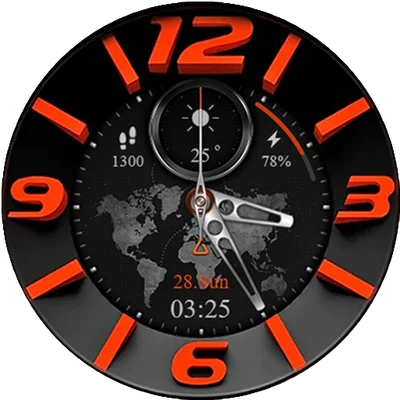
Orange 3D Watch Face
RADU GHEORGHE TURCU- Rating 3+Batasan usia
- PersonalisasiKategori
- 9/9/2025Diperbarui
- Rp 19.000Harga
Tertaut ke halaman resmi com.turcuradu.orange3dwatchface di Google Play. Terakhir diperiksa pada 28/11/2026.
Tentang aplikasi ini
Terjemahan otomatis oleh Google. Bahasa asli: Inggris (Amerika Serikat).
Coba desain oranye ini untuk semua perangkat wear os
Orange 3D – Tampilan Jam Hibrida Dinamis
Hidupkan jam tangan pintar Anda dengan Orange 3D, tampilan jam yang berani dan futuristik yang dirancang untuk gaya dan performa.
🔹 Fitur Utama
Dua Desain Unik → Beralih di antara dua tata letak yang dirancang dengan cermat untuk menyesuaikan suasana hati dan gaya Anda.
Informasi Cuaca → Dapatkan informasi cuaca terkini langsung di pergelangan tangan Anda.
Indikator Baterai → Pelacakan level baterai yang jelas, sehingga Anda tidak pernah lengah.
Penghitung Langkah → Pedometer internal untuk memantau aktivitas harian Anda.
Jam Hibrida → Gabungkan tampilan analog klasik dengan tampilan waktu digital untuk kenyamanan maksimal.
Efek 3D yang Cerah → Desain oranye dan hitam yang menarik dengan tampilan premium dan sporty.
Sempurna untuk pengguna yang menginginkan tampilan jam fungsional namun bergaya yang menonjol. Baik Anda di kantor, di pusat kebugaran, atau di luar ruangan, Orange 3D akan selalu memberi Anda informasi dalam sekejap.
--------------------------------------------------------------------------------------------------------
Catatan pemasangan tampilan jam di jam tangan pintar:
Aplikasi ponsel hanya berfungsi sebagai pengganti untuk memudahkan pemasangan & menemukan tampilan jam di jam tangan Wear OS Anda. Anda harus memilih perangkat jam tangan Anda dari menu tarik-turun pemasangan.
Jika Anda mengunduh helper langsung dengan ponsel, Anda perlu membuka aplikasi dan menyentuh layar atau tombol unduh. -> akan mulai terpasang di jam tangan.
Jam tangan Wear OS perlu dihubungkan.
Jika tidak berfungsi dengan cara itu, Anda dapat menyalin tautan tersebut ke peramban Chrome ponsel Anda dan mengeklik panah bawah dari kanan, lalu pilih tampilan jam yang akan dipasang.
..............................................
Setelah pemasangan, Anda perlu mengatur tampilan jam tersebut ke layar Anda. Dari aplikasi Wear OS, buka tampilan jam yang telah diunduh dan Anda akan menemukannya.
Jika Anda mengalami masalah, silakan hubungi saya di raduturcu03@gmail.com
xxxxxxxxxxxxxxxxxxxxxxxxxxxxxxxxxxxxxxxxxxxxxxxx
IKUTI KAMI DI TELEGRAM: https://t.me/TRWatchfaces
IKUTI SITUS WEB KAMI UNTUK MENDAPATKAN KUPON GRATIS:
https://trwatches.odoo.com/
xxxxxxxxxxxxxxxxxxxxxxxxxxxxxxxxxxxxxxxxxxxxxxxxxxxxx
Coba lihat desain lainnya di profil Google saya.
Tampilkan teks asli
Orange 3D – Dynamic Hybrid Watch Face
Bring your smartwatch to life with Orange 3D, a bold and futuristic watch face designed for both style and performance.
🔹 Key Features
Two Unique Designs → Switch between two carefully crafted layouts to match your mood and style.
Weather Information → Stay updated with real-time weather right on your wrist.
Battery Indicator → Clear battery level tracking, so you’re never caught off guard.
Step Counter → Built-in pedometer to keep your daily activity in check.
Hybrid Clock → Combine the classic analog look with a digital time readout for maximum convenience.
Vibrant 3D Effect → Eye-catching orange and black design with a premium, sporty look.
Perfect for users who want a functional yet stylish watch face that stands out. Whether you're at the office, the gym, or outdoors, Orange 3D keeps you informed at a glance.
--------------------------------------------------------------------------------------------------------
Watch face installation notes on smart watch:
Phone app serves only as a placeholder to make it easier to install & find the watch face on your Wear OS watch. You have to select your watch device from the install dropdown menu.
If you download the helper directly with the phone , you need to open application and touch on the display or the download button. -> will start to install on the watch.
A wear os watch need to be connected.
If not working in that way , you can copy that link into your phone chrome browser and click on arrow down from right , and you choose the watch face to install.
..............................................
After installation you need to set that watch face to your screen , from wear OS app , go down at downloaded watch faces and you will find it.
If you have problems , please contact me on raduturcu03@gmail.com
xxxxxxxxxxxxxxxxxxxxxxxxxxxxxxxxxxxxxxxxxxxxxxxx
FOLLOW US AT TELEGRAM : https://t.me/TRWatchfaces
FOLLOW US WEBSITE TO GET FREE COUPONS :
https://trwatches.odoo.com/
xxxxxxxxxxxxxxxxxxxxxxxxxxxxxxxxxxxxxxxxxxxxxxxxx
Try to see others designs in my google profile.
Keamanan data
Yang dinyatakan RADU GHEORGHE TURCU di Google Play tentang data yang dikumpulkan dan dibagikan aplikasi ini.
- Tidak ada data yang dibagikan kepada pihak ketigaPelajari lebih lanjut cara developer menyatakan pembagian data
- Tidak ada data yang dikumpulkanPelajari lebih lanjut cara developer menyatakan pengumpulan data
Yang baru
9/9/2025
First Release
Kontak pengembang
- Situs webtrwatches.odoo.com
- Emailraduturcu03@gmail.com
- Kebijakan Privasitrwatches.odoo.com
- AlamatStr. Eduard Albert Bielz, Nr. 89d, Bl. b1, Sc. f, et.1, Ap. 60 550031 Sibiu Romania
Informasi
- Ditawarkan oleh
- RADU GHEORGHE TURCU
- Kategori
- Personalisasi
- Diperbarui
- 9/9/2025
- Dirilis
- 9/9/2025
- Batasan usia
- Rating 3+
- Harga
- Rp 19.000
- Nama paket
- com.turcuradu.orange3dwatchface