- Clasificación por edad4+
- CategoríaProductividad
- DesarrolladorMarco Luthi
- IdiomasInglés
- Tamaño10,4 MB
Enlaza a la página oficial de App Store
Download.org no aloja ningún archivo de 59 min. El botón abre la página de la aplicación en App Store, donde la publica Marco Luthi. Ficha comprobada por última vez el 15/11/2026.
Capturas de pantalla

Acerca de
El desarrollador no ha proporcionado este texto en tu idioma.
Turn your phone. That’s the timer.
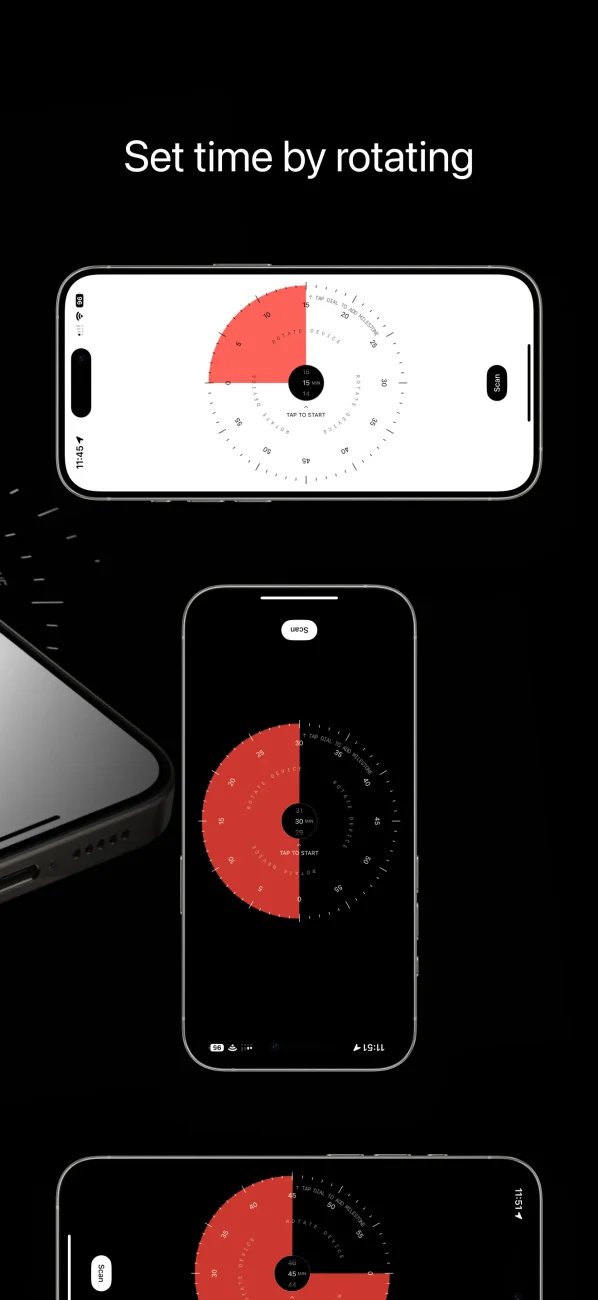
59 min is a visual timer you set the way you set a kitchen timer: by twisting it. Tap +, rotate your iPhone, and a red disk fills the dial. One full turn is one hour. Tap again and the disk starts to shrink, so you can see how much time is left from across the room.
TWIST TO SET
• Rotate your iPhone to dial in anything up to 60 minutes
• A big countdown above the dial shows the exact time, and gentle haptics tick off each minute
• The labels stay upright while you turn. No wheels to scroll, no numbers to type
SEE TIME DISAPPEAR
• A big red disk shows the time that’s left, like a classic classroom timer
• The countdown tells you when it ends, like “Ends at 10:45”
• The screen stays awake while the timer runs, and the dial rattles like an alarm clock when time’s up
MILESTONES: A HEADS‑UP BEFORE TIME’S UP
• Tap the dial while setting to add extra alerts, like “10 min left” or “5 min left”
• Tap a dot to remove it
• Great for talks, exams, meetings and workouts
REAL ALARMS THAT RING ON SILENT
• Built on Apple’s AlarmKit: your timer rings even in Silent Mode or a Focus
• A Live Activity on the Lock Screen and in the Dynamic Island shows the countdown
• Stop the alarm with one tap, without unlocking
ONE TIMER, EVERY PHONE. NO APP NEEDED
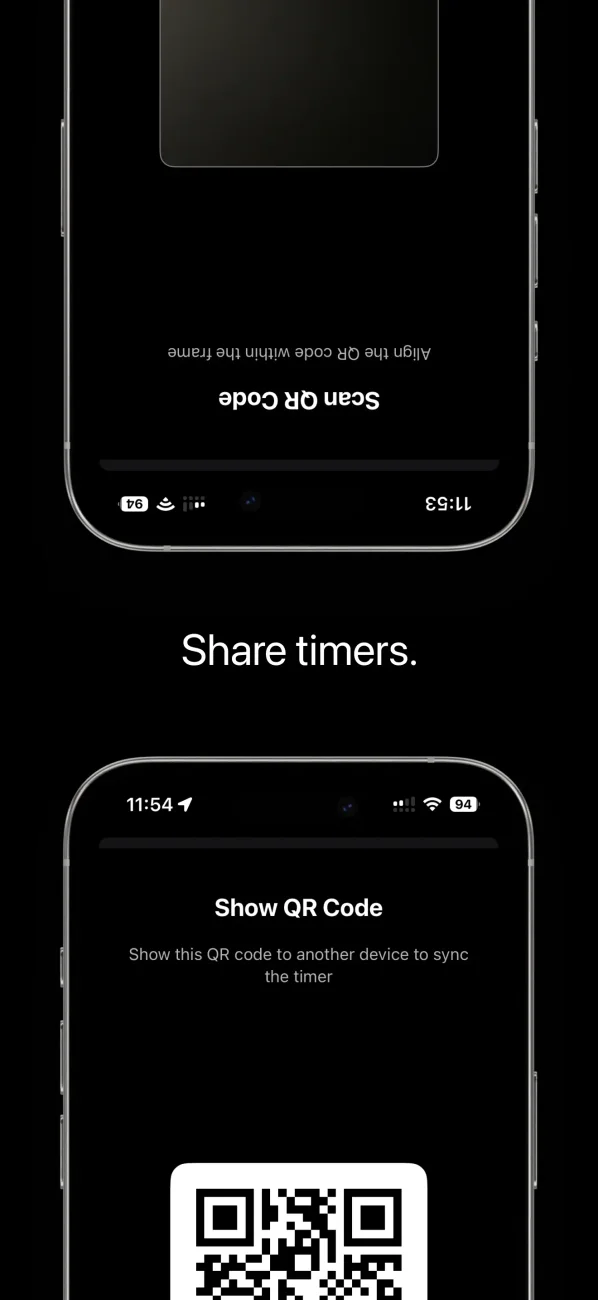
• Tap Share to show a QR code of your running timer
• Others scan it with the iPhone Camera and join instantly in an App Clip, no download needed
• Or tap Send Link to share it in Messages, Mail or anywhere else
• Everyone gets the same end time and milestones
• Perfect for classrooms, workshops, group workouts or a speaker and their timekeeper
• No account, no sign‑up, no server: the timer is in the code
ON YOUR HOME SCREEN
• A small or medium widget shows the red disk and the time left at a glance
CALM BY DESIGN
• Shake to cancel
• The screen fades to black when you’re not touching it; tap to wake it
• Light and Dark Mode
• No ads. No account. No tracking.
Made for anyone who works better when they can see time: people with ADHD, teachers and students, speakers, cooks, and anyone who just wants a timer without the clutter.
Novedades
Versión 1.3 · 10/10/2026
Improved onboarding & tutorial
Privacidad de la aplicación
Lo que Marco Luthi declara en App Store sobre cómo esta aplicación gestiona los datos.
-
No se recopilan datos
El desarrollador no recopila ningún dato de esta aplicación.
Las prácticas de privacidad pueden variar, por ejemplo, según las funciones que uses o tu edad.
Información
- Vendedor
- Marco Luthi
- Categoría
- Productividad
- Versión
- 1.3
- Actualizado
- 10/10/2026
- Publicado
- 29/4/2025
- Tamaño
- 10,4 MB
- Requiere
- iOS 26.0 o posterior
- Clasificación por edad
- 4+
- Precio
- Gratis
- Idiomas
- Inglés
- Copyright
- © Marco Luthi
Quizá también te guste
-
 Bear Todo Box: Lista de tareasVoz, widget y recordatorios
-
 Bleep - Visual Ideas & NotesProductividad
-
 Scrap PaperProductividad
-
 Minimalist Launcher: LessPhoneProductividad
-
 Habit Tracker - HabitBotProductividad
-
 Temporizador Pomodoro: KronoRastreador de Foco y Estudio
-
 Habit Tracker - Goals OnTrackProductividad
-
 Pomodoro Timer deepfocusProductividad
-
 Afternoon: Control de hábitosTareas, rachas y logros
-
 WakeMinder-Recordatorios PopupTareas al despertar tu Mac