
NextExplorer
Tu nube de archivos propia
Diseñada para iPhone, iPad, Mac
Gratis · Compras en la aplicación
- Clasificación por edad4+
- CategoríaUtilidades
- DesarrolladorPhillip Maizza
- IdiomasInglés+ 28 más
- Tamaño157,9 MB
Enlaza a la página oficial de App Store
Download.org no aloja ningún archivo de NextExplorer. El botón abre la página de la aplicación en App Store, donde la publica Phillip Maizza. Ficha comprobada por última vez el 24/11/2026.
Capturas de pantalla



Acerca de
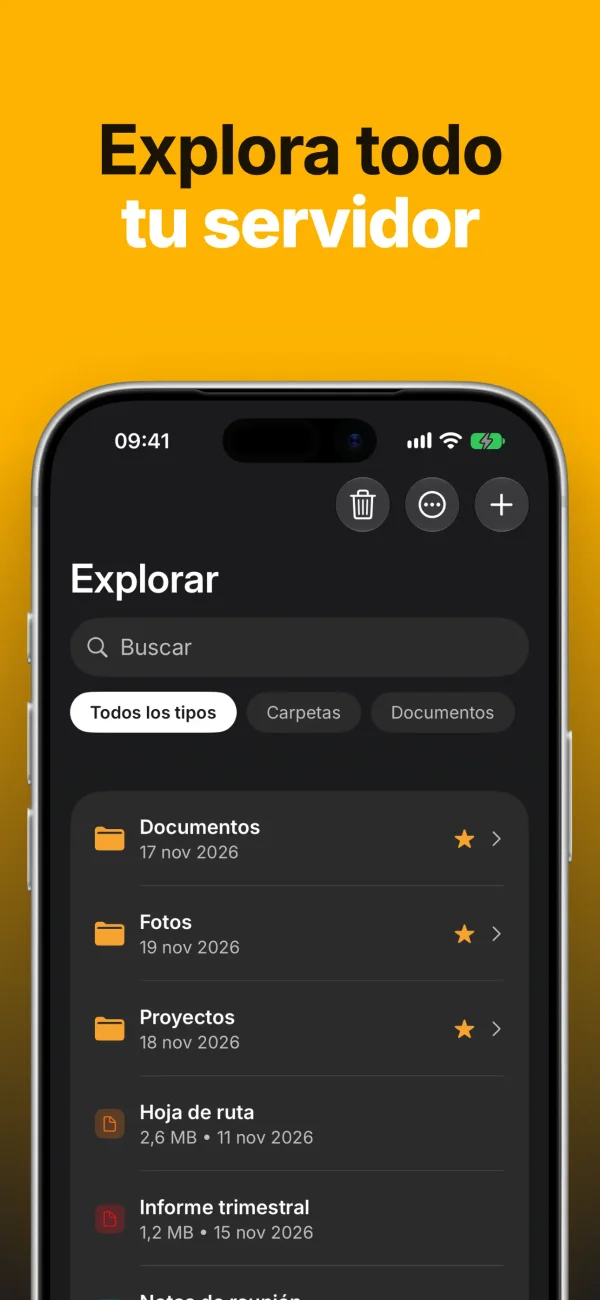
NextExplorer es el cliente nativo y rápido para tu servidor NextExplorer autoalojado, en iPhone, iPad y Mac. Accede de forma privada y a toda velocidad a tus archivos, fotos, documentos y código, todo alojado en tu propia infraestructura.
Tu servidor. Tus datos. Velocidad nativa.
NOTA: NextExplorer requiere una instancia activa del servidor NextExplorer. No aloja archivos por sí mismo.
EXPLORACIÓN NATIVA DE ARCHIVOS
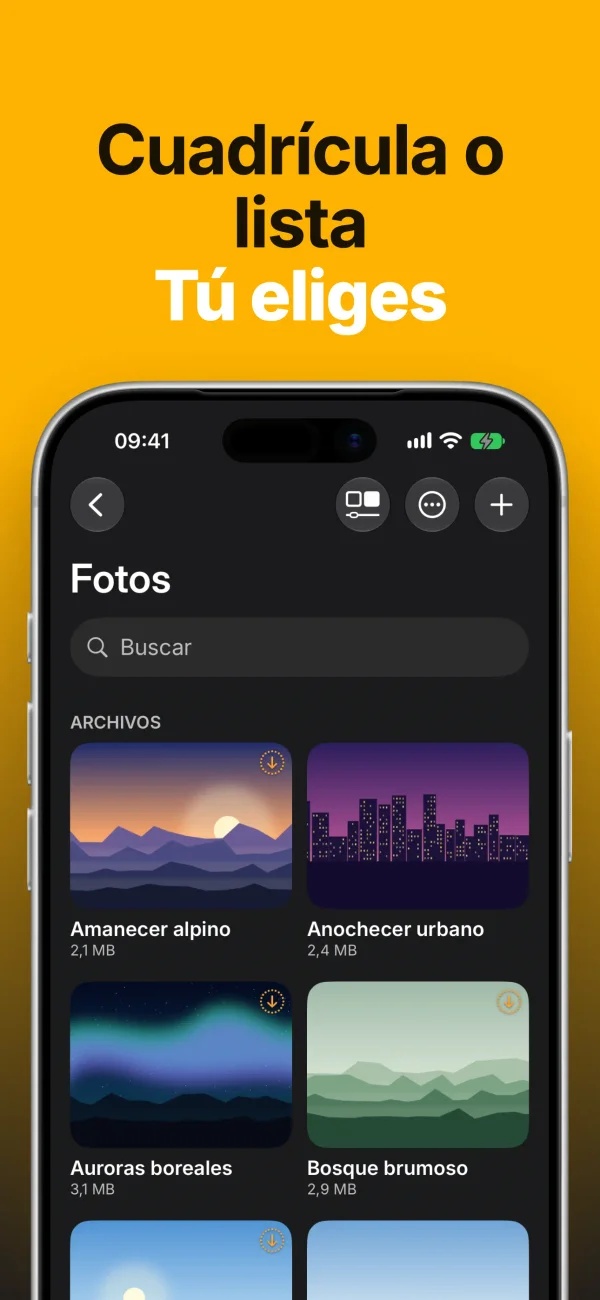
- Vistas de cuadrícula y lista: Navegación fluida con miniaturas generadas por el servidor, ruta de navegación y arrastrar para actualizar.
- Previsualizaciones completas: Una galería a pantalla completa para fotos, vídeos, audio, PDF, texto y código, con gestos y zoom.
- Inspección de archivos comprimidos: Explora el interior de archivos ZIP sin extraerlos.
EDITOR DE CÓDIGO Y TEXTO INTEGRADO
- Resaltado de sintaxis: Edita Swift, Python, JS/TS, Go, Rust, Java, HTML, CSS, JSON, YAML, Markdown y más.
- Ediciones rápidas: Modifica los archivos del servidor al instante, desde tu dispositivo.
BÚSQUEDA Y ORGANIZACIÓN POTENTES
- Búsqueda por nombre y texto completo: Busca en todas las carpetas, con la línea exacta de cada coincidencia en el contenido.
- Filtrado instantáneo: Acota los resultados por tipo de archivo con un toque.
- Comparte y gestiona: Crea enlaces con contraseña y fecha de caducidad, fija favoritos, sube, mueve, copia, renombra y deshaz, sobre la marcha.
SIN CONEXIÓN Y PRIVACIDAD ANTE TODO
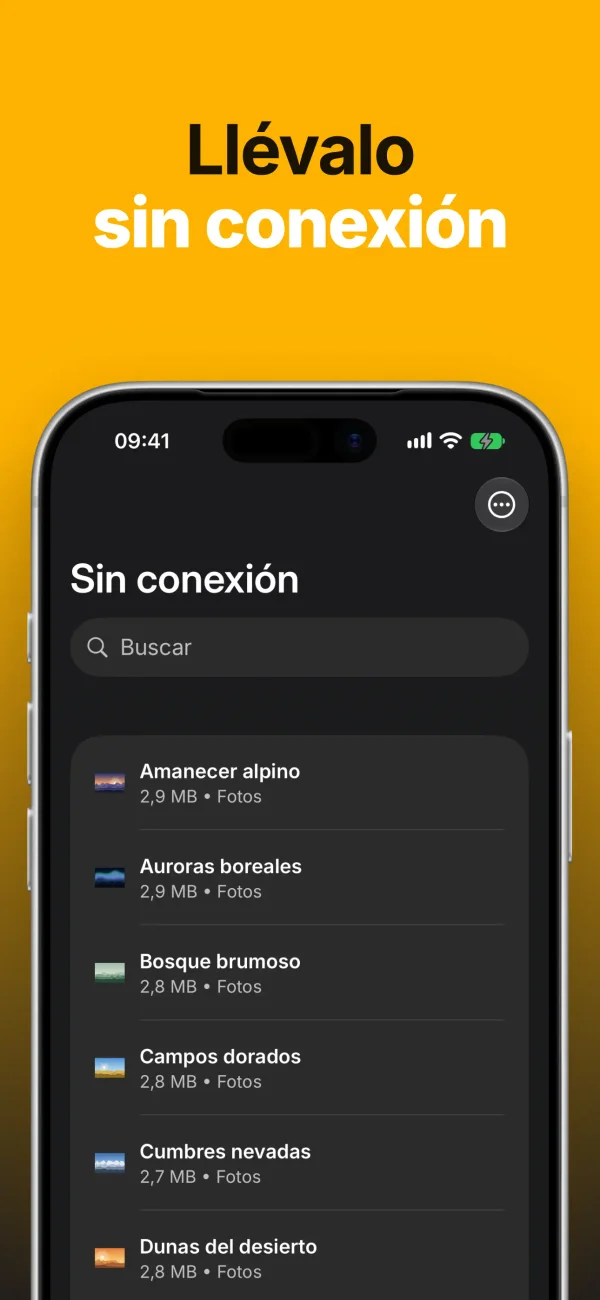
- Pestaña Sin conexión: Guarda cualquier archivo o carpeta en tu dispositivo y ábrelo sin conexión.
- Cero rastreo: Tus archivos van directamente entre tu dispositivo y tu servidor. Sin intermediarios ni telemetría.
ACCESIBLE Y GLOBAL
- Localizada: Traducida a 30 idiomas, con compatibilidad total de derecha a izquierda para árabe y hebreo.
- Nativa en todas partes: Modo oscuro, Dynamic Type, VoiceOver, movimiento reducido y mayor contraste, además de una extensión para compartir y una barra lateral nativa translúcida en Mac.
Ten tu propia nube. Tus datos, solo tuyos.
Novedades
Versión 1.4.0 · 23/11/2026
• Offline replaces Downloads: mark any file or folder Available Offline and open it without a connection
• Save to Device: photos and videos go to Photos, other files to the Files app
• The Offline tab shows the space it uses and when each item last updated
• Remove a single item from inside a folder you keep offline
• A dot on Offline tells you when new files were kept
• The app opens without a connection and shows your saved folders and files
• The gallery pages through every file in a folder: photos, videos, PDFs, text and more
• Video thumbnails, audio cover art and a preview of text and code files
• Pictures the server cannot read (ICO, BMP, TIFF, RAW) get thumbnails made on your device
• Every file opens with a zoom from its thumbnail
• Undo moves, copies and renames with a shake, a three finger swipe, Command Z or the toast's Undo
• Slide a finger sideways over rows or tiles to select them
• Select mode gathers its actions into one menu
• Name files shared from other apps before they upload
• Pictures and PDFs shared into the app show their thumbnail right away
• Search understands patterns like *.pdf and finds names with or without accents
• Search shows what is on this device first and works offline from your saved folders
• The top level searches everywhere, a folder searches itself, and Search Everywhere is one tap away
• Search results say where each file lives and what matched
• Long press a search result to show it in its folder or copy its path
• Settings is one menu with a page per section, and creating an API token is simpler
• A new font: Inter, the same as the NextExplorer website
• Stronger colors when Increase Contrast is on
• iPad: keyboard shortcuts, an account menu in the sidebar and a path bar over the folder
• iPad: a frosted sidebar and sign in card, solid when Reduce Transparency is on
• Mac: frosted windows and a native sidebar
• Mac: search in a Spotlight style panel from the magnifier, Command F or Command K, with your current folder's matches first and thumbnails
• Mac: a search result opens on top of where you were, so Back takes you there, and a file opens inside its folder
• Mac: undo and redo moves, renames and new folders and files with Command Z, Shift Command Z or the toast's Undo
• Mac: Upload, Refresh and Search sit together in the toolbar of every folder
• Mac: offline progress shows in a bar under the folder
• Mac: Help and Support writes to the support email, and the About window's coffee link opens the tip jar
• Moving or copying no longer reports a failure after it worked
• Sharing large files from other apps no longer fails
• Tapping an upload notification opens the folder the files went to instead of closing the app
• Offline size estimates no longer show folders in terabytes
• A video opened in the gallery starts playing and keeps its place
• Search keeps its results while you type, and a failed search says why with Try Again
• The gallery's page dots sit above the bottom bar
• Password and two factor settings no longer flash in and out
• Safer single sign on
• Smoother animations and haptics that follow Apple's guidance
Privacidad de la aplicación
Lo que Phillip Maizza declara en App Store sobre cómo esta aplicación gestiona los datos.
-
No se recopilan datos
El desarrollador no recopila ningún dato de esta aplicación.
Las prácticas de privacidad pueden variar, por ejemplo, según las funciones que uses o tu edad.
Información
- Vendedor
- Phillip Maizza
- Categoría
- Utilidades
- Versión
- 1.4.0
- Actualizado
- 23/11/2026
- Publicado
- 22/9/2026
- Tamaño
- 157,9 MB
- Requiere
- iOS 18.0 o posterior
- Clasificación por edad
- 4+
- Precio
- Gratis
- Compras en la aplicación
- Sí
- Idiomas
- Inglés, Árabe, Checo, Danés, Neerlandés, Finés, Francés, Alemán, Griego, Hebreo, Hindi, Húngaro + 17 más
- Copyright
- © 2026 Phillip Maizza