
- Age rating4+
- CategoryUtilities
- DeveloperNaohiro Kamio
- LanguagesEnglish
- Size55.4 MB
Links to the official App Store page
Download.org hosts no file of わんタップ. The button opens its official App Store page, published by Naohiro Kamio. Listing last checked on Nov 14, 2026.
Screenshots


About
Organize favorite apps by category and launch them from the app or Home Screen widgets. Free to use on iPhone and iPad, with no account required.
Find and launch quickly
Open frequently used apps from Home or search across your registered apps. On wider screens, categories and apps appear side by side. Your selected category, search text, and editing mode stay in place when the window size changes.
Start with everyday sets
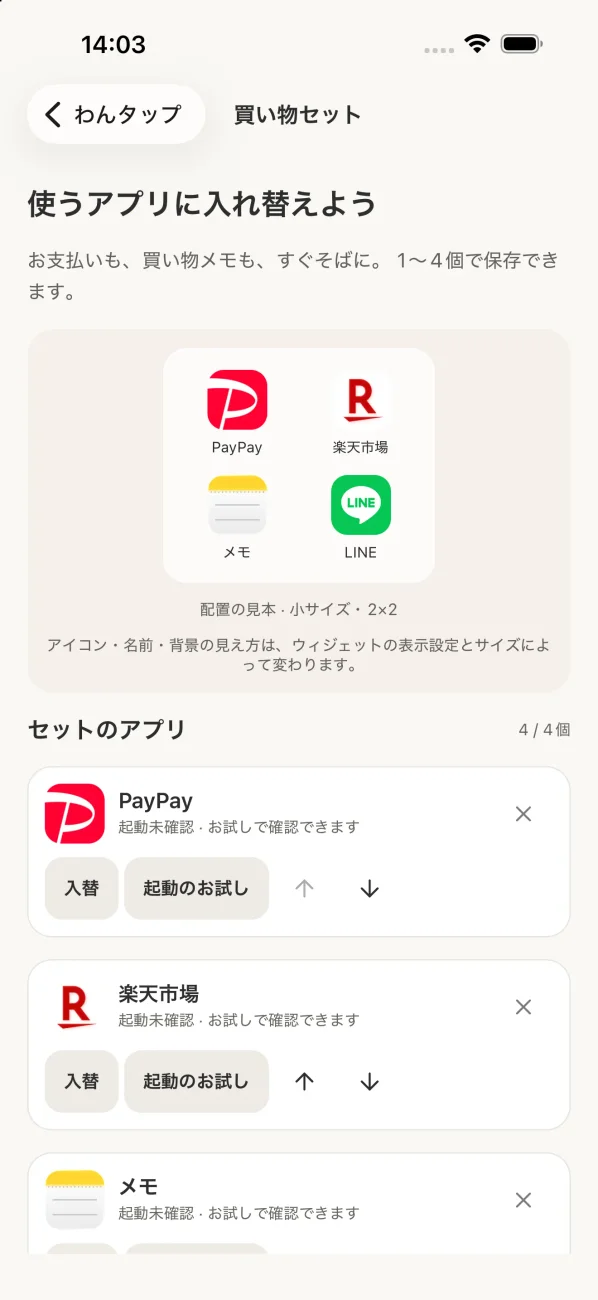
Choose Shopping, Commuting, or Work, then select 1–4 apps, replace items, change their order, and save a new category. Get suggested widget layouts.
Add by purpose
Open a route in Maps with your destination and travel mode. For a shopping note, first create a shortcut that opens your chosen note, then register its exact name. You can also register frequently used shortcuts with optional text input.
Launch from your Home Screen
Four widgets: App Launcher and Category Apps, each with Glass and Transparent variants. Add a widget manually and choose its category and layout. Small, medium, and large sizes are supported. The glass appearance uses iOS 26 or later display features; appearance varies with OS and Home Screen settings.
Organize and back up
Add, edit, and reorder categories and apps. Export and restore your registrations and settings as JSON. Backups are not encrypted and do not include photo files. Choose whether to show the mascot, or use a photo of your choice.
Requires iOS or iPadOS 17 or later. Target apps must be installed and support the configured launch URL. Shortcuts must be created in Apple's Shortcuts app beforehand. This app does not automatically make payments or create notes.
What’s new
Version 1.8 · Oct 18, 2026
- Added iPad support, including landscape and resizable windows.
- Added a side-by-side Home layout for wider screens. Selected categories, search text, editing mode, and unsaved form inputs are preserved while resizing the screen.
- Simplified Home around frequently used apps, search, and your app list. Use Add to choose individual apps, everyday sets, or purpose-based actions.
- Updated the app icon.
- Strengthened validation of incoming links and backup images, reduced launch-link content in diagnostic logs and icon filenames, and clarified that JSON backups are not encrypted.
- Updated the app framework and improved widget category selection and display. The four Glass/Transparent widgets remain available.
App privacy
What Naohiro Kamio declares on the App Store about how this app handles data.
-
Data not collected
The developer does not collect any data from this app.
Privacy practices may vary, for example with the features you use or your age.
Information
- Seller
- Naohiro Kamio
- Category
- Utilities
- Version
- 1.8
- Updated
- Oct 18, 2026
- Released
- May 5, 2026
- Size
- 55.4 MB
- Requires
- iOS 17.0 or later
- Age rating
- 4+
- Languages
- English
- Copyright
- © 2026 Nano
You might also like
-
 Drawer AppUtilities
-
 ElceedeeRetro LCD clock
-
 Clock Widgets: Flip & DigitalUnique Clock Styles & Modes
-
 Digital Analog ClockUtilities
-
 20 Girls ClockCute Girls Clock
-
 MinimalLauncherMinimum required launcher
-
 Digital Clock - Advance TimeWidget, Customize Your Time
-
 Phone Security: Virus CleanerAntivirus & Malware Protection
-
 Clock SkinClock Skin
-
 Digital Clock Widget · StandByLive Seconds, Weather, Bedside