Duo Trackpad - Touch Control
Trackpad, gestures & shortcuts
Designed for iPhone, iPad, Mac
Free · In-app purchases
- Age rating4+
- CategoryUtilities
- DeveloperCoreBits LLC
- LanguagesEnglish
- Size35.0 MB
Links to the official App Store page
Download.org hosts no file of Duo Trackpad - Touch Control. The button opens its official App Store page, published by CoreBits LLC. Listing last checked on Nov 25, 2026.
Screenshots

About
Turn your iPhone or iPad into a trackpad and customizable control center for your Mac.
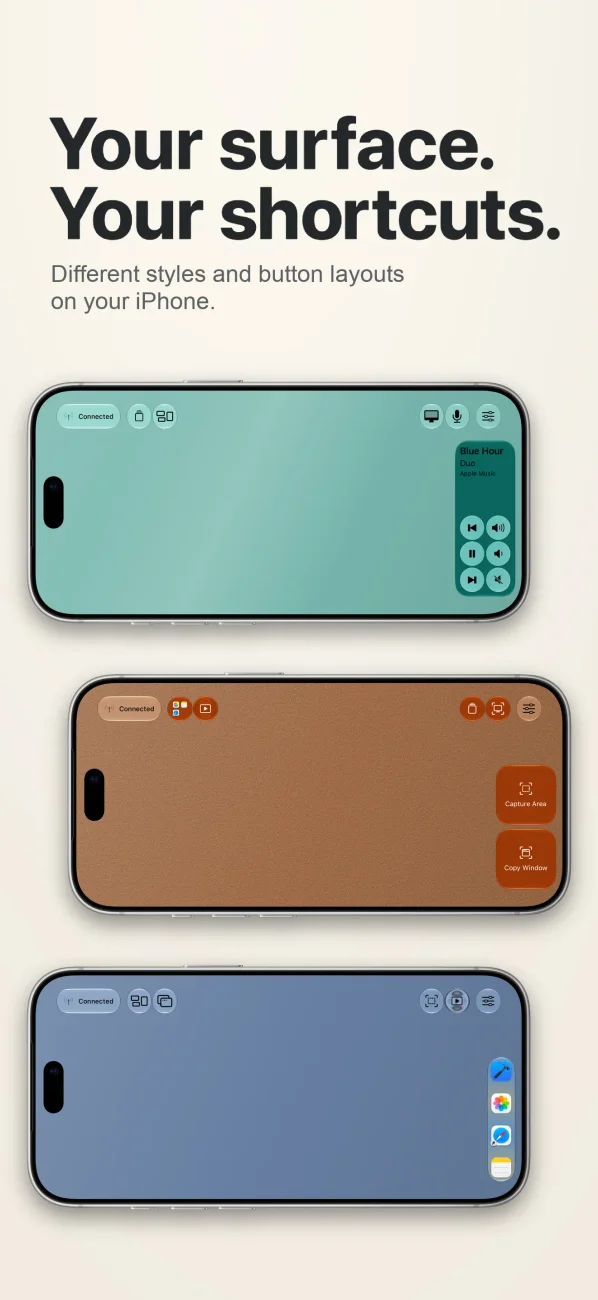
Point, click, scroll, and drag with familiar touch gestures. Then make the surface your own: keep your favorite Mac apps, Shortcuts, media controls, and quick actions within reach.
BUILD YOUR OWN CONTROL SURFACE
Create named layouts for work, creativity, presentations, or relaxing with music. Arrange and resize buttons on the surface or in its toolbars. Customize button colors and symbols, and choose when mouse-button labels appear. Switch layouts with a button, through Shortcuts, or automatically when your device changes orientation or enters a supported iPhone Duo pose.
YOUR MAC, ONE TAP AWAY
Launch Mac applications and run your Mac's Shortcuts from dedicated buttons. Navigate the Mac app switcher, switch to another app, or hide and quit apps without reaching for your keyboard. Capture your Mac's entire screen, a selected area, or a window, saving it on the Mac or copying it to its clipboard.
PLAYBACK AT YOUR FINGERTIPS
Add playback buttons, a volume slider, or a larger media control panel. Optional Apple Music access brings song information and playback state to the surface. A separate microphone button mutes and unmutes your Mac's default input on supported devices.
FAMILIAR GESTURES, YOUR STYLE
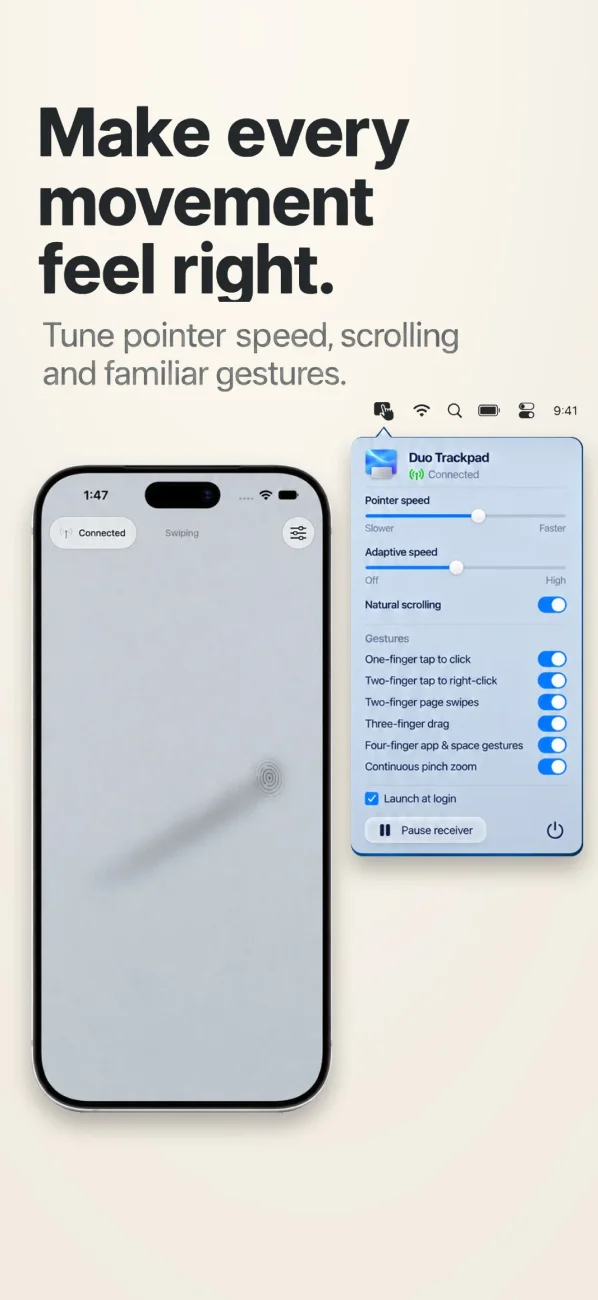
Move the pointer with one finger and scroll with two. Click and hold to drag, or use Premium gestures for three-finger dragging, page navigation, Mission Control, app windows, Spaces, and pinch to zoom in supported Mac apps. Choose Matte Aluminum, Satin Plastic, Leather, Woven Fabric, or Silicone, with touch impressions that bring each surface to life. Supported iPhones also offer optional haptic feedback for controls.
START FREE, MAKE IT YOURS WITH PREMIUM
Pointer movement, tap clicks, and scrolling are free. Premium unlocks custom layouts and buttons, advanced gestures, additional surface styles, and more pointer adjustments. The Mac receiver is free to use.
CONNECT TO YOUR MAC
Install Duo Trackpad on both devices. Connect over Bluetooth or your local Wi-Fi network. The Mac companion stays in your menu bar and guides you through pointer-control permissions. Selecting Mac apps and Shortcuts requires Wi-Fi; saved buttons also work over Bluetooth. Update both companion apps to use the latest features.
Requires iOS or iPadOS 26 or later and macOS 26 or later. Apple Music and Mac Shortcuts integrations require optional permissions on your Mac. Microphone mute depends on the input device and does not change a meeting app's own mute setting.
Privacy Policy: https://duotrackpad.com/privacy
Terms of Use: https://www.apple.com/legal/internet-services/itunes/dev/stdeula/
What’s new
Version 1.2 · Nov 24, 2026
A holiday touch for your trackpad
Discover six interactive Holiday Pack surfaces: Snowdrift, Cabin Plaid, Cranberry Velvet, Evergreen Knit, Starlight Foil and Frosted Window. All six surfaces are included with Premium.
Also new in 1.2:
• Try the Trackpad without connecting to a Mac—customize your surface or show off your Duo Trackpad setup.
• Improved button placement when rotating or folding your device, plus better panel switching on iPhone Duo.
• Adjust Apple Music and your Mac’s output volume together.
• More reliable Mac app launching.
• Fixed an issue that could change your selection when you finished dragging.
Update Duo Trackpad on your iPhone or iPad and your Mac for the latest improvements.
App privacy
What CoreBits LLC declares on the App Store about how this app handles data.
-
Data not linked to you
May be collected but is not linked to your identity.
- Purchases
- Identifiers
- Usage data
- Diagnostics
Privacy practices may vary, for example with the features you use or your age.
Information
- Seller
- CoreBits LLC
- Category
- Utilities
- Version
- 1.2
- Updated
- Nov 24, 2026
- Released
- Oct 14, 2026
- Size
- 35.0 MB
- Requires
- iOS 26.0 or later
- Age rating
- 4+
- Price
- Free
- In-app purchases
- Yes
- Languages
- English
- Copyright
- © 2026 CoreBits LLC
You might also like
-
 eTrackPad: Wireless TrackpadGestures, keyboard & remote
-
 Farroom: Remote DesktopVNC, RDP & Sunshine streaming
-
 CBNoteQuick Access to Notes
-
 MeowDisplaySecond display for your Mac
-
 Viewport Duo: Safari LayoutMore room for Duo websites
-
 DigiDFUfor DigiBall and DigiCue
-
 Padoo TrackpadMouse for Mac and Windows PC
-
 Forget Something?Check it before you leave
-
 PointerDeck: Trackpad for MacA focused trackpad for Mac
-
 NETX - Resilient buildingsUtilities