- Age rating4+
- CategoryUtilities
- DeveloperFutoshi Ebata
- LanguagesEnglish
- Size3.2 MB
Links to the official App Store page
Download.org hosts no file of EVA Clock Nixie. The button opens its official App Store page, published by Futoshi Ebata. Listing last checked on Nov 12, 2026.
Screenshots

About
A nixie tube clock for your iPhone or iPad.
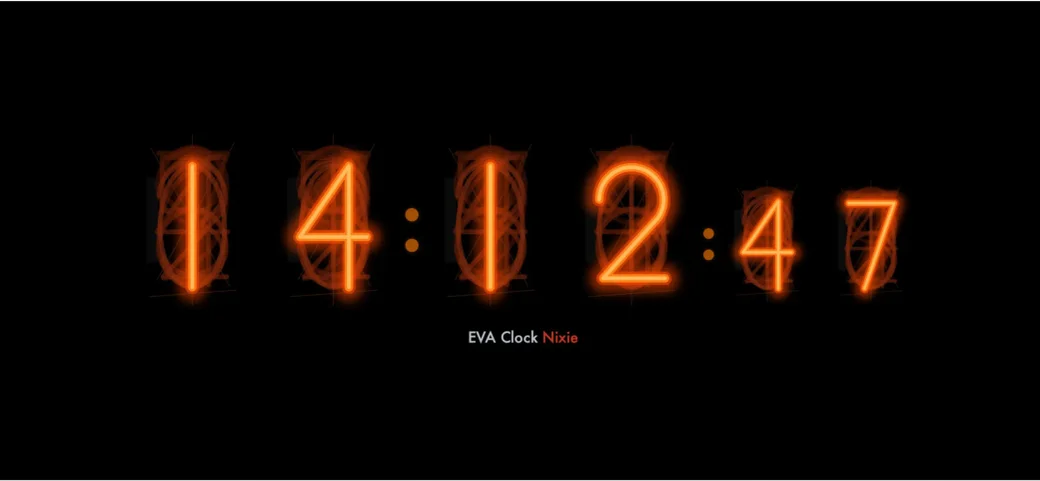
The glowing orange digits are not photographs. Every bend of every numeral, and every wire stacked behind it, is drawn from scratch. Each digit is built as a single bent wire, and three layers - bloom, midtone, and glowing core - stack up to make that particular orange light.
The digits that are not lit are still there, as a faint stack of ten numeral-shaped cathodes behind the glowing one. As the time changes, lit and unlit tubes quietly trade places.
Turn the device sideways and the tubes fill the screen. It is meant to sit on your nightstand or desk as the clock itself.
WHAT IT DOES
- Home Screen widgets showing hours and minutes, in a small square or a wide rectangle - they work in StandBy too
- Switch between 12-hour and 24-hour display
- Turn the seconds on or off. When off, only hours and minutes are shown, at the same tube size, centered on the screen. On by default.
- Turn colon blinking on or off. When on, the colons between hours, minutes, and seconds blink in step with the seconds. Off by default.
- Hourly chime, with a three-second countdown tone and adjustable volume (it respects the silent switch)
- Keep the screen awake while the clock is showing
- Dim the display for night use
- Protect OLED displays by shifting the clock a few points every few minutes
ABOUT THE WIDGET
It sits on your Home Screen or in StandBy. It shows hours and minutes; seconds do not move. iOS decides when widgets refresh, so the displayed time may lag slightly behind. Lock Screen widgets are not supported - the Lock Screen renders widgets without color, and nixie tubes do not survive that.
USING IT
Tap the screen to open the settings. There are no other buttons - you get the clock and nothing else.
PRIVACY
This app collects nothing. No analytics, no crash reporting, no advertising. It performs no network communication at all. Your settings are stored only on your device.
REQUIREMENTS
iOS 17.0 or later / iPadOS 17.0 or later
Also available for Mac under the same name.
What’s new
Version 1.2.2 · Nov 9, 2026
The colons now glow like the Nixie tubes.
- Each dot is now a dark bead with a glowing center. It keeps its shape even at small sizes.
- With Blinking Colons on, only the glowing center blinks; the dark bead stays visible.
- The colons in the Home Screen widget have the same new look.
App privacy
What Futoshi Ebata declares on the App Store about how this app handles data.
-
Data not collected
The developer does not collect any data from this app.
Privacy practices may vary, for example with the features you use or your age.
Information
- Seller
- Futoshi Ebata
- Category
- Utilities
- Version
- 1.2.2
- Updated
- Nov 9, 2026
- Released
- Aug 4, 2026
- Size
- 3.2 MB
- Requires
- iOS 17.0 or later
- Age rating
- 4+
- Price
- Free
- Languages
- English
- Copyright
- Copyright © 2026 EVA Titer. All rights reserved.
You might also like
-
 HoralumeAnimated Night Clock & Alarm
-
 NixiTubeClockVintage Glow Digital Clock
-
 Lumitron: Fullscreen ClockNo Status Bar. No System UI
-
 Simple Clock JPBig clock for stage and studio
-
 Silent Time signalUtilities
-
 Clockist: Desk Clock & DaysFlip clock, widgets, countdown
-
 Clock Widgets: Flip & DigitalUnique Clock Styles & Modes
-
 30minTimer: Hourly ChimeHear the time, every half hour
-
 Segment ChronoInterval timer: HIIT, cooking
-
 EmpireClockUtilities