
PDF Scanner & Editor: Lemon
OCR, Sign, Print & Compress
Designed for iPhone, iPad, Mac
In-app purchases
- Age rating4+
- CategoryProductivity
- DeveloperFuzhou Buwan Technology Co., Ltd.
- LanguagesJapanese+ 9 more
- Size7.6 MB
Links to the official App Store page
Download.org hosts no file of PDF Scanner & Editor: Lemon. The button opens its official App Store page, published by Fuzhou Buwan Technology Co., Ltd. Listing last checked on Nov 12, 2026.
Screenshots
About
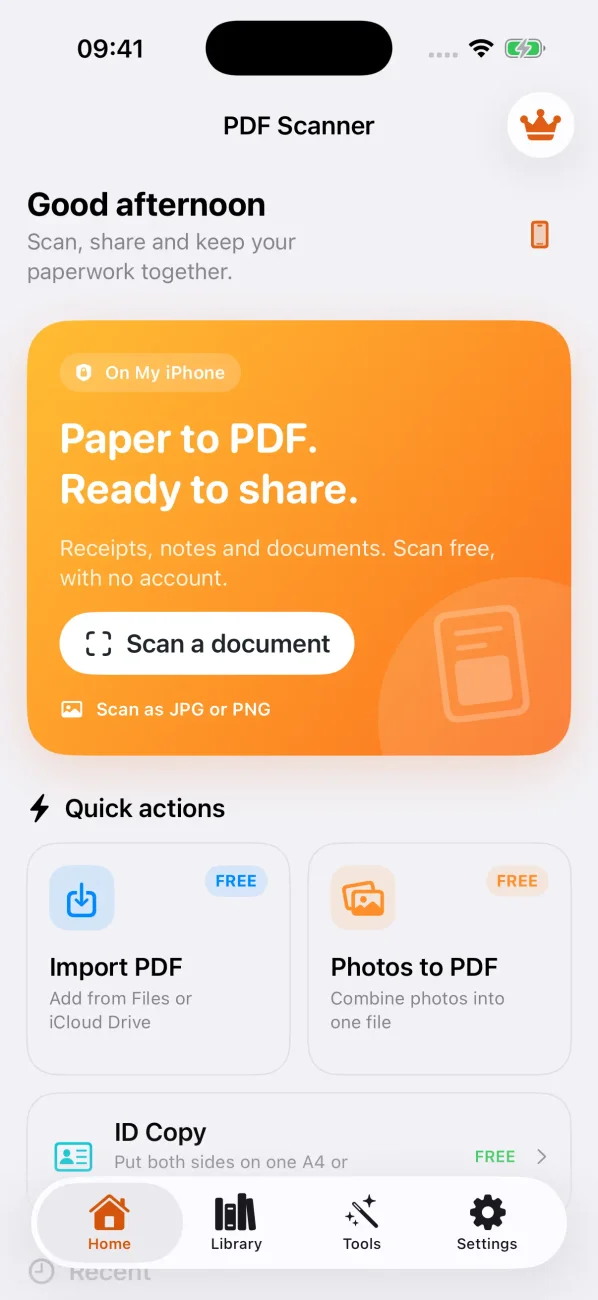
Finish your everyday PDF tasks without a subscription. Scan paperwork on iPhone or iPad, combine files, create a smaller sharing copy, and send or print the result. No account and no ads.
FREE EVERYDAY TOOLS
- Camera scanning on supported iPhone/iPad, with PDF, JPG or PNG export
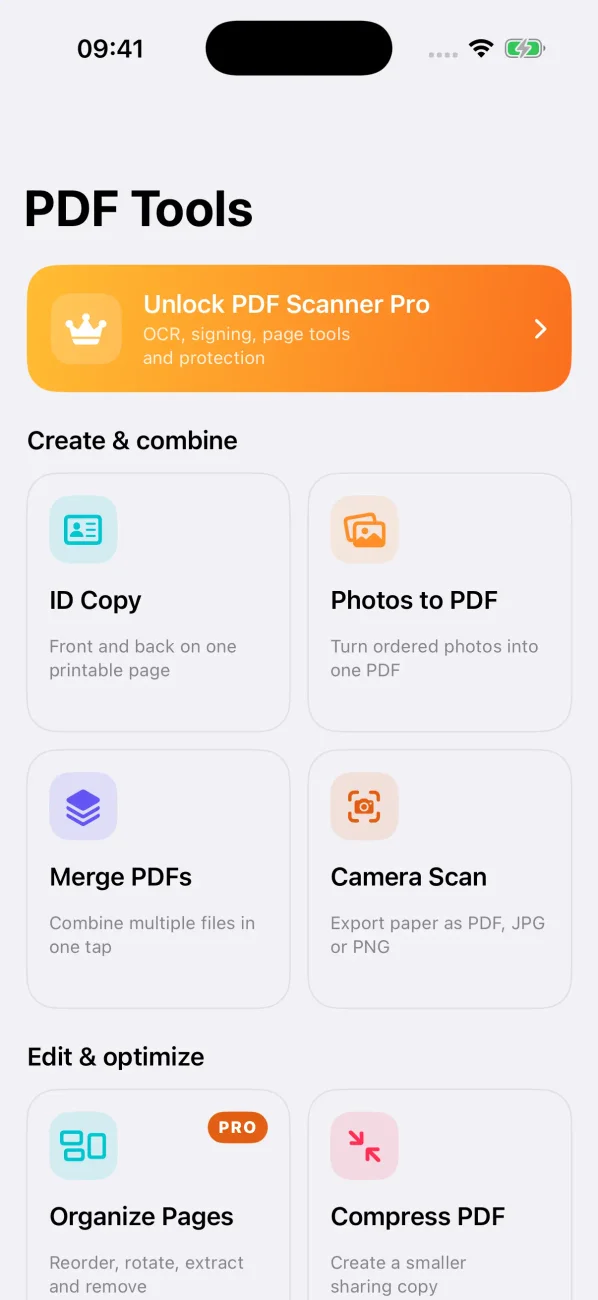
- ID Copy: front and back card images on one A4 or US Letter PDF page
- Photos to PDF in your chosen order
- Merge PDFs without a subscription or usage counter
- Screen-optimized PDF compression without a subscription or usage counter
- Import, read, rename, favorite, share and print PDFs
- Optional fictional sample PDF to try the app
PRO WHEN YOU NEED MORE
- On-device OCR: extract, search, copy and share recognized text
- Highlight, annotate and place handwritten signature stamps
- Reorder, rotate, extract or remove pages
- PDF passwords and document permissions
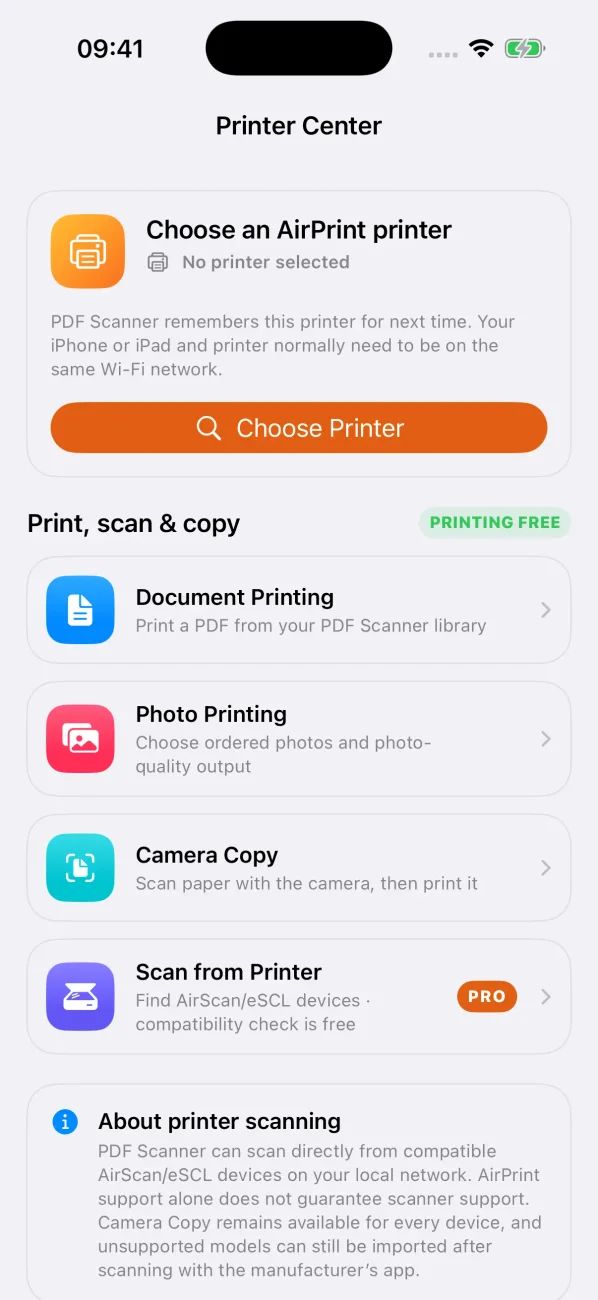
- Compatible AirScan/eSCL network scanning
- Supported PDF watermark tools and authorized photo/video region masking
PRIVACY AND STORAGE
Files are processed on your device. There is no developer-operated document upload server or app account. Optional iCloud Drive uses your Apple account; otherwise documents stay locally.
IMPORTANT LIMITS
Compression results depend on the source; a PDF may shrink little or become larger. The original stays unchanged. Compression is not a guaranteed target-size or lossless conversion. OCR extracts text; it does not add a searchable text layer to exported PDFs. Signatures are visible annotations, not certified digital signatures. Watermark tools do not recover content hidden underneath flattened watermarks. Only edit content you own or have permission to modify.
Camera capture is an iPhone/iPad feature, not a Mac feature. Mac printing uses Apple’s system dialog. Network scanning requires compatible AirScan/eSCL hardware; AirPrint alone does not guarantee scanner compatibility. ID Copy fits cropped images proportionally into standard card-sized slots; use 100% print scale for card-sized output. It does not verify identity.
PRO PURCHASES
Monthly, quarterly and yearly auto-renewable subscriptions, or a one-time lifetime purchase, unlock the same remaining Pro tools. Localized prices and terms are shown before purchase. Restore purchases in Settings or on the paywall. Merge and compression remain free whether or not you subscribe.
Privacy Policy: https://h5.skyingidea.com/legal/
Terms of Use: https://h5.skyingidea.com/legal/terms.html
Support: https://h5.skyingidea.com/legal/support.html
What’s new
Version 1.0.7 · Oct 25, 2026
Now supports 10 interface languages: English, Spanish, Brazilian Portuguese, French, Simplified Chinese, German, Italian, Japanese, Korean and Hindi. Localized tools, purchase explanations, permission prompts and errors. Scanning, PDF merge and compression remain free. No price changes.
App privacy
What Fuzhou Buwan Technology Co., Ltd. declares on the App Store about how this app handles data.
-
Data not collected
The developer does not collect any data from this app.
Privacy practices may vary, for example with the features you use or your age.
Information
- Seller
- Fuzhou Buwan Technology Co., Ltd.
- Category
- Productivity
- Version
- 1.0.7
- Updated
- Oct 25, 2026
- Released
- Aug 20, 2026
- Size
- 7.6 MB
- Requires
- iOS 17.0 or later
- Age rating
- 4+
- In-app purchases
- Yes
- Languages
- Japanese, Italian, Spanish, German, Hindi, French, Portuguese, Simplified Chinese, English, Korean
- Copyright
- © 2026 Fuzhou Buwan Technology Co., Ltd.
You might also like
-
 Scanner: Scan Documents to PDFJPG to PDF, Image to Text OCR
-
 SnapScan: PDF Scanner & OCREdit, Sign & Share Documents
-
 Scanly: PDF Scanner & DocsScan, sign & export PDFs
-
 Scan PDF: Document Scanner OCRConvert Photo to Word & JPG
-
 PDF Scanner: Scan Documents AIDocument Scanner PDF Converter
-
 CS PDF Editor - Scanner AppGenius QR Code & Cam Scanner
-
 InstaPDF - Scan, Edit & ShareGo paperless. PDF Scanner. OCR
-
 PDF Converter For Adobe PDF.PDF Editor: Photo to PDF Maker
-
 PDF Converter : Picture to PDFConvert Photo, Image, JPG, PNG
-
 PDF Docs PDF ScannerDocument Scanner & PDF Reader