VelNotes: Handwriting Notes
PDF, Voice & Study Notebook
Designed for iPhone, iPad
Free · In-app purchases
- Age rating4+
- CategoryProductivity
- DeveloperYUNUS ISLEGEL
- LanguagesEnglish+ 4 more
- Size104.5 MB
Links to the official App Store page
Download.org hosts no file of VelNotes: Handwriting Notes. The button opens its official App Store page, published by YUNUS ISLEGEL. Listing last checked on Nov 20, 2026.
Screenshots




About
Take handwritten notes, annotate PDFs, and turn lecture recordings into text on your iPhone and iPad. Start without creating an account.
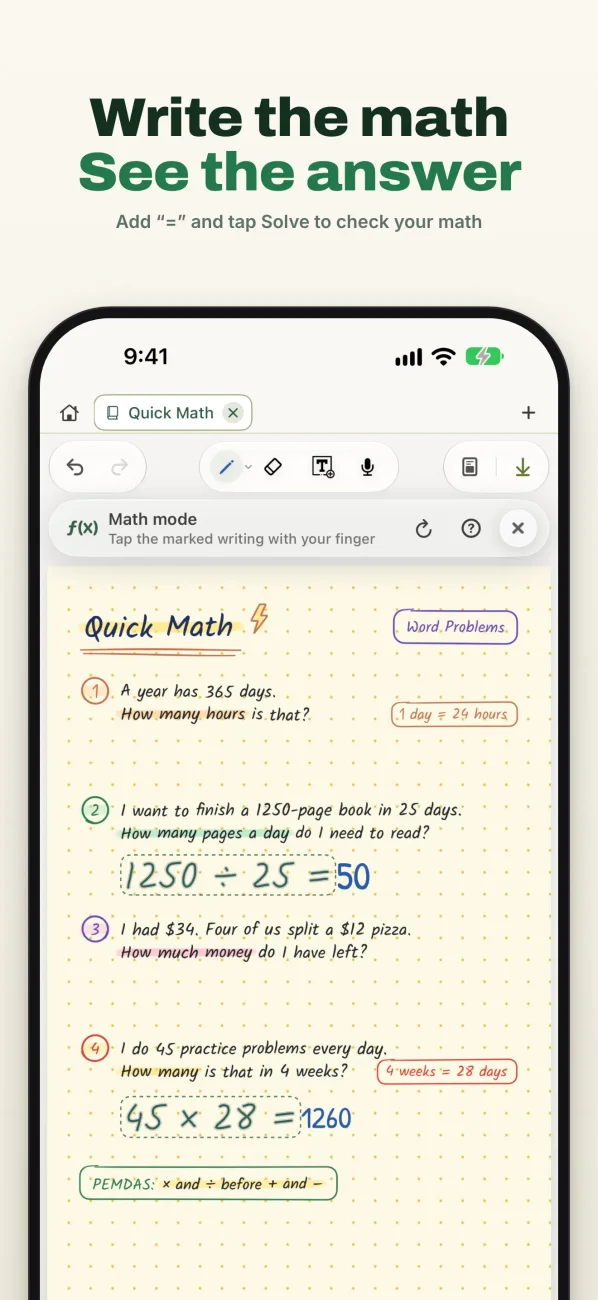
• Math mode: Write 2(3+4)= with your finger on iPhone or Apple Pencil on iPad, and we'll handle the rest. Tap the green line with your finger, then Solve: 14 lands beside the = in your own ink. Something misread? Edit what we picked up.
• Beautify while writing: Lines you scrawl in a lecture turn clean and readable as you write. Pick one of 19 handwriting styles or a neater version of your own.
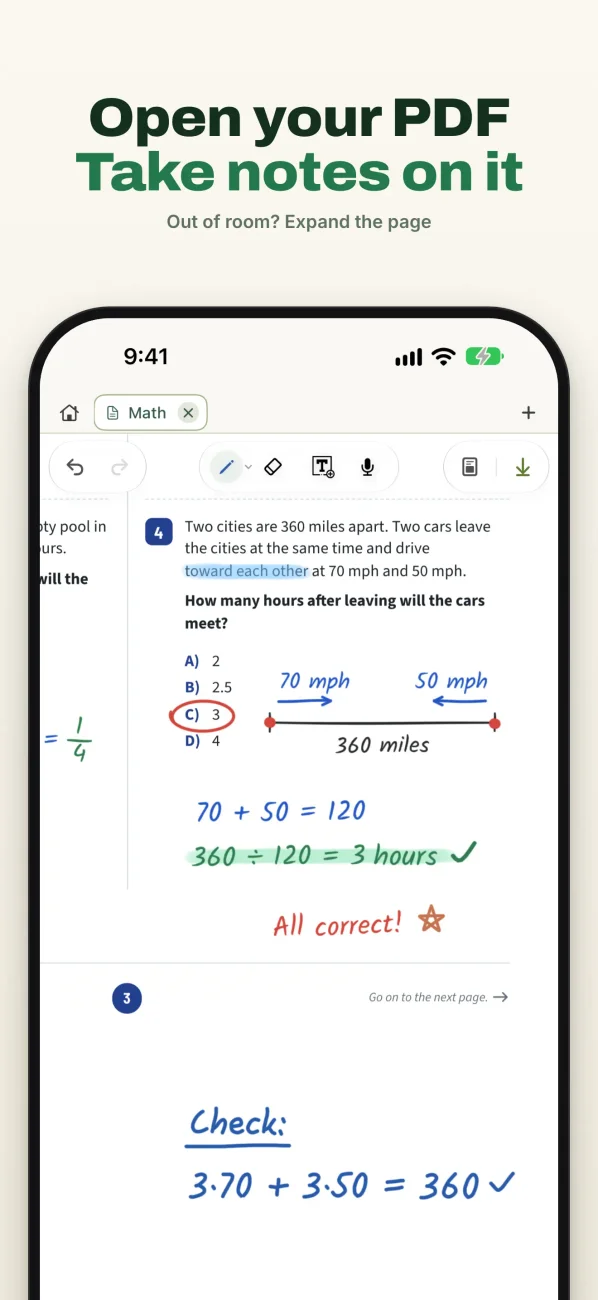
• Cramped PDFs are no problem in VelNotes: Widen the page or add workspace beside it, so every note, solution, and sketch fits.
ONE APP FOR IPHONE AND IPAD
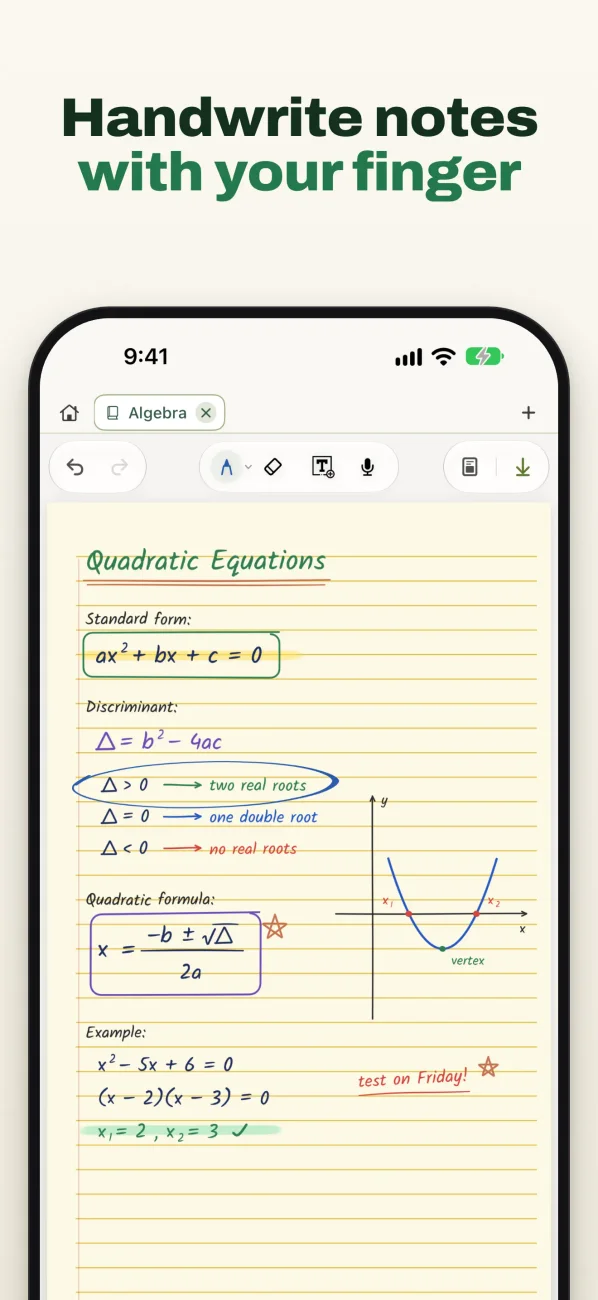
• On iPhone, write with your finger or type on Phone screen pages that fit without zooming
• On iPad, write with Apple Pencil or turn on Finger Writing Mode
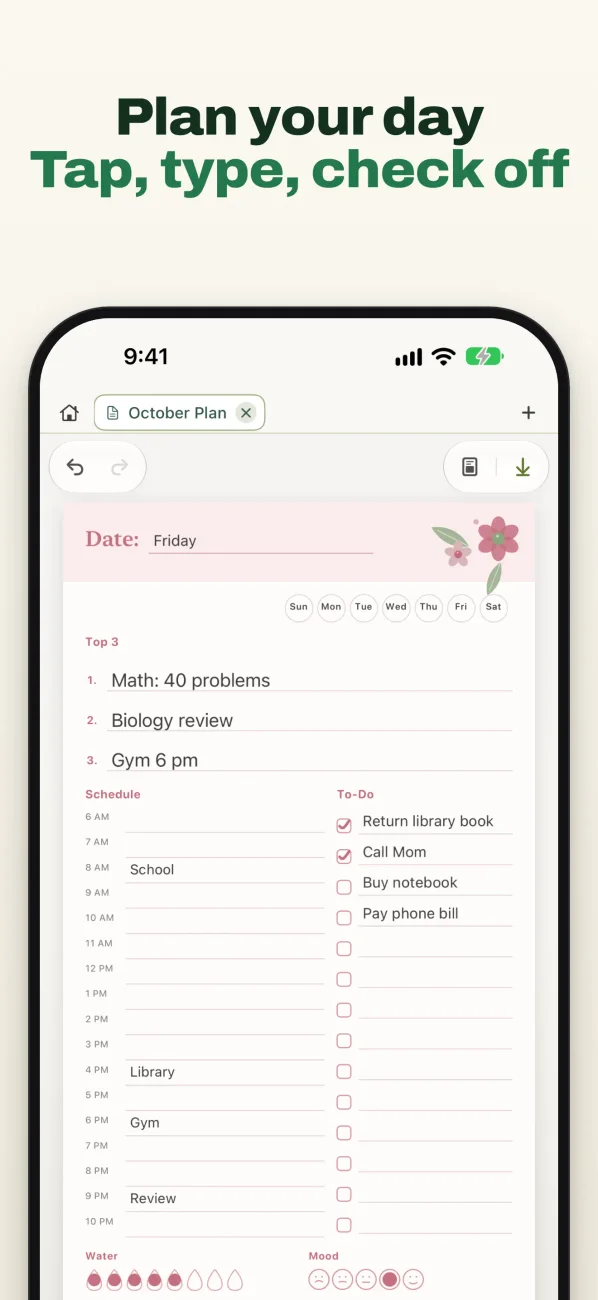
• Planners on iPhone: start from 12 templates or make your own, with the dates already on the pages. Tap a line to type, a checkbox to check it off
• Two notebooks side by side on iPad, each with its own toolbar
• Video window on iPad: watch a lesson video beside your notes
WRITE YOUR WAY
• Write and highlight naturally; Snap to Straight Line and Hold for a straight line keep lines neat
• Type text, draw shapes, and use a ruler, brushes, labels, and sticky notes, plus a laser pointer on iPad
• Capture typed notes fast with Quick Text, then save them as a notebook
• Move or resize selected handwriting, convert it to text, or scribble over strokes to erase
• Choose paper styles, custom colors, daily and weekly layouts, 360 stickers, and colorful folders
WORK WITH PDFS AND MEDIA
• Import PDFs, including password-protected ones; PDFs over 300 pages import in parts
• Write, draw, and place text, photos, scans, stickers, and shapes over PDF pages
• Add GIFs, keep notebooks open in tabs, and choose A4, Letter, or custom page sizes
• Add images from Photos, Camera, or the built-in document scanner
• Export notebooks as PDF or images with multiple quality options
RECORD AND TRANSCRIBE
• Record lectures, meetings, and ideas; if the app closes mid-recording, your audio is kept
• Create on-device transcripts in the spoken language you pick, when supported by the device, system, and language
• Import local audio or video and turn speech into notebook text with Pro
REPLAY AND CREATE
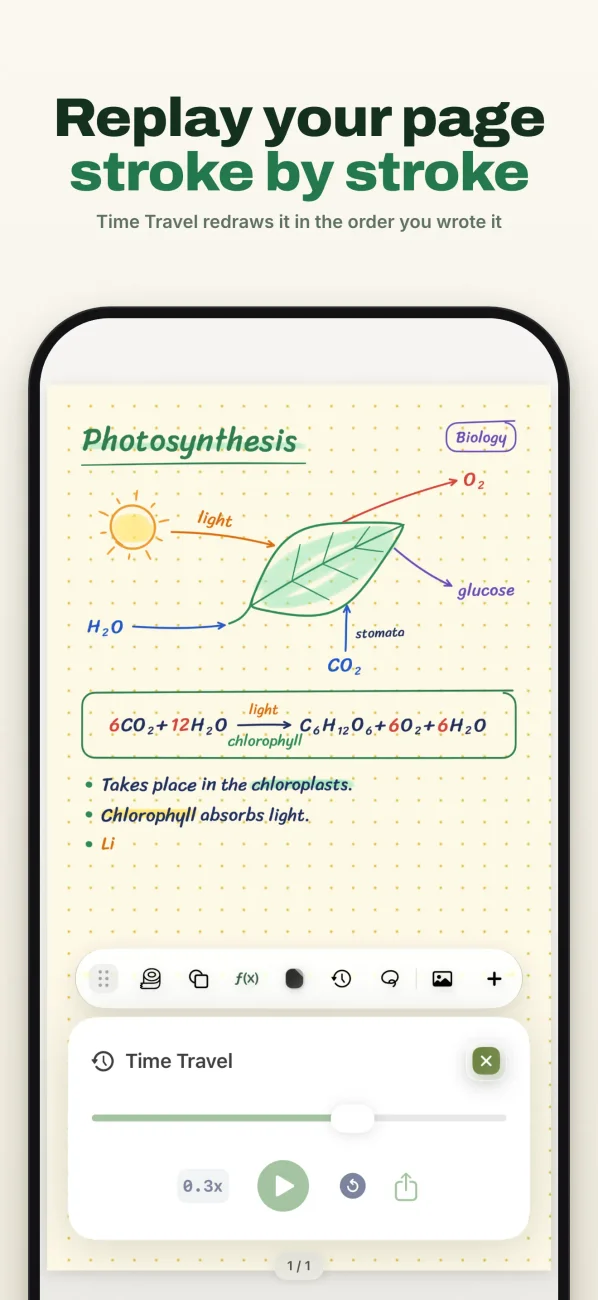
• Replay how a page was written and drawn with Time Travel, and export it as a 9:16 or 16:9 video
• Turn photos into cutout stickers locally with Sticker Studio
PRIVATE BY DESIGN
• Notebooks are stored on this device first
• When iCloud Drive is available, notebook sync across your iPhone and iPad and an automatic private safety backup are on by default; restore an earlier copy, turn either off, or export your data at any time
• VelNotes does not upload your notebooks or raw recordings to a VelNotes server
FREE AND PRO
Free includes up to 3 notebooks at a time, plus 3 planners on iPhone (synced and trashed ones count; delete one for good to start a new one), recordings of up to 15 minutes per session, and one free use of live transcription. Time Travel video export is free and unlimited for everyone. Weekly, monthly, and yearly Pro plans and a one-time lifetime purchase unlock the same features: unlimited notebooks (and planners on iPhone), local audio/video import for on-device transcription, longer recordings, and unlimited live transcription on supported devices. One Pro covers your iPhone and iPad with the same Apple Account.
Transcription and handwriting recognition can contain errors and depend on device, operating-system, and language support. Math mode works with numbers only: no variables, unknowns, or equations to solve. The app interface is available in English, Turkish, German, Spanish, and French; other device languages use English.
Privacy Policy: https://velnotes.com/privacy/en
Terms of Use: https://www.apple.com/legal/internet-services/itunes/dev/stdeula/
What’s new
Version 2.2.0 · Nov 8, 2026
VelNotes is now on iPhone too: your notebooks in your pocket, in sync with your iPad.
• VelNotes on iPhone: write with your finger or type, mark up PDFs, record lectures, and turn them into text, right on your phone. New notebooks get Phone screen pages that fit without zooming, and the sidebar tucks away with one tap. Notebooks sync with your iPad through your own iCloud Drive, and one Pro covers both with the same Apple Account.
• Planners on iPhone: tap the calendar button on Home and pick one of 12 ready-made planners, such as Daily Focus, Weekly Plan, Habit Tracker, Budget, and Exam Study Plan, or create your own. The dates are already on the pages: tap a line to type, tap a checkbox to check it off. Your planners live in the new Planners tab, with an optional reminder on the days you choose.
• Two notebooks side by side on iPad: keep a PDF on one side and your notes on the other, and write in both, each with its own toolbar. Your split is still there the next time you open VelNotes.
• Video window on iPad: watch a lesson video in a floating window while you take notes. Paste a video link or search for a lesson. Put it away and the video keeps playing; it pauses when you start a recording or leave VelNotes.
Also new
• The whole app is now available in French.
• Straight lines: turn on Snap to Straight Line for the highlighter and every highlight comes out straight. With pens, use Hold for a straight line: pause at the end of a stroke and it straightens.
• 360 stickers in 12 categories, from Study and Cute to Botanical and Vintage.
• Folders that look like real folders, with 12 colors, 30 icons, and sorting by newest, name, or number of notebooks.
• Quicker tabs: tap + in the tab bar to open a notebook you already have, or start a new one.
• Longer and locked PDFs: PDFs over 300 pages import in parts, and password-protected PDFs import once you enter the password.
• Pick the spoken language before you transcribe.
• Recordings are safe if VelNotes closes unexpectedly: everything up to that moment is kept, ready to open next time. The voice panel now lists your recordings.
• iCloud Backup keeps earlier copies: go back to an earlier day, or restore another device's latest backup.
• Free plan: delete a notebook for good and you can start a new one. Keep up to 3 notebooks at a time, plus 3 planners on iPhone.
Improved
Pages and PDFs stay crisp while you turn them, and tapping the page counter takes you to any page. Text boxes wrap at the page edge, and the page rises above the keyboard while you type. Sticky notes stay above your ink. Math mode marks a line it couldn't read and keeps the answer clear of the =. Long notebooks turn pages much faster. A notebook now opens even if a page can't be read, and anything unreadable is kept safe in Notebook Health. Deleted pages show a preview in the Trash. Fixed a crash the first time you used live transcription.
App privacy
What YUNUS ISLEGEL declares on the App Store about how this app handles data.
-
Data not linked to you
May be collected but is not linked to your identity.
- Identifiers
- Usage data
- Diagnostics
Privacy practices may vary, for example with the features you use or your age.
Information
- Seller
- YUNUS ISLEGEL
- Category
- Productivity
- Version
- 2.2.0
- Updated
- Nov 8, 2026
- Released
- Apr 24, 2026
- Size
- 104.5 MB
- Requires
- iOS 17.6 or later
- Age rating
- 4+
- Price
- Free
- In-app purchases
- Yes
- Languages
- English, French, German, Spanish, Turkish
- Copyright
- © 2026 Yunus Islegel
You might also like
-
 AINotes: Note Taking & PDFHandwriting & Infinite Canvas
-
 Pentip: Notes, Sketch & PDFPro Notes, Sketch & PDF Markup
-
 ScribblePad: Notes & PDFHandwriting notes & PDF markup
-
 OpenNotes: Notes & PDF MarkupHandwriting, PDFs, no account
-
 Notes: Color Notepad, NotebookNotes for Daily Tasks
-
 OrigNotesNotes, PDF Markup & Mind Maps
-
 Notes for iPad - Pencil NotesQuick Note Taking & Notepad
-
 StarNote: Notes & PDF MarkupAI Note-Taking & Handwriting
-
 Prodrafts - Infinite NotesHandwriting, PDF & Mind Maps
-
 Element Note: Digital NotebookHandwritten Notes & PDF Markup