
- 対象年齢4+
- カテゴリユーティリティ
- 開発元Weigan Technology (Shenzhen) Co., Ltd.
- 言語英語ほか43言語
- サイズ14.0 MB
App Storeの公式ページにリンクしています
Download.orgはDevLocationのファイルを一切ホストしていません。ボタンを押すと、Weigan Technology (Shenzhen) Co., Ltd.が公開しているApp Storeのアプリページが開きます。ページの最終確認:2026/11/20。
スクリーンショット

概要
開発元はこのテキストをお使いの言語で提供していません。
Terms of Use (EULA): https://www.apple.com/legal/internet-services/itunes/dev/stdeula/
DevLocation is a location simulation and GPS debugging tool for iOS developers. From Mac, simulate a single coordinate or a continuous route on an iPhone with Developer Mode enabled, so you can test maps, navigation, and location-based features on a real device.
For development and functional testing only. Enable Developer Mode, connect with USB, and tap Trust. Follow local laws and the Apple Developer Agreement.
FEATURES
• Single-point mode: pick a map location, search an address, or enter coordinates
• Route mode: set start, via, and end points, then simulate walk, run, cycle, or drive
• Speed and GPS jitter: adjust speed and add slight jitter to test accuracy logic
• GPX import and export: reuse tracks or save the current route
• Follow roads: optionally generate road-aligned paths
• Favorites and history: save places and routes, replay previous sessions
• Mac and iPhone companion: sync on the same network; stop and restore from iPhone
• Shortcuts: set or stop location simulation on Mac
HOW TO USE ON IPHONE
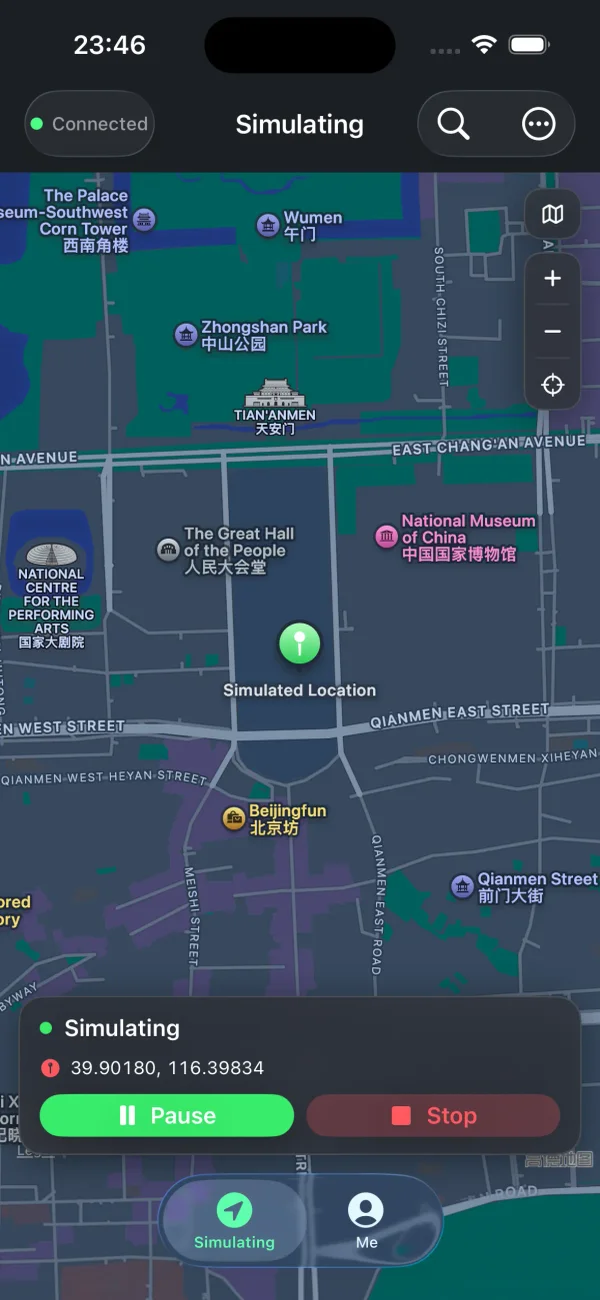
The iPhone app is a companion. It shows status and lets you stop and restore. Simulation is started from Mac.
1. Install and open
• Install DevLocation on an iPhone with Developer Mode enabled
• Allow local network access to find the Mac on the same Wi-Fi
2. Pair with Mac
• Open DevLocation on Mac, connect this iPhone with USB, tap Trust, and connect
• Keep both devices on the same Wi-Fi
• Status syncs automatically; the home screen shows the Mac name
3. Monitor a session
• The header shows Simulating or Idle, plus connection health
• Location Preview marks the coordinate; change map style, zoom, or recenter
• Details lists device, mode, speed, coordinates, and last update
4. Stop and restore
• While simulating, tap Stop and Restore
• iPhone tells Mac to end the session and restore real location
• The button is disabled when idle
5. Tips
• Use Mac to pick points, build routes, and start
• Use iPhone to confirm on device or to stop quickly
• If status does not update, check the same network and keep the Mac app open
NOTES
• Developer Mode is required
• Use only on your own development devices to test apps you are developing
• Stop and restore when finished
• This tool does not bypass system restrictions or misrepresent location for non-development use
新機能
バージョン 1.0.8 · 2026/11/16
Fix user-reported Bugs.
アプリのプライバシー
このアプリのデータの取り扱いについて、Weigan Technology (Shenzhen) Co., Ltd.がApp Storeで申告している内容です。
-
ユーザーのトラッキングに使用されるデータ
他社のアプリやウェブサイトを横断してユーザーをトラッキングする目的で使用される場合があります。
- ID
-
ユーザーに関連付けられないデータ
収集される場合がありますが、ユーザーの識別情報には関連付けられません。
- ID
プライバシーの取り扱いは、ご利用の機能やお客様の年齢などに応じて異なる場合があります。
情報
- 販売元
- Weigan Technology (Shenzhen) Co., Ltd.
- カテゴリ
- ユーティリティ
- バージョン
- 1.0.8
- 更新日
- 2026/11/16
- リリース
- 2026/9/1
- サイズ
- 14.0 MB
- 必要条件
- iOS 18.0以降
- 対象年齢
- 4+
- 価格
- 無料
- アプリ内課金
- あり
- 言語
- 英語, アラビア語, ベンガル語, カタロニア語, クロアチア語, チェコ語, デンマーク語, オランダ語, フィンランド語, フランス語, ドイツ語, ギリシャ語 ほか32言語
- 著作権
- © weigan