
DevLocation
GPS & Location Simulator
Projetado para iPhone, iPad, Mac
Grátis · Compras no app
- Classificação etária4+
- CategoriaUtilidades
- DesenvolvedorWeigan Technology (Shenzhen) Co., Ltd.
- IdiomasInglêse mais 43
- Tamanho14,0 MB
Leva à página oficial na App Store
O Download.org não hospeda nenhum arquivo de DevLocation. O botão abre a página do app na App Store, onde Weigan Technology (Shenzhen) Co., Ltd. o publica. Página verificada pela última vez em 20/11/2026.
Capturas de tela

Sobre
O desenvolvedor não forneceu este texto no seu idioma.
Terms of Use (EULA): https://www.apple.com/legal/internet-services/itunes/dev/stdeula/
DevLocation is a location simulation and GPS debugging tool for iOS developers. From Mac, simulate a single coordinate or a continuous route on an iPhone with Developer Mode enabled, so you can test maps, navigation, and location-based features on a real device.
For development and functional testing only. Enable Developer Mode, connect with USB, and tap Trust. Follow local laws and the Apple Developer Agreement.
FEATURES
• Single-point mode: pick a map location, search an address, or enter coordinates
• Route mode: set start, via, and end points, then simulate walk, run, cycle, or drive
• Speed and GPS jitter: adjust speed and add slight jitter to test accuracy logic
• GPX import and export: reuse tracks or save the current route
• Follow roads: optionally generate road-aligned paths
• Favorites and history: save places and routes, replay previous sessions
• Mac and iPhone companion: sync on the same network; stop and restore from iPhone
• Shortcuts: set or stop location simulation on Mac
HOW TO USE ON IPHONE
The iPhone app is a companion. It shows status and lets you stop and restore. Simulation is started from Mac.
1. Install and open
• Install DevLocation on an iPhone with Developer Mode enabled
• Allow local network access to find the Mac on the same Wi-Fi
2. Pair with Mac
• Open DevLocation on Mac, connect this iPhone with USB, tap Trust, and connect
• Keep both devices on the same Wi-Fi
• Status syncs automatically; the home screen shows the Mac name
3. Monitor a session
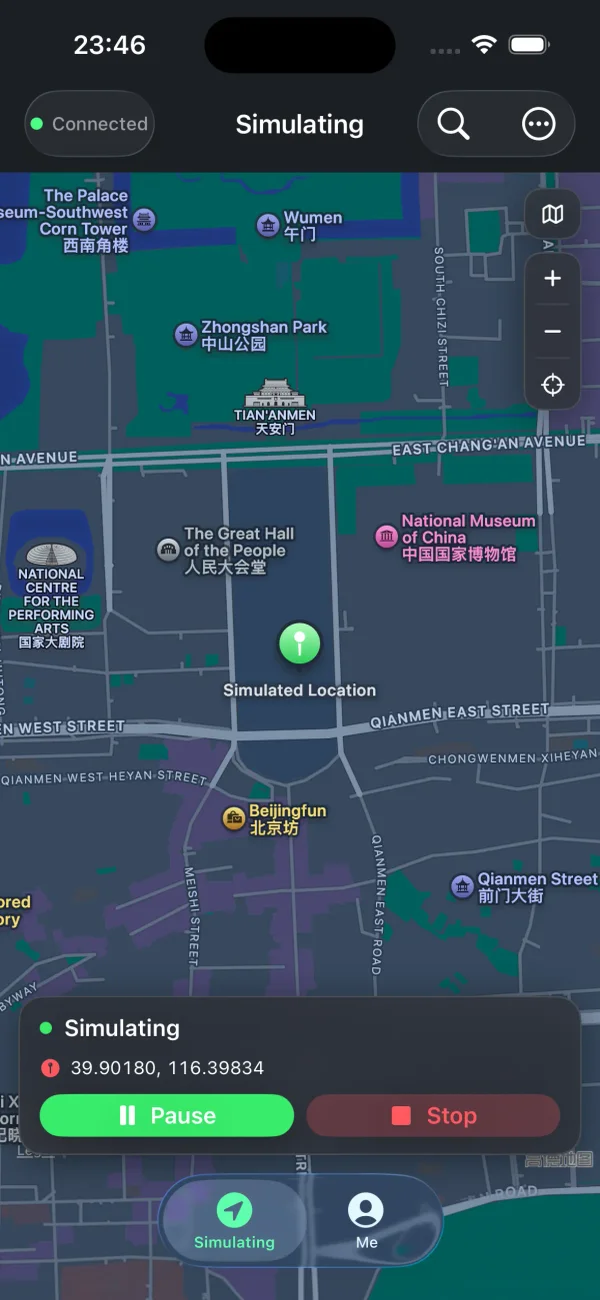
• The header shows Simulating or Idle, plus connection health
• Location Preview marks the coordinate; change map style, zoom, or recenter
• Details lists device, mode, speed, coordinates, and last update
4. Stop and restore
• While simulating, tap Stop and Restore
• iPhone tells Mac to end the session and restore real location
• The button is disabled when idle
5. Tips
• Use Mac to pick points, build routes, and start
• Use iPhone to confirm on device or to stop quickly
• If status does not update, check the same network and keep the Mac app open
NOTES
• Developer Mode is required
• Use only on your own development devices to test apps you are developing
• Stop and restore when finished
• This tool does not bypass system restrictions or misrepresent location for non-development use
Novidades
Versão 1.0.8 · 16/11/2026
Fix user-reported Bugs.
Privacidade do app
O que Weigan Technology (Shenzhen) Co., Ltd. declara na App Store sobre como este app lida com os dados.
-
Dados usados para rastrear você
Podem ser usados para rastrear você em apps e sites de outras empresas.
- Identificadores
-
Dados não vinculados a você
Podem ser coletados, mas não são vinculados à sua identidade.
- Identificadores
As práticas de privacidade podem variar, por exemplo, com base nos recursos que você usa ou na sua idade.
Informações
- Vendedor
- Weigan Technology (Shenzhen) Co., Ltd.
- Categoria
- Utilidades
- Versão
- 1.0.8
- Atualizado
- 16/11/2026
- Lançamento
- 01/09/2026
- Tamanho
- 14,0 MB
- Requer
- iOS 18.0 ou posterior
- Classificação etária
- 4+
- Preço
- Grátis
- Compras no app
- Sim
- Idiomas
- Inglês, Árabe, Bengali, Catalão, Croata, Checo, Dinamarquês, Holandês, Finlandês, Francês, Alemão, Grego e mais 32
- Copyright
- © weigan