
DevLocation
GPS & Location Simulator
iPhone, iPad, Mac için tasarlandı
Ücretsiz · Uygulama içi satın alma
- Yaş sınırı4+
- KategoriYardımcılar
- GeliştiriciWeigan Technology (Shenzhen) Co., Ltd.
- Dillerİngilizce+ 43 dil daha
- Boyut14,0 MB
Resmi App Store sayfasına bağlanır
Download.org, DevLocation için hiçbir dosya barındırmaz. Düğme, uygulamanın App Store üzerindeki sayfasını açar; uygulamayı orada Weigan Technology (Shenzhen) Co., Ltd. yayınlar. Sayfanın son kontrolü: 20.11.2026.
Ekran görüntüleri

Hakkında
Geliştirici bu metni dilinizde sunmamış.
Terms of Use (EULA): https://www.apple.com/legal/internet-services/itunes/dev/stdeula/
DevLocation is a location simulation and GPS debugging tool for iOS developers. From Mac, simulate a single coordinate or a continuous route on an iPhone with Developer Mode enabled, so you can test maps, navigation, and location-based features on a real device.
For development and functional testing only. Enable Developer Mode, connect with USB, and tap Trust. Follow local laws and the Apple Developer Agreement.
FEATURES
• Single-point mode: pick a map location, search an address, or enter coordinates
• Route mode: set start, via, and end points, then simulate walk, run, cycle, or drive
• Speed and GPS jitter: adjust speed and add slight jitter to test accuracy logic
• GPX import and export: reuse tracks or save the current route
• Follow roads: optionally generate road-aligned paths
• Favorites and history: save places and routes, replay previous sessions
• Mac and iPhone companion: sync on the same network; stop and restore from iPhone
• Shortcuts: set or stop location simulation on Mac
HOW TO USE ON IPHONE
The iPhone app is a companion. It shows status and lets you stop and restore. Simulation is started from Mac.
1. Install and open
• Install DevLocation on an iPhone with Developer Mode enabled
• Allow local network access to find the Mac on the same Wi-Fi
2. Pair with Mac
• Open DevLocation on Mac, connect this iPhone with USB, tap Trust, and connect
• Keep both devices on the same Wi-Fi
• Status syncs automatically; the home screen shows the Mac name
3. Monitor a session
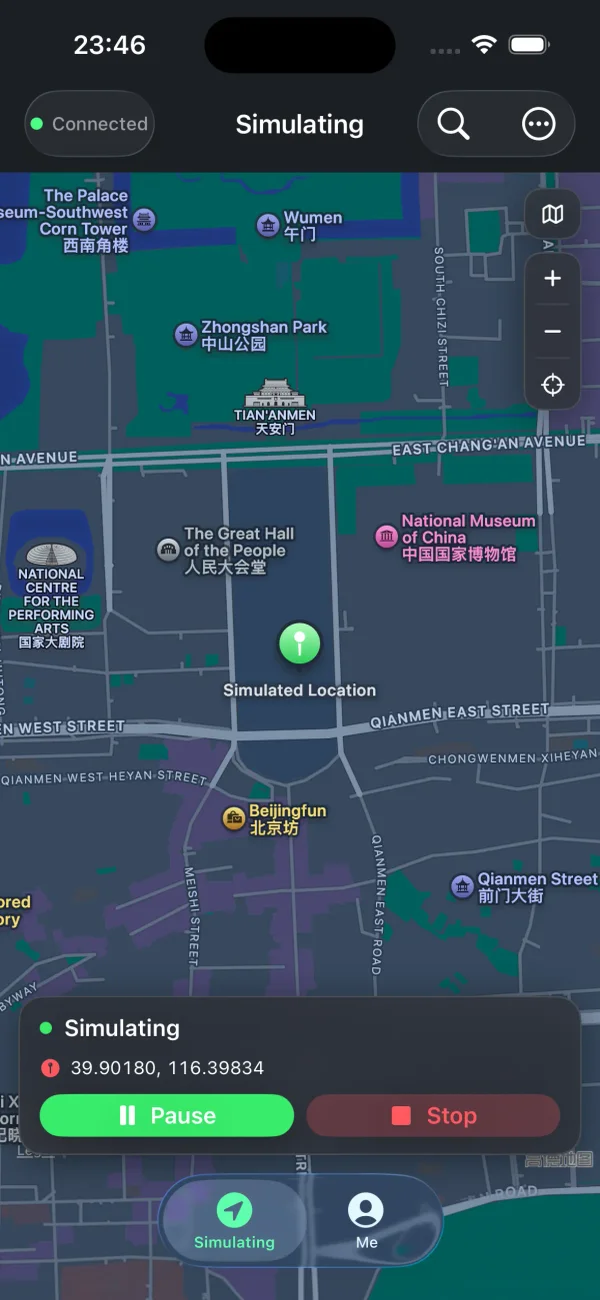
• The header shows Simulating or Idle, plus connection health
• Location Preview marks the coordinate; change map style, zoom, or recenter
• Details lists device, mode, speed, coordinates, and last update
4. Stop and restore
• While simulating, tap Stop and Restore
• iPhone tells Mac to end the session and restore real location
• The button is disabled when idle
5. Tips
• Use Mac to pick points, build routes, and start
• Use iPhone to confirm on device or to stop quickly
• If status does not update, check the same network and keep the Mac app open
NOTES
• Developer Mode is required
• Use only on your own development devices to test apps you are developing
• Stop and restore when finished
• This tool does not bypass system restrictions or misrepresent location for non-development use
Yenilikler
Sürüm 1.0.8 · 16.11.2026
Fix user-reported Bugs.
Uygulama gizliliği
Bu uygulamanın verileri nasıl işlediği hakkında Weigan Technology (Shenzhen) Co., Ltd. tarafından App Store üzerinde yapılan beyan.
-
Sizi izlemek için kullanılan veriler
Başka şirketlere ait uygulamalarda ve web sitelerinde sizi izlemek için kullanılabilir.
- Tanımlayıcılar
-
Sizinle ilişkilendirilmeyen veriler
Toplanabilir ancak kimliğinizle ilişkilendirilmez.
- Tanımlayıcılar
Gizlilik uygulamaları, örneğin kullandığınız özelliklere veya yaşınıza göre değişiklik gösterebilir.
Bilgiler
- Satıcı
- Weigan Technology (Shenzhen) Co., Ltd.
- Kategori
- Yardımcılar
- Sürüm
- 1.0.8
- Güncellendi
- 16.11.2026
- Yayın tarihi
- 01.09.2026
- Boyut
- 14,0 MB
- Gereksinim
- iOS 18.0 veya sonrası
- Yaş sınırı
- 4+
- Fiyat
- Ücretsiz
- Uygulama içi satın alma
- Evet
- Diller
- İngilizce, Arapça, Bengali, Katalanca, Hırvatça, Çekçe, Danca, Hollandaca, Fince, Fransızca, Almanca, Yunanca + 32 dil daha
- Telif hakkı
- © weigan