
DevLocation
GPS & Location Simulator
Được thiết kế cho iPhone, iPad, Mac
Miễn phí · Mua hàng trong ứng dụng
- Độ tuổi4+
- Danh mụcTiện Ích
- Nhà phát triểnWeigan Technology (Shenzhen) Co., Ltd.
- Ngôn ngữTiếng Anh+ 43 ngôn ngữ khác
- Kích thước14,0 MB
Liên kết đến trang App Store chính thức
Download.org không lưu trữ tệp nào của DevLocation. Nút này mở trang ứng dụng trên App Store, nơi Weigan Technology (Shenzhen) Co., Ltd. phát hành ứng dụng. Trang được kiểm tra lần cuối: 20/11/2026.
Ảnh chụp màn hình

Giới thiệu
Nhà phát triển chưa cung cấp nội dung này bằng ngôn ngữ của bạn.
Terms of Use (EULA): https://www.apple.com/legal/internet-services/itunes/dev/stdeula/
DevLocation is a location simulation and GPS debugging tool for iOS developers. From Mac, simulate a single coordinate or a continuous route on an iPhone with Developer Mode enabled, so you can test maps, navigation, and location-based features on a real device.
For development and functional testing only. Enable Developer Mode, connect with USB, and tap Trust. Follow local laws and the Apple Developer Agreement.
FEATURES
• Single-point mode: pick a map location, search an address, or enter coordinates
• Route mode: set start, via, and end points, then simulate walk, run, cycle, or drive
• Speed and GPS jitter: adjust speed and add slight jitter to test accuracy logic
• GPX import and export: reuse tracks or save the current route
• Follow roads: optionally generate road-aligned paths
• Favorites and history: save places and routes, replay previous sessions
• Mac and iPhone companion: sync on the same network; stop and restore from iPhone
• Shortcuts: set or stop location simulation on Mac
HOW TO USE ON IPHONE
The iPhone app is a companion. It shows status and lets you stop and restore. Simulation is started from Mac.
1. Install and open
• Install DevLocation on an iPhone with Developer Mode enabled
• Allow local network access to find the Mac on the same Wi-Fi
2. Pair with Mac
• Open DevLocation on Mac, connect this iPhone with USB, tap Trust, and connect
• Keep both devices on the same Wi-Fi
• Status syncs automatically; the home screen shows the Mac name
3. Monitor a session
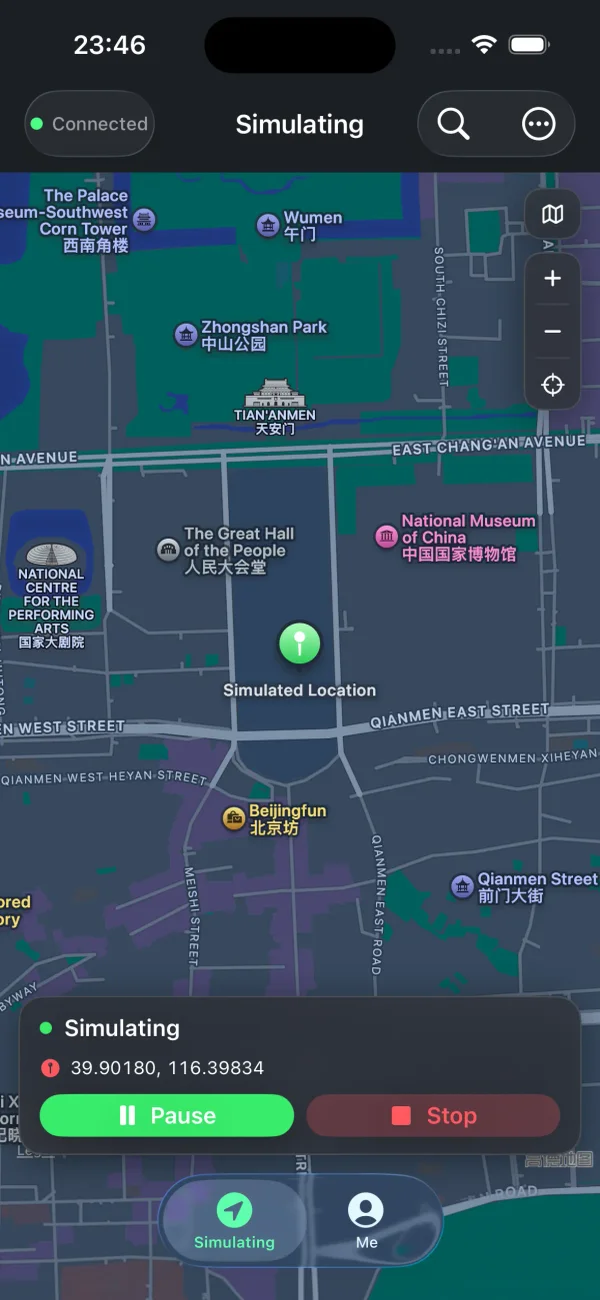
• The header shows Simulating or Idle, plus connection health
• Location Preview marks the coordinate; change map style, zoom, or recenter
• Details lists device, mode, speed, coordinates, and last update
4. Stop and restore
• While simulating, tap Stop and Restore
• iPhone tells Mac to end the session and restore real location
• The button is disabled when idle
5. Tips
• Use Mac to pick points, build routes, and start
• Use iPhone to confirm on device or to stop quickly
• If status does not update, check the same network and keep the Mac app open
NOTES
• Developer Mode is required
• Use only on your own development devices to test apps you are developing
• Stop and restore when finished
• This tool does not bypass system restrictions or misrepresent location for non-development use
Có gì mới
Phiên bản 1.0.8 · 16/11/2026
Fix user-reported Bugs.
Quyền riêng tư của ứng dụng
Những gì Weigan Technology (Shenzhen) Co., Ltd. khai báo trên App Store về cách ứng dụng này xử lý dữ liệu.
-
Dữ liệu được sử dụng để theo dõi bạn
Có thể được sử dụng để theo dõi bạn trên các ứng dụng và trang web do công ty khác sở hữu.
- Mã định danh
-
Dữ liệu không liên kết với bạn
Có thể được thu thập nhưng không liên kết với danh tính của bạn.
- Mã định danh
Phương thức đảm bảo quyền riêng tư có thể khác nhau, chẳng hạn như tuỳ theo các tính năng bạn sử dụng hoặc độ tuổi của bạn.
Thông tin
- Người bán
- Weigan Technology (Shenzhen) Co., Ltd.
- Danh mục
- Tiện Ích
- Phiên bản
- 1.0.8
- Cập nhật
- 16/11/2026
- Phát hành
- 01/09/2026
- Kích thước
- 14,0 MB
- Yêu cầu
- iOS 18.0 trở lên
- Độ tuổi
- 4+
- Giá
- Miễn phí
- Mua hàng trong ứng dụng
- Có
- Ngôn ngữ
- Tiếng Anh, Tiếng Ả Rập, Bengali, Tiếng Catalan, Tiếng Croatia, Tiếng Séc, Tiếng Đan Mạch, Tiếng Hà Lan, Tiếng Phần Lan, Tiếng Pháp, Tiếng Đức, Tiếng Hy Lạp + 32 ngôn ngữ khác
- Bản quyền
- © weigan