
- Classificação etária4+
- CategoriaPara desenvolvedores
- DesenvolvedorZheng Jiang
- IdiomasInglês
- Tamanho1,2 MB
Leva à página oficial na App Store
O Download.org não hospeda nenhum arquivo de ProxyDeck — Network Lab. O botão abre a página do app na App Store, onde Zheng Jiang o publica. Página verificada pela última vez em 20/11/2026.
Capturas de tela
Sobre
O desenvolvedor não forneceu este texto no seu idioma.
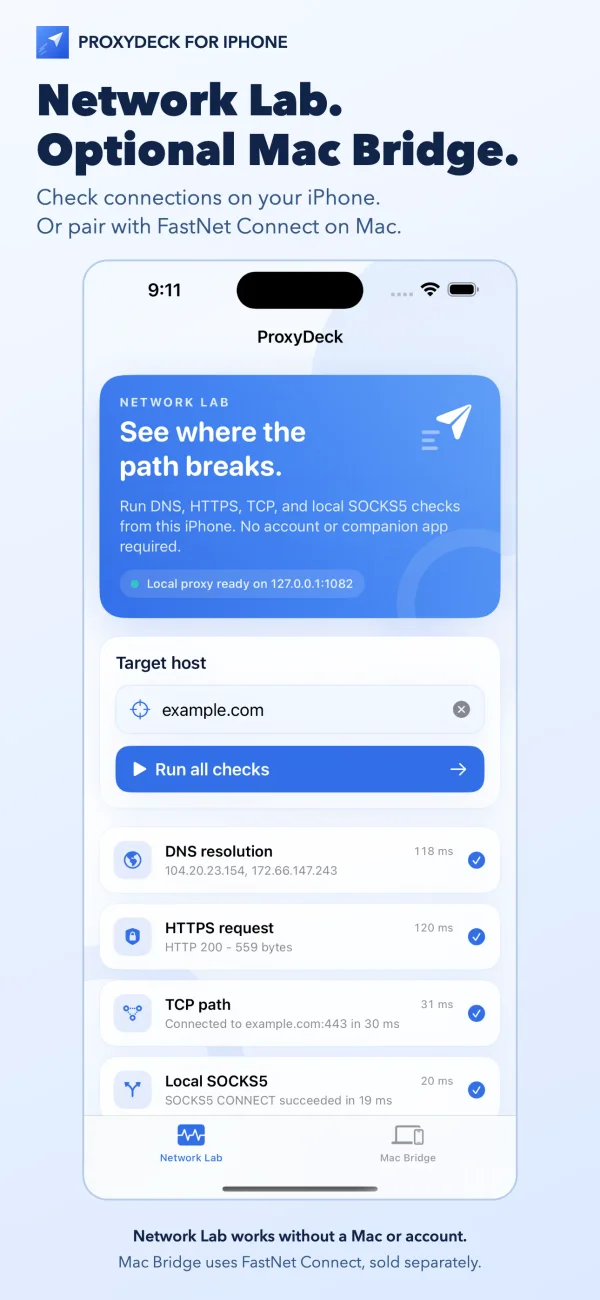
ProxyDeck is a free network lab and local proxy for iPhone. Check DNS, HTTPS, TCP, and local SOCKS5 paths directly on your device, without a Mac or account.
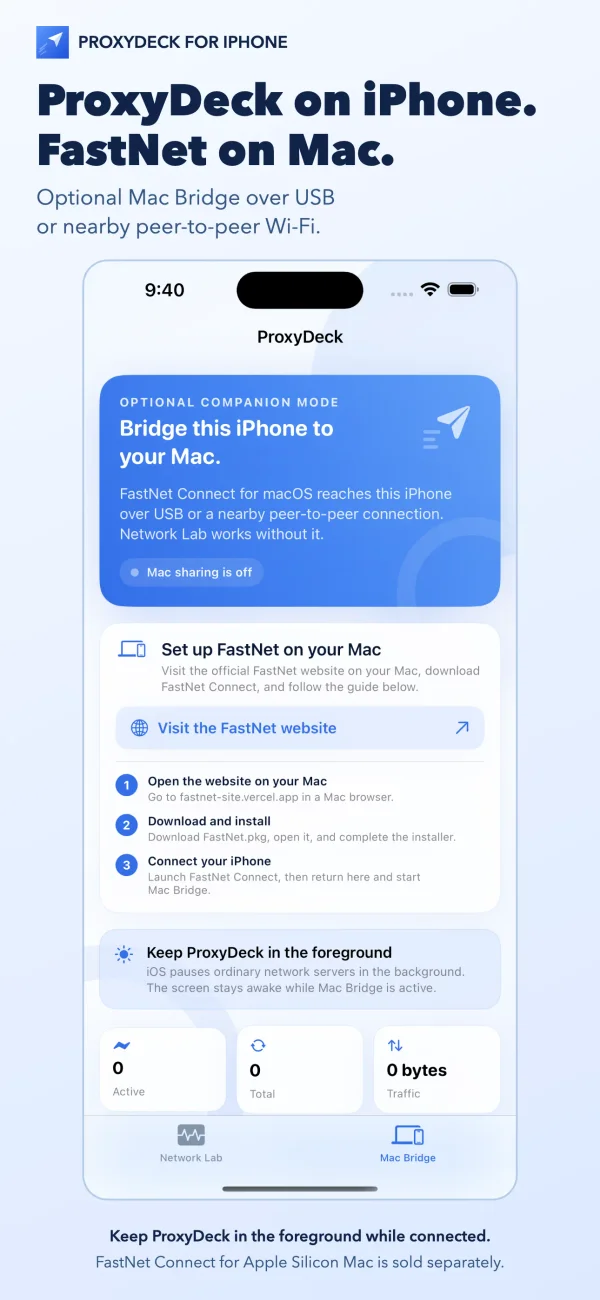
Looking for the iPhone app that works with FastNet Connect? This is it. ProxyDeck's optional Mac Bridge connects to the separately purchased FastNet Connect app on an Apple Silicon Mac over USB or nearby peer-to-peer Wi-Fi. Mac Bridge requires both apps and works only while ProxyDeck stays in the foreground. It stops when you leave the app.
Run four practical checks against any host:
• DNS resolution — inspect the addresses returned on the current network
• HTTPS request — verify an end-to-end secure request and response
• TCP path — measure connection setup to port 443
• Local SOCKS5 — prove the built-in 127.0.0.1 proxy with a real CONNECT request
Every proxy flow appears in a live connection inspector with its host, port, protocol, state, and traffic totals.
Optional Mac Bridge
If you use FastNet Connect for macOS, ProxyDeck can expose its proxy over USB or a nearby peer-to-peer connection. This companion mode is optional and starts only when you tap Start Mac Bridge. The standalone Network Lab requires no Mac or other app.
Private by design:
• No account
• No analytics or tracking
• No data collection
• No servers operated by us
• Diagnostic checks contact only the host you enter
Mac Bridge is a foreground-only tool and stops when ProxyDeck leaves the foreground.
Novidades
Versão 1.0.5 · 11/11/2026
Mac Bridge stays responsive during heavy downloads: new connections no longer wait behind bulk traffic, so pages keep loading while a large transfer or speed test runs. Mac Bridge also answers the Mac companion's connection health check, and the Stop Mac Bridge button is readable in Dark Mode. Network Lab is unchanged.
Privacidade do app
O que Zheng Jiang declara na App Store sobre como este app lida com os dados.
-
Dados não coletados
O desenvolvedor não coleta nenhum dado deste app.
As práticas de privacidade podem variar, por exemplo, com base nos recursos que você usa ou na sua idade.
Informações
- Vendedor
- Zheng Jiang
- Categoria
- Para desenvolvedores
- Versão
- 1.0.5
- Atualizado
- 11/11/2026
- Lançamento
- 31/08/2026
- Tamanho
- 1,2 MB
- Requer
- iOS 16.0 ou posterior
- Classificação etária
- 4+
- Preço
- Grátis
- Idiomas
- Inglês
- Copyright
- © 2026 Zheng Jiang
Você também pode gostar
-
 SocketClaw: SSH TerminalPara desenvolvedores
-
 LogPulse – Logs & MonitoringPara desenvolvedores
-
 Keyframer PreviewPara desenvolvedores
-
 Steer - Agent InboxPara desenvolvedores
-
 Sidecar MLPara desenvolvedores
-
 Bolt SSHPara desenvolvedores
-
 ShellCastPara desenvolvedores
-
 HTTrailNetwork proxy & API client
-
 Shellby: SSH Client & TerminalPara desenvolvedores
-
 ProxyTunnel: Smart LAN ProxyPara desenvolvedores