
ProxyDeck — Network Lab
Network diagnostics & proxy
Được thiết kế cho iPhone
Miễn phí
- Độ tuổi4+
- Danh mụcCông Cụ Nhà Phát Triển
- Nhà phát triểnZheng Jiang
- Ngôn ngữTiếng Anh
- Kích thước1,2 MB
Liên kết đến trang App Store chính thức
Download.org không lưu trữ tệp nào của ProxyDeck — Network Lab. Nút này mở trang ứng dụng trên App Store, nơi Zheng Jiang phát hành ứng dụng. Trang được kiểm tra lần cuối: 20/11/2026.
Ảnh chụp màn hình
Giới thiệu
Nhà phát triển chưa cung cấp nội dung này bằng ngôn ngữ của bạn.
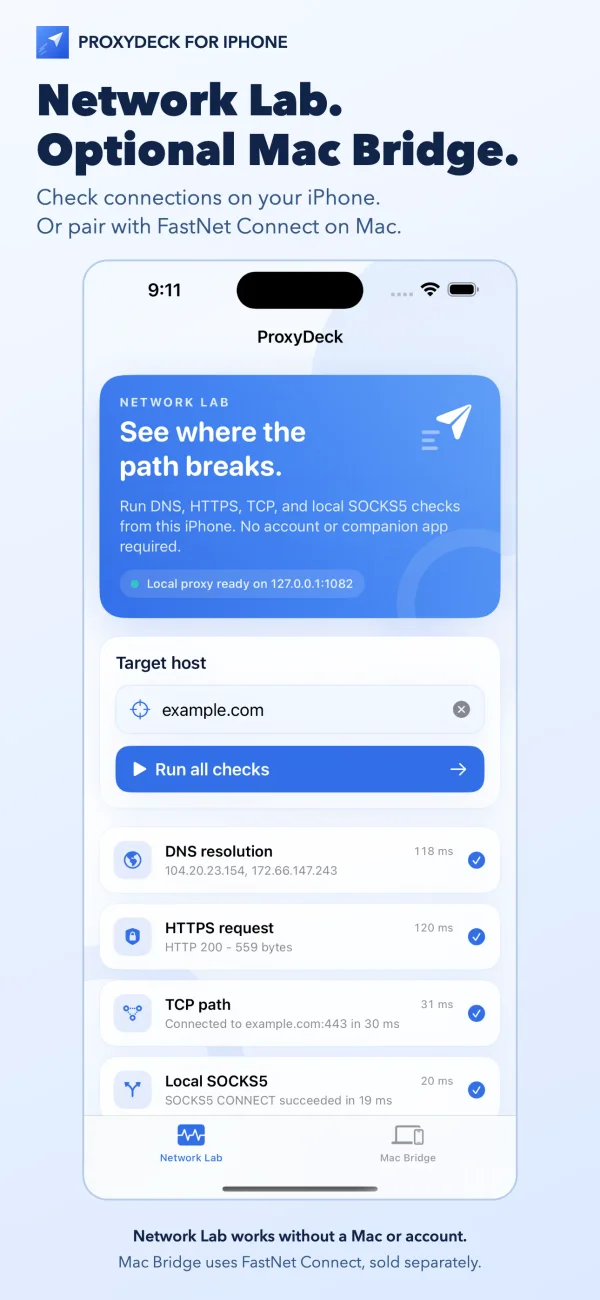
ProxyDeck is a free network lab and local proxy for iPhone. Check DNS, HTTPS, TCP, and local SOCKS5 paths directly on your device, without a Mac or account.
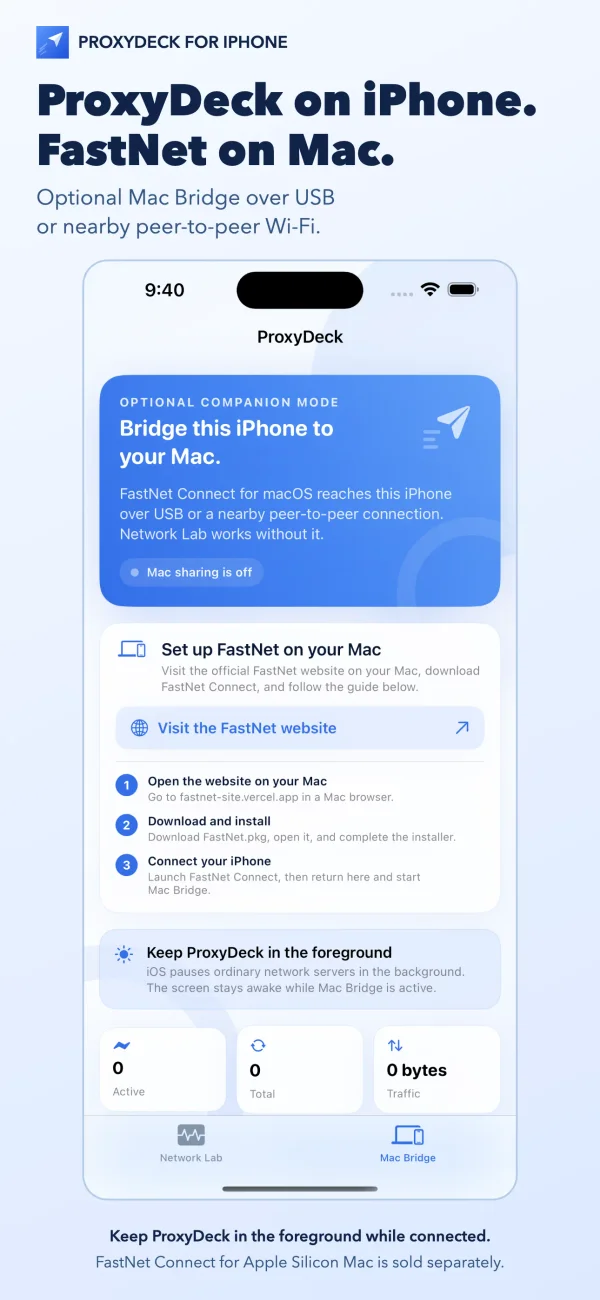
Looking for the iPhone app that works with FastNet Connect? This is it. ProxyDeck's optional Mac Bridge connects to the separately purchased FastNet Connect app on an Apple Silicon Mac over USB or nearby peer-to-peer Wi-Fi. Mac Bridge requires both apps and works only while ProxyDeck stays in the foreground. It stops when you leave the app.
Run four practical checks against any host:
• DNS resolution — inspect the addresses returned on the current network
• HTTPS request — verify an end-to-end secure request and response
• TCP path — measure connection setup to port 443
• Local SOCKS5 — prove the built-in 127.0.0.1 proxy with a real CONNECT request
Every proxy flow appears in a live connection inspector with its host, port, protocol, state, and traffic totals.
Optional Mac Bridge
If you use FastNet Connect for macOS, ProxyDeck can expose its proxy over USB or a nearby peer-to-peer connection. This companion mode is optional and starts only when you tap Start Mac Bridge. The standalone Network Lab requires no Mac or other app.
Private by design:
• No account
• No analytics or tracking
• No data collection
• No servers operated by us
• Diagnostic checks contact only the host you enter
Mac Bridge is a foreground-only tool and stops when ProxyDeck leaves the foreground.
Có gì mới
Phiên bản 1.0.5 · 11/11/2026
Mac Bridge stays responsive during heavy downloads: new connections no longer wait behind bulk traffic, so pages keep loading while a large transfer or speed test runs. Mac Bridge also answers the Mac companion's connection health check, and the Stop Mac Bridge button is readable in Dark Mode. Network Lab is unchanged.
Quyền riêng tư của ứng dụng
Những gì Zheng Jiang khai báo trên App Store về cách ứng dụng này xử lý dữ liệu.
-
Dữ liệu không được thu thập
Nhà phát triển không thu thập bất kỳ dữ liệu nào từ ứng dụng này.
Phương thức đảm bảo quyền riêng tư có thể khác nhau, chẳng hạn như tuỳ theo các tính năng bạn sử dụng hoặc độ tuổi của bạn.
Thông tin
- Người bán
- Zheng Jiang
- Danh mục
- Công Cụ Nhà Phát Triển
- Phiên bản
- 1.0.5
- Cập nhật
- 11/11/2026
- Phát hành
- 31/08/2026
- Kích thước
- 1,2 MB
- Yêu cầu
- iOS 16.0 trở lên
- Độ tuổi
- 4+
- Giá
- Miễn phí
- Ngôn ngữ
- Tiếng Anh
- Bản quyền
- © 2026 Zheng Jiang
Có thể bạn cũng thích
-
 SocketClaw: SSH TerminalCông Cụ Nhà Phát Triển
-
 LogPulse – Logs & MonitoringCông Cụ Nhà Phát Triển
-
 Keyframer PreviewCông Cụ Nhà Phát Triển
-
 Steer - Agent InboxCông Cụ Nhà Phát Triển
-
 Sidecar MLCông Cụ Nhà Phát Triển
-
 Bolt SSHCông Cụ Nhà Phát Triển
-
 ShellCastCông Cụ Nhà Phát Triển
-
 HTTrailCông Cụ Nhà Phát Triển
-
 Shellby: SSH Client & TerminalCông Cụ Nhà Phát Triển
-
 ProxyTunnel: Smart LAN ProxyCông Cụ Nhà Phát Triển