
ProxyDeck — Network Lab
Network diagnostics & proxy
iPhone için tasarlandı
Ücretsiz
- Yaş sınırı4+
- KategoriGeliştirici Araçları
- GeliştiriciZheng Jiang
- Dillerİngilizce
- Boyut1,2 MB
Resmi App Store sayfasına bağlanır
Download.org, ProxyDeck — Network Lab için hiçbir dosya barındırmaz. Düğme, uygulamanın App Store üzerindeki sayfasını açar; uygulamayı orada Zheng Jiang yayınlar. Sayfanın son kontrolü: 20.11.2026.
Ekran görüntüleri
Hakkında
Geliştirici bu metni dilinizde sunmamış.
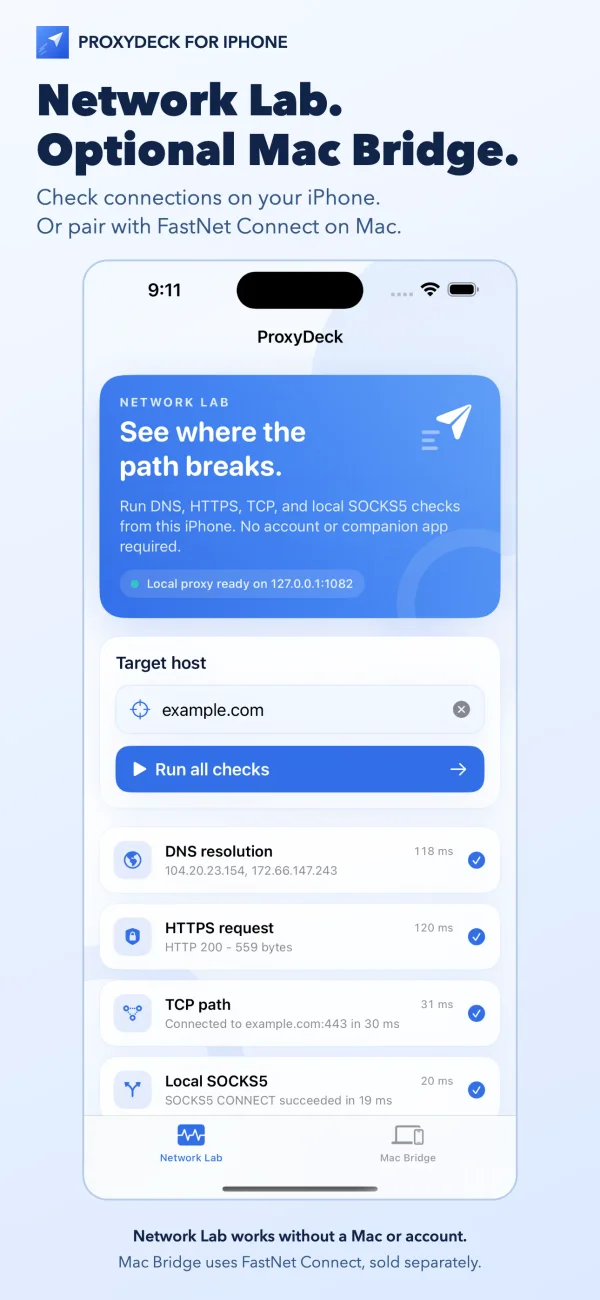
ProxyDeck is a free network lab and local proxy for iPhone. Check DNS, HTTPS, TCP, and local SOCKS5 paths directly on your device, without a Mac or account.
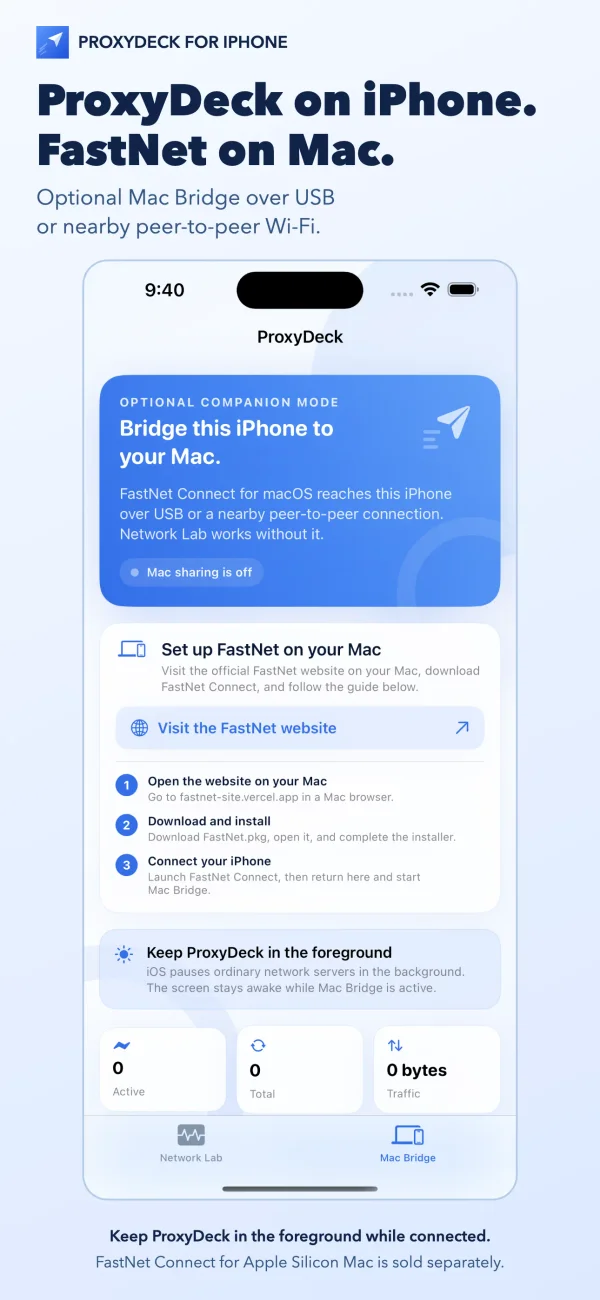
Looking for the iPhone app that works with FastNet Connect? This is it. ProxyDeck's optional Mac Bridge connects to the separately purchased FastNet Connect app on an Apple Silicon Mac over USB or nearby peer-to-peer Wi-Fi. Mac Bridge requires both apps and works only while ProxyDeck stays in the foreground. It stops when you leave the app.
Run four practical checks against any host:
• DNS resolution — inspect the addresses returned on the current network
• HTTPS request — verify an end-to-end secure request and response
• TCP path — measure connection setup to port 443
• Local SOCKS5 — prove the built-in 127.0.0.1 proxy with a real CONNECT request
Every proxy flow appears in a live connection inspector with its host, port, protocol, state, and traffic totals.
Optional Mac Bridge
If you use FastNet Connect for macOS, ProxyDeck can expose its proxy over USB or a nearby peer-to-peer connection. This companion mode is optional and starts only when you tap Start Mac Bridge. The standalone Network Lab requires no Mac or other app.
Private by design:
• No account
• No analytics or tracking
• No data collection
• No servers operated by us
• Diagnostic checks contact only the host you enter
Mac Bridge is a foreground-only tool and stops when ProxyDeck leaves the foreground.
Yenilikler
Sürüm 1.0.5 · 11.11.2026
Mac Bridge stays responsive during heavy downloads: new connections no longer wait behind bulk traffic, so pages keep loading while a large transfer or speed test runs. Mac Bridge also answers the Mac companion's connection health check, and the Stop Mac Bridge button is readable in Dark Mode. Network Lab is unchanged.
Uygulama gizliliği
Bu uygulamanın verileri nasıl işlediği hakkında Zheng Jiang tarafından App Store üzerinde yapılan beyan.
-
Veri toplanmıyor
Geliştirici bu uygulamadan hiçbir veri toplamıyor.
Gizlilik uygulamaları, örneğin kullandığınız özelliklere veya yaşınıza göre değişiklik gösterebilir.
Bilgiler
- Satıcı
- Zheng Jiang
- Kategori
- Geliştirici Araçları
- Sürüm
- 1.0.5
- Güncellendi
- 11.11.2026
- Yayın tarihi
- 31.08.2026
- Boyut
- 1,2 MB
- Gereksinim
- iOS 16.0 veya sonrası
- Yaş sınırı
- 4+
- Fiyat
- Ücretsiz
- Diller
- İngilizce
- Telif hakkı
- © 2026 Zheng Jiang
Bunları da beğenebilirsiniz
-
 SocketClaw: SSH TerminalGeliştirici Araçları
-
 LogPulse – Logs & MonitoringGeliştirici Araçları
-
 Keyframer PreviewGeliştirici Araçları
-
 Steer - Agent InboxGeliştirici Araçları
-
 Sidecar MLGeliştirici Araçları
-
 Bolt SSHGeliştirici Araçları
-
 ShellCastGeliştirici Araçları
-
 HTTrailGeliştirici Araçları
-
 Shellby: SSH Client & TerminalGeliştirici Araçları
-
 ProxyTunnel: Smart LAN ProxyGeliştirici Araçları