
Tracing: Drawing Practice
Trace over a guide image
iPad için tasarlandı
₺49,99
- Yaş sınırı4+
- KategoriGrafik ve Tasarım
- GeliştiriciYasuo Fukushima
- Dillerİngilizce+ 6 dil daha
- Boyut3,3 MB
Resmi App Store sayfasına bağlanır
Download.org, Tracing: Drawing Practice için hiçbir dosya barındırmaz. Düğme, uygulamanın App Store üzerindeki sayfasını açar; uygulamayı orada Yasuo Fukushima yayınlar. Sayfanın son kontrolü: 18.11.2026.
Ekran görüntüleri



Hakkında
Geliştirici bu metni dilinizde sunmamış.
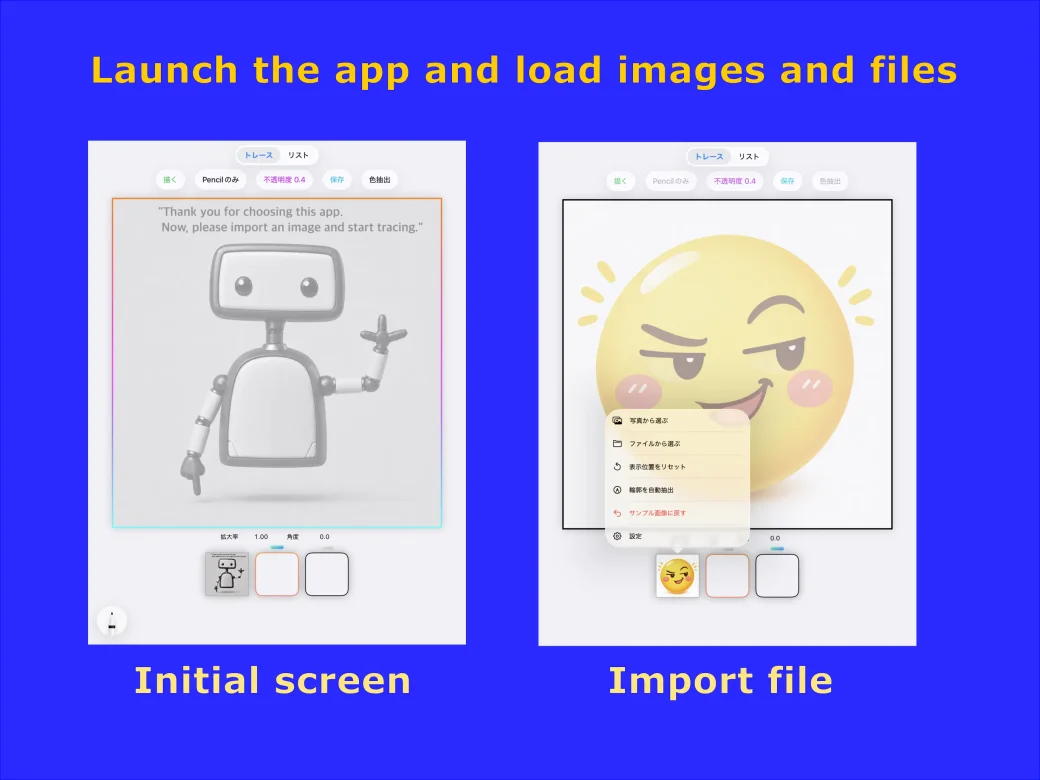
Trace is a simple drawing app that lets you import photos, images, and files as references, then trace and paint over them.
One of Trace’s key features is its three-layer structure: the Reference Layer, Trace Layer, and Paint Layer.
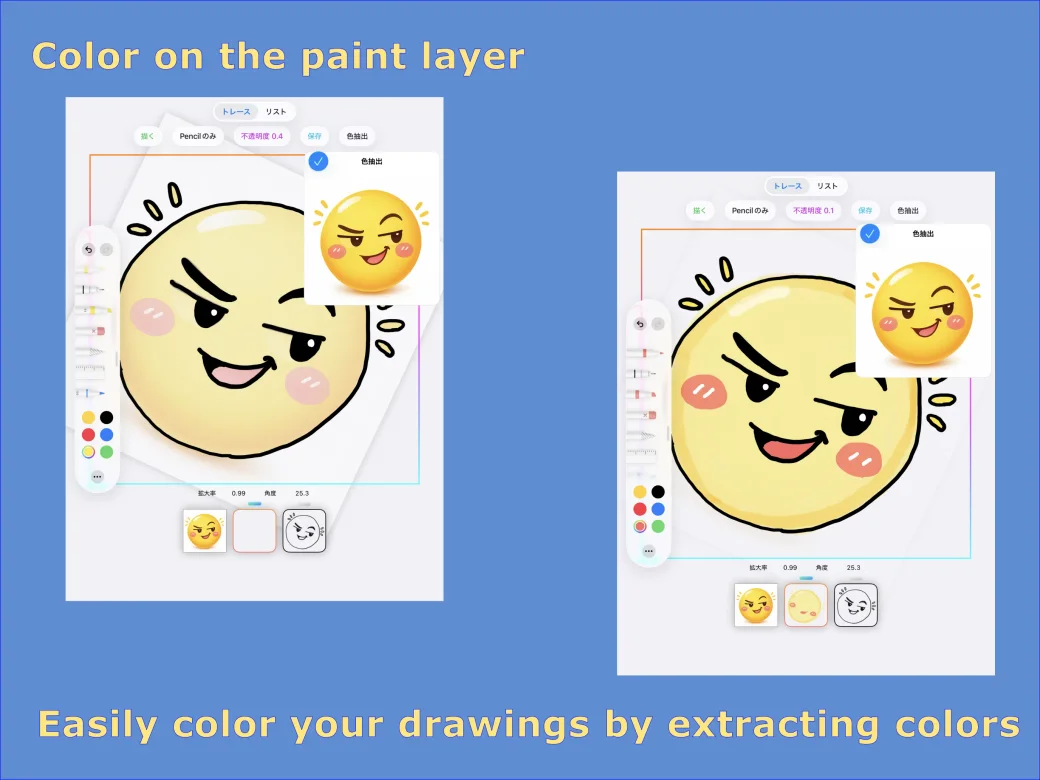
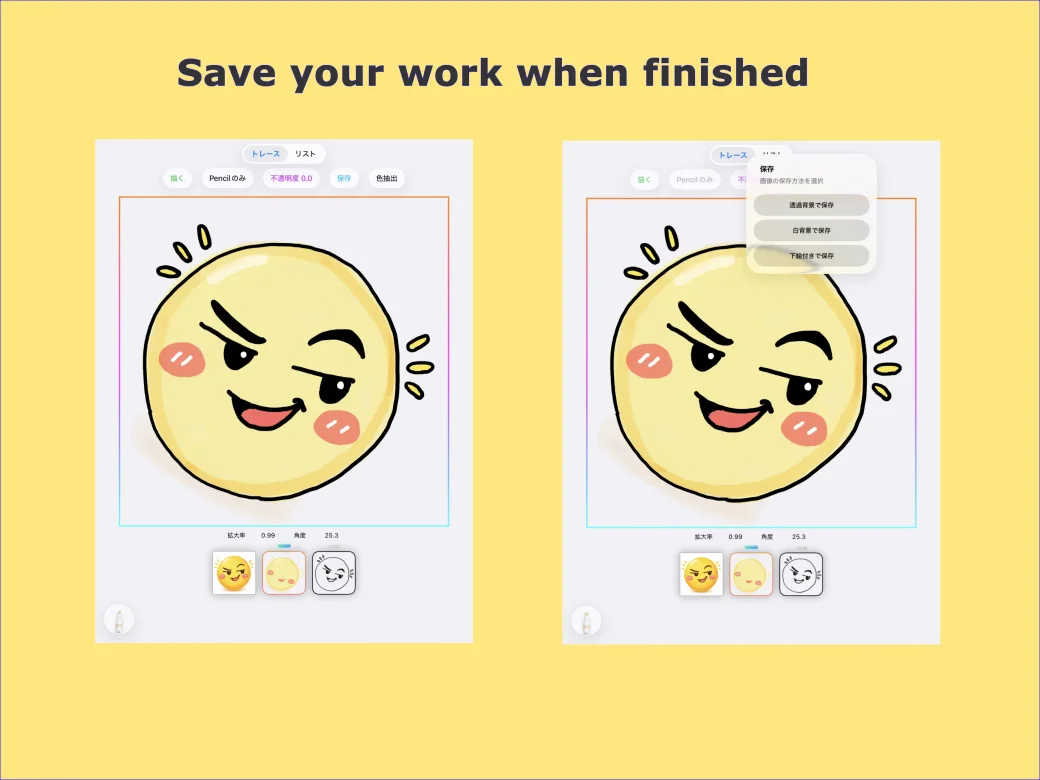
You can trace outlines while viewing your reference image, then add color on the Paint Layer to complete your artwork. By separating each step into its own layer, Trace makes the drawing process simple and easy to manage.
The Reference Layer supports zooming, scaling, and rotation, giving you the freedom to adjust the size and angle of your reference image to match your composition.
In addition to importing images from your photo library, Trace also supports importing image files, allowing you to use a wide variety of reference materials.
Key Features
* Reference Layer
Display a photo or image as your drawing reference.
Zoom, resize, and rotate it freely to match the size and angle you want.
* Trace Layer
Trace outlines and shapes while viewing the reference image underneath.
* Paint Layer
Add color while using your traced lines as a guide to complete your artwork.
* Import from Photos
Use images stored in your photo library as references.
* Import from Files
Import image files in addition to photos, giving you more flexibility when choosing reference materials.
* Flexible Reference Adjustment
Freely adjust the size and angle of your reference image to suit your composition and tracing needs.
* Simple and Intuitive Controls
Designed to keep unnecessary complexity to a minimum so you can focus on tracing, drawing, and painting.
Trace can be used for drawing practice, illustration, sketching, design studies, and many other creative purposes.
“Place your reference.”
“Trace the lines.”
“Add color.”
By separating these three steps into layers, Trace provides a smooth and intuitive workflow from tracing to painting.
Turn your favorite photos and images into your own artwork with Trace.
Yenilikler
Sürüm 3.5 · 06.11.2026
• Minor bug fixes.
• Improved relationship between layer order and rendering.
• Easier color extraction from images for seamless painting.
• Improved drawing stability.
Uygulama gizliliği
Bu uygulamanın verileri nasıl işlediği hakkında Yasuo Fukushima tarafından App Store üzerinde yapılan beyan.
-
Veri toplanmıyor
Geliştirici bu uygulamadan hiçbir veri toplamıyor.
Gizlilik uygulamaları, örneğin kullandığınız özelliklere veya yaşınıza göre değişiklik gösterebilir.
Bilgiler
- Satıcı
- Yasuo Fukushima
- Kategori
- Grafik ve Tasarım
- Sürüm
- 3.5
- Güncellendi
- 06.11.2026
- Yayın tarihi
- 03.05.2020
- Boyut
- 3,3 MB
- Gereksinim
- iOS 26.6 veya sonrası
- Yaş sınırı
- 4+
- Fiyat
- ₺49,99
- Diller
- İngilizce, Fransızca, İtalyanca, Japonca, Korece, Basitleştirilmiş Çince, Geleneksel Çince
- Telif hakkı
- © 2020 FukushimaYasuo
Bunları da beğenebilirsiniz
-
 Animator PlusGrafik ve Tasarım
-
 Video Figure: Gesture DrawingGrafik ve Tasarım
-
 Holo.Draw: Sketch On ScreenGrafik ve Tasarım
-
 Round CornerGrafik ve Tasarım
-
 Dönüş - Fenakistiskop EfektiBüyüleyici görsel yarat
-
 Simple Trace ProGrafik ve Tasarım
-
 Emerge - Draw and revealGrafik ve Tasarım
-
 MahoujinEx MobileGrafik ve Tasarım
-
 9VAeProGrafik ve Tasarım
-
 Trace DrawGrafik ve Tasarım