
Tracing: Drawing Practice
Trace over a guide image
Được thiết kế cho iPad
29.000đ
- Độ tuổi4+
- Danh mụcĐồ Họa & Thiết Kế
- Nhà phát triểnYasuo Fukushima
- Ngôn ngữTiếng Anh+ 6 ngôn ngữ khác
- Kích thước3,3 MB
Liên kết đến trang App Store chính thức
Download.org không lưu trữ tệp nào của Tracing: Drawing Practice. Nút này mở trang ứng dụng trên App Store, nơi Yasuo Fukushima phát hành ứng dụng. Trang được kiểm tra lần cuối: 18/11/2026.
Ảnh chụp màn hình
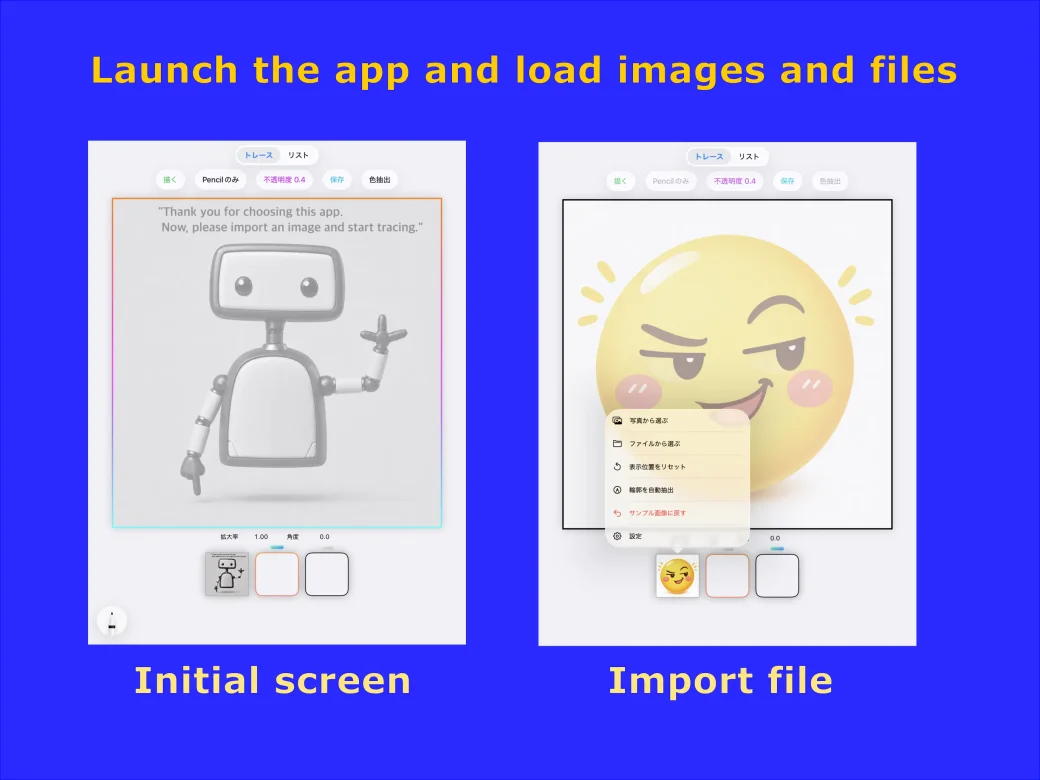

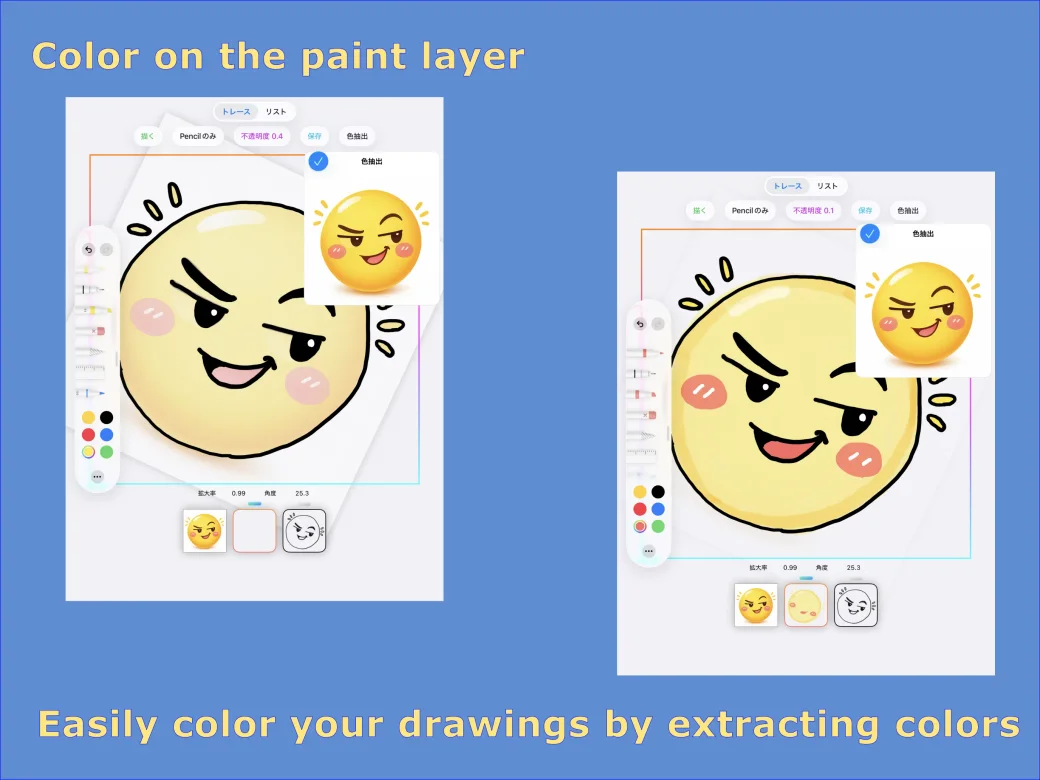
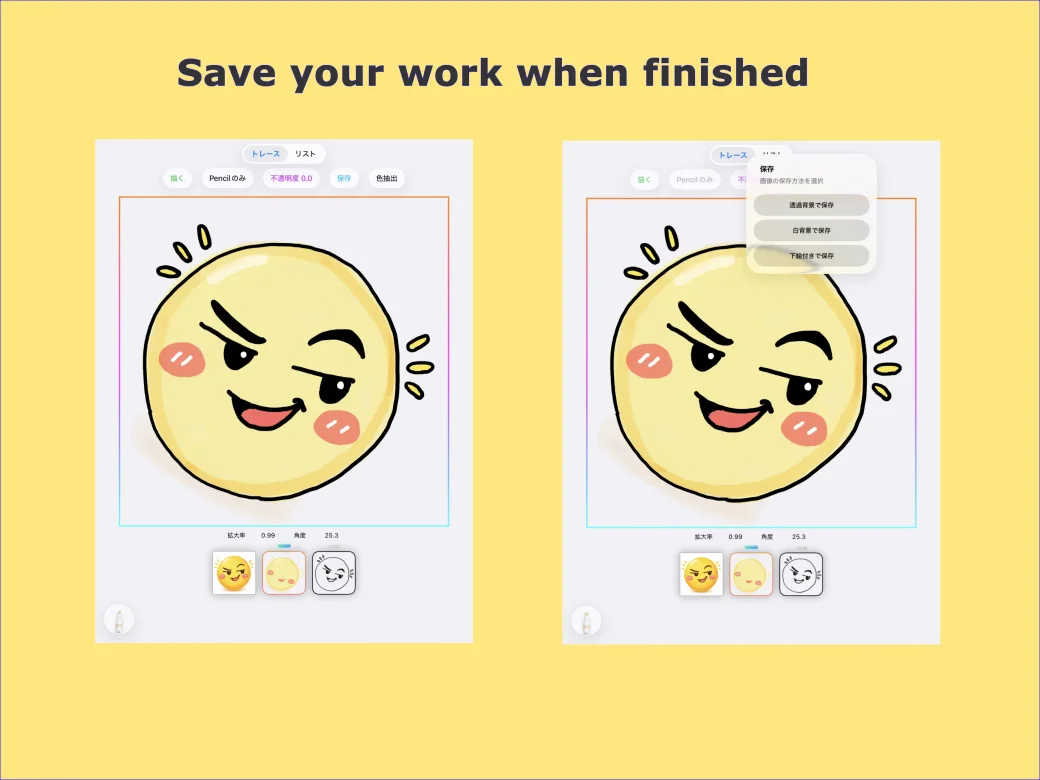


Giới thiệu
Nhà phát triển chưa cung cấp nội dung này bằng ngôn ngữ của bạn.
Trace is a simple drawing app that lets you import photos, images, and files as references, then trace and paint over them.
One of Trace’s key features is its three-layer structure: the Reference Layer, Trace Layer, and Paint Layer.
You can trace outlines while viewing your reference image, then add color on the Paint Layer to complete your artwork. By separating each step into its own layer, Trace makes the drawing process simple and easy to manage.
The Reference Layer supports zooming, scaling, and rotation, giving you the freedom to adjust the size and angle of your reference image to match your composition.
In addition to importing images from your photo library, Trace also supports importing image files, allowing you to use a wide variety of reference materials.
Key Features
* Reference Layer
Display a photo or image as your drawing reference.
Zoom, resize, and rotate it freely to match the size and angle you want.
* Trace Layer
Trace outlines and shapes while viewing the reference image underneath.
* Paint Layer
Add color while using your traced lines as a guide to complete your artwork.
* Import from Photos
Use images stored in your photo library as references.
* Import from Files
Import image files in addition to photos, giving you more flexibility when choosing reference materials.
* Flexible Reference Adjustment
Freely adjust the size and angle of your reference image to suit your composition and tracing needs.
* Simple and Intuitive Controls
Designed to keep unnecessary complexity to a minimum so you can focus on tracing, drawing, and painting.
Trace can be used for drawing practice, illustration, sketching, design studies, and many other creative purposes.
“Place your reference.”
“Trace the lines.”
“Add color.”
By separating these three steps into layers, Trace provides a smooth and intuitive workflow from tracing to painting.
Turn your favorite photos and images into your own artwork with Trace.
Có gì mới
Phiên bản 3.5 · 06/11/2026
• Minor bug fixes.
• Improved relationship between layer order and rendering.
• Easier color extraction from images for seamless painting.
• Improved drawing stability.
Quyền riêng tư của ứng dụng
Những gì Yasuo Fukushima khai báo trên App Store về cách ứng dụng này xử lý dữ liệu.
-
Dữ liệu không được thu thập
Nhà phát triển không thu thập bất kỳ dữ liệu nào từ ứng dụng này.
Phương thức đảm bảo quyền riêng tư có thể khác nhau, chẳng hạn như tuỳ theo các tính năng bạn sử dụng hoặc độ tuổi của bạn.
Thông tin
- Người bán
- Yasuo Fukushima
- Danh mục
- Đồ Họa & Thiết Kế
- Phiên bản
- 3.5
- Cập nhật
- 06/11/2026
- Phát hành
- 03/05/2020
- Kích thước
- 3,3 MB
- Yêu cầu
- iOS 26.6 trở lên
- Độ tuổi
- 4+
- Giá
- 29.000đ
- Ngôn ngữ
- Tiếng Anh, Tiếng Pháp, Tiếng Ý, Tiếng Nhật, Tiếng Hàn, Tiếng Trung Giản thể, Tiếng Trung Phồn thể
- Bản quyền
- © 2020 FukushimaYasuo
Có thể bạn cũng thích
-
 Animator PlusĐồ Họa & Thiết Kế
-
 Video Figure: Gesture DrawingĐồ Họa & Thiết Kế
-
 Holo.Draw: Sketch On ScreenĐồ Họa & Thiết Kế
-
 Round CornerĐồ Họa & Thiết Kế
-
 Xoay - Hiệu ứngTạo ảo ảnh quang học hấp dẫn
-
 Simple Trace ProĐồ Họa & Thiết Kế
-
 Emerge - Draw and revealĐồ Họa & Thiết Kế
-
 MahoujinEx MobileĐồ Họa & Thiết Kế
-
 9VAeProĐồ Họa & Thiết Kế
-
 Trace DrawĐồ Họa & Thiết Kế