iDocCam
Unleash Doc Cam in your phone
Entwickelt für iPhone, iPod touch
Kostenlos · In-App-Käufe
- Altersfreigabe4+
- KategorieProduktivität
- EntwicklerIPEVO
- SprachenEnglisch+ 11 weitere
- Größe20,9 MB
Verlinkt auf die offizielle App Store-Seite
Download.org hostet keine Datei von iDocCam. Die Schaltfläche öffnet die App-Seite bei App Store, wo IPEVO die App veröffentlicht. Eintrag zuletzt geprüft am 12.11.2026.
Screenshots

Info
Der Entwickler hat diesen Text nicht in Ihrer Sprache bereitgestellt.
iDocCam is an app that allows you to control your iPhone’s camera in real-time, and even turn it into a document camera for large-screen projection. You may subscribe to iDocCam either on a monthly or yearly basis.
There are 3 ways to use it:
1. Use iDocCam as a standalone app.
Use it as a standalone app to view and adjust live images captured by your iPhone’s camera.
2. Use iDocCam with IPEVO Visualizer software
Install iDocCam on your iPhone. And then, install IPEVO Visualizer software on a computer, tablet, or smart TV*. Connect your iPhone and your device to the same wireless network. Launch iDocCam and Visualizer respectively*.
After that, choose your iPhone as the camera source in Visualizer. You’ll then be able to view the live images of your iPhone’s camera in Visualizer. You can then control and adjust the live images using Visualizer.
And if you connect your device to a projector, the live images will be projected onto a large screen, turning your iPhone into a document camera instantly.
*For more information about IPEVO Visualizer, please visit https://www.ipevo.com/visualizer .
*If you’re using your iPhone in conjunction with Visualizer on an iOS or macOS device, you do not need to connect them to the same wireless network. You can connect them via Bluetooth instead.
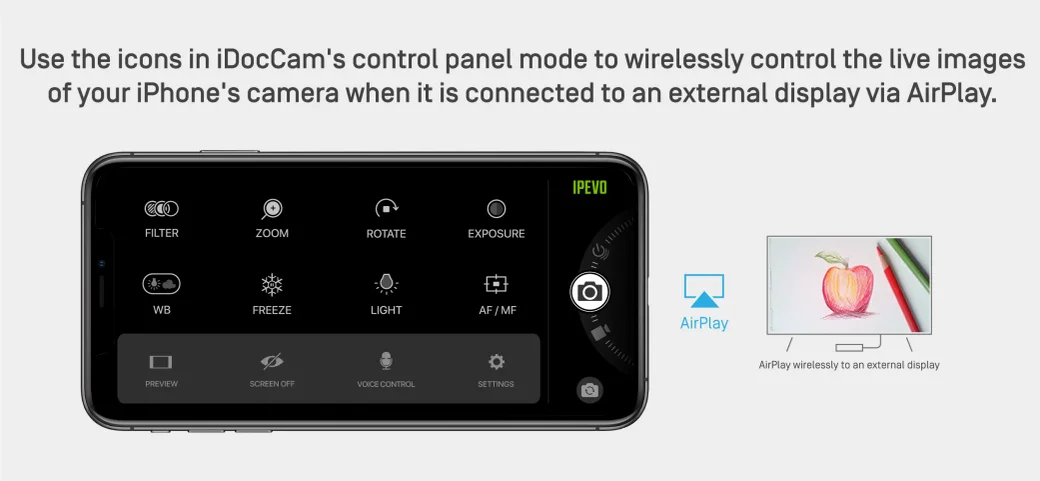
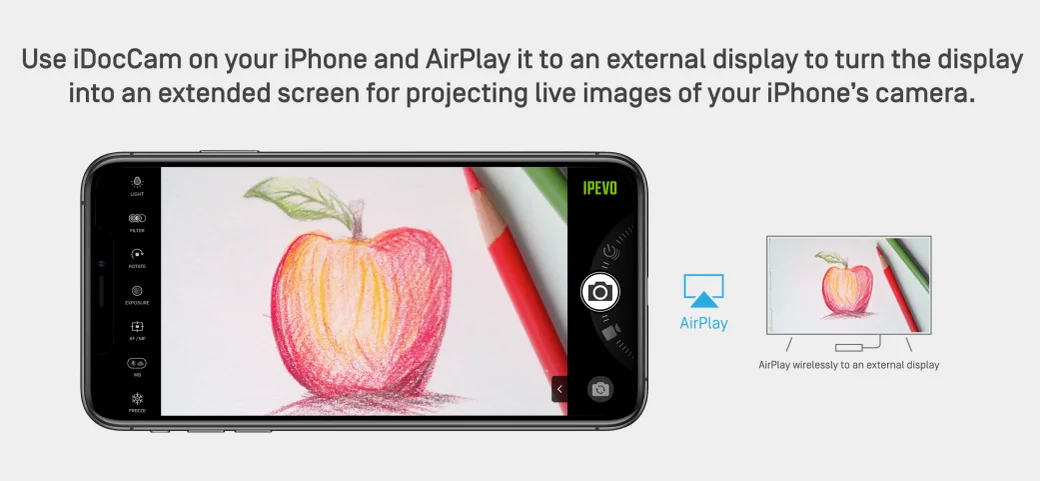
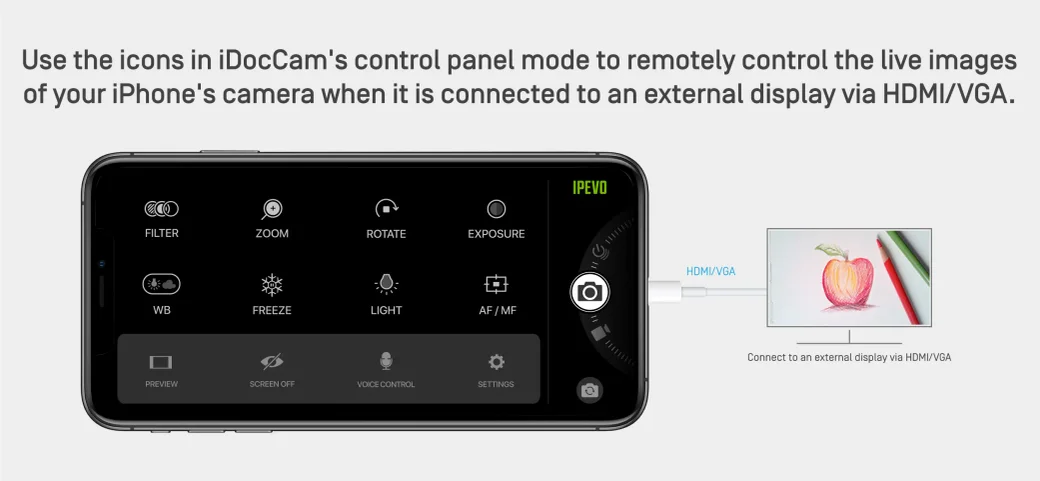
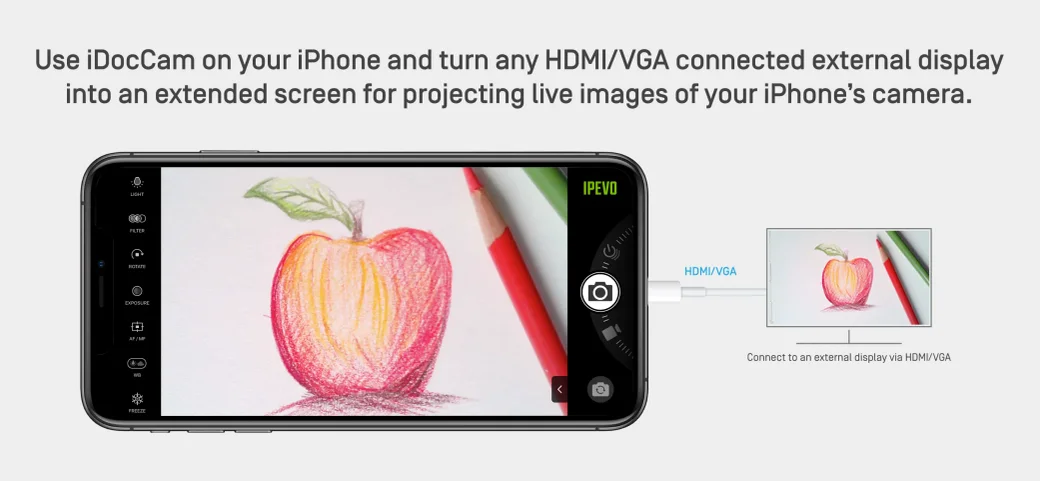
3. Connect iDocCam to an external display via HDMI/VGA, or AirPlay
Launch iDocCam on your iPhone. Then, connect your iPhone to an external display via HDMI/VGA via a Lightning to HDMI/VGA adapter, or AirPlay (using Apple TV). Now you can use the external display as an extended screen to project the live images of your iPhone’s camera.
#Trial Version
Available features:
• Snapshot*
• Wi-Fi connectivity to IPEVO Visualizer and Virtual Camera*
• HDMI, VGA, and Airplay projection*
*Digital watermark applied on output.
#Full Version
Added features:
• No watermark
• High-resolution video and image
• Customizable camera settings
• Image filters
• Video recording
• Timelapse recording
• Power-saving mode
• Voice control
• Full-screen controller
Neue Funktionen
Version 3.6.5 · 16.05.2025
Fixed minor bugs.
App-Datenschutz
Was IPEVO im App Store zum Umgang dieser App mit Daten angibt.
-
Nicht mit Ihnen verknüpfte Daten
Können erfasst werden, sind aber nicht mit Ihrer Identität verknüpft.
- Käufe
- Kennungen
Die Datenschutzpraktiken können variieren, zum Beispiel je nach den von Ihnen verwendeten Funktionen oder Ihrem Alter.
Informationen
- Anbieter
- IPEVO
- Kategorie
- Produktivität
- Version
- 3.6.5
- Aktualisiert
- 16.05.2025
- Veröffentlicht
- 08.12.2019
- Größe
- 20,9 MB
- Erfordert
- iOS 12.0 oder neuer
- Altersfreigabe
- 4+
- Preis
- Kostenlos
- In-App-Käufe
- Ja
- Sprachen
- Englisch, Niederländisch, Finnisch, Französisch, Deutsch, Italienisch, Japanisch, Koreanisch, Russisch, Vereinf. Chinesisch, Spanisch, Tradit. Chinesisch
- Copyright
- © 2025 IPEVO Corp.
Das könnte Ihnen auch gefallen
-
 Extron ControlProduktivität
-
 Swivl CaptureProduktivität
-
 Ditto ConnectProduktivität
-
 Q-SYS UCI ViewerProduktivität
-
 Ekahau SurveyProduktivität
-
 ISTELive 26 and ASCD Annual 26Produktivität
-
 vCastSenderProduktivität
-
 Scribble Together WhiteboardOnline-Nachhilfe & PDF-Notizen
-
 Ekahau AnalyzerProduktivität
-
 Seeing AISprechende Kamera für Blinde