iDocCam
Unleash Doc Cam in your phone
Diseñada para iPhone, iPod touch
Gratis · Compras en la aplicación
- Clasificación por edad4+
- CategoríaProductividad
- DesarrolladorIPEVO
- IdiomasInglés+ 11 más
- Tamaño20,9 MB
Enlaza a la página oficial de App Store
Download.org no aloja ningún archivo de iDocCam. El botón abre la página de la aplicación en App Store, donde la publica IPEVO. Ficha comprobada por última vez el 12/11/2026.
Capturas de pantalla

Acerca de
El desarrollador no ha proporcionado este texto en tu idioma.
iDocCam is an app that allows you to control your iPhone’s camera in real-time, and even turn it into a document camera for large-screen projection. You may subscribe to iDocCam either on a monthly or yearly basis.
There are 3 ways to use it:
1. Use iDocCam as a standalone app.
Use it as a standalone app to view and adjust live images captured by your iPhone’s camera.
2. Use iDocCam with IPEVO Visualizer software
Install iDocCam on your iPhone. And then, install IPEVO Visualizer software on a computer, tablet, or smart TV*. Connect your iPhone and your device to the same wireless network. Launch iDocCam and Visualizer respectively*.
After that, choose your iPhone as the camera source in Visualizer. You’ll then be able to view the live images of your iPhone’s camera in Visualizer. You can then control and adjust the live images using Visualizer.
And if you connect your device to a projector, the live images will be projected onto a large screen, turning your iPhone into a document camera instantly.
*For more information about IPEVO Visualizer, please visit https://www.ipevo.com/visualizer .
*If you’re using your iPhone in conjunction with Visualizer on an iOS or macOS device, you do not need to connect them to the same wireless network. You can connect them via Bluetooth instead.
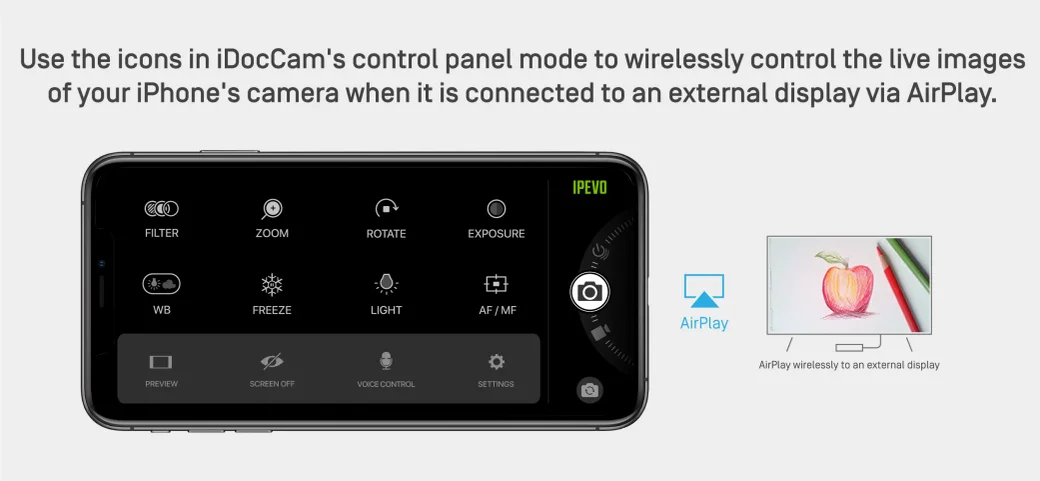
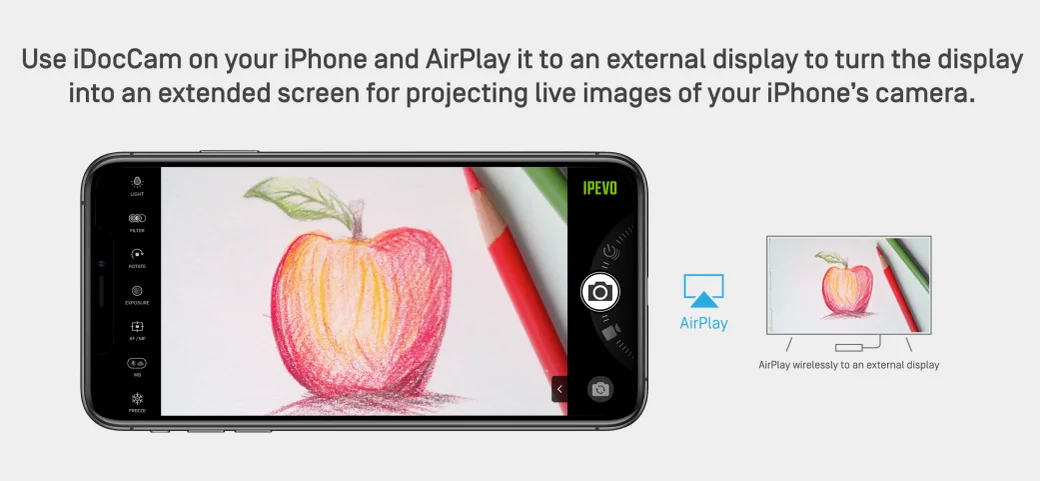
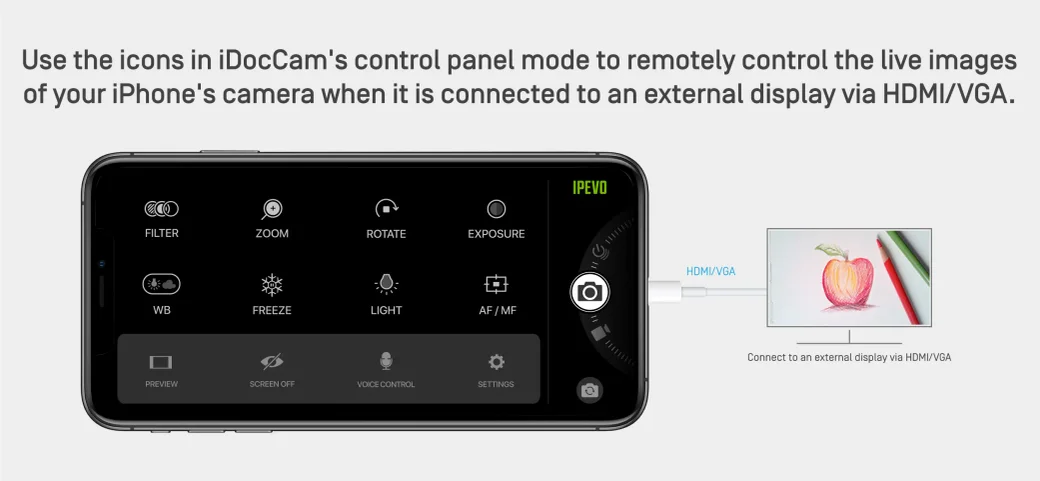
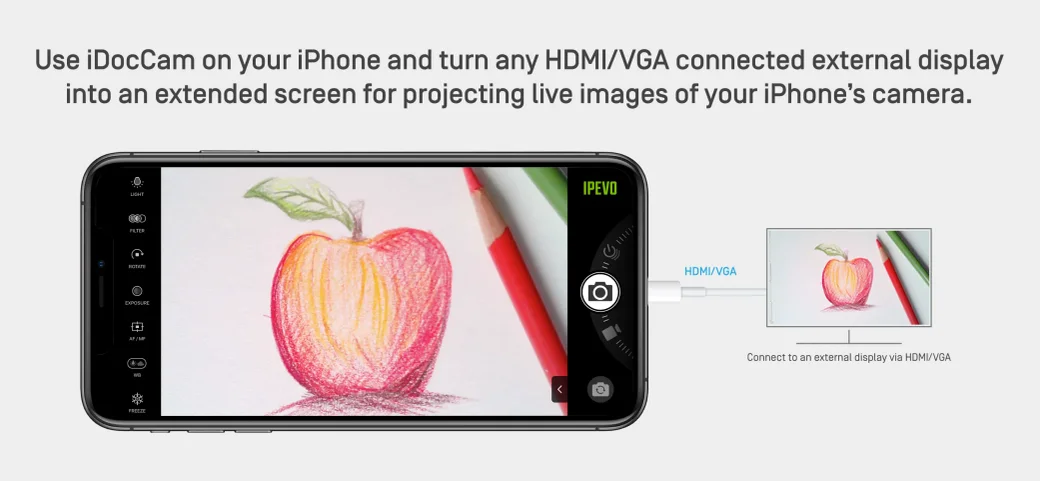
3. Connect iDocCam to an external display via HDMI/VGA, or AirPlay
Launch iDocCam on your iPhone. Then, connect your iPhone to an external display via HDMI/VGA via a Lightning to HDMI/VGA adapter, or AirPlay (using Apple TV). Now you can use the external display as an extended screen to project the live images of your iPhone’s camera.
#Trial Version
Available features:
• Snapshot*
• Wi-Fi connectivity to IPEVO Visualizer and Virtual Camera*
• HDMI, VGA, and Airplay projection*
*Digital watermark applied on output.
#Full Version
Added features:
• No watermark
• High-resolution video and image
• Customizable camera settings
• Image filters
• Video recording
• Timelapse recording
• Power-saving mode
• Voice control
• Full-screen controller
Novedades
Versión 3.6.5 · 16/5/2025
Fixed minor bugs.
Privacidad de la aplicación
Lo que IPEVO declara en App Store sobre cómo esta aplicación gestiona los datos.
-
Datos no vinculados a ti
Pueden recopilarse, pero no se vinculan a tu identidad.
- Compras
- Identificadores
Las prácticas de privacidad pueden variar, por ejemplo, según las funciones que uses o tu edad.
Información
- Vendedor
- IPEVO
- Categoría
- Productividad
- Versión
- 3.6.5
- Actualizado
- 16/5/2025
- Publicado
- 8/12/2019
- Tamaño
- 20,9 MB
- Requiere
- iOS 12.0 o posterior
- Clasificación por edad
- 4+
- Precio
- Gratis
- Compras en la aplicación
- Sí
- Idiomas
- Inglés, Neerlandés, Finés, Francés, Alemán, Italiano, Japonés, Coreano, Ruso, Chino simplificado, Español, Chino tradicional
- Copyright
- © 2025 IPEVO Corp.
Quizá también te guste
-
 Extron ControlProductividad
-
 Swivl CaptureProductividad
-
 Ditto ConnectProductividad
-
 Q-SYS UCI ViewerProductividad
-
 Ekahau SurveyProductividad
-
 ISTELive 26 and ASCD Annual 26Productividad
-
 vCastSenderProductividad
-
 Scribble Together pizarraTutorías online y notas PDF
-
 Ekahau AnalyzerProductividad
-
 Seeing AICámara descriptiva para ciegos