- Altersfreigabe4+
- KategorieFoto und Video
- Entwicklersangkoo Kang
- SprachenEnglisch
- Größe2,0 MB
Verlinkt auf die offizielle App Store-Seite
Download.org hostet keine Datei von OLiveCam. Die Schaltfläche öffnet die App-Seite bei App Store, wo sangkoo Kang die App veröffentlicht. Eintrag zuletzt geprüft am 18.11.2026.
Screenshots


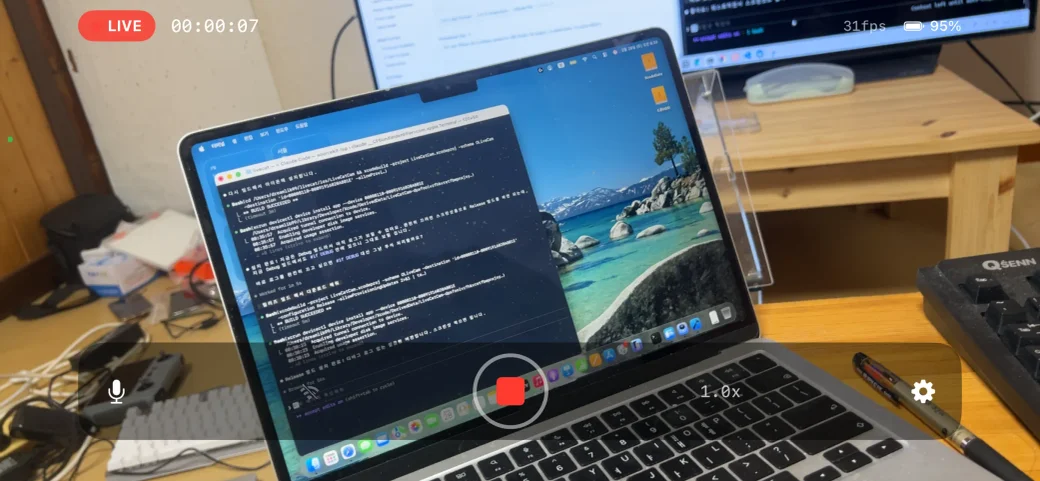
Info
Der Entwickler hat diesen Text nicht in Ihrer Sprache bereitgestellt.
Turn your phone into a professional wireless camera for OBS Studio.
OLiveCam streams crystal-clear H.264 video to OBS — no cables, no extra plugins, no watermarks. Choose SRT for
reliable quality or UDP for ultra-low latency.
SIMPLE SETUP
1. Open OBS → Add Media Source → srt://0.0.0.0:9000?mode=listener
2. Tap Auto Discover or enter your PC's IP
3. Tap Start — you're live
KEY FEATURES
• SRT protocol — reliable, crystal-clear streaming (~200ms)
• UDP protocol — ultra-low latency for local Wi-Fi
• Auto Discover — finds OBS on your network automatically
• Real-time OBS monitor — WiFi icon shows live connection status
• 1080p / 720p H.264 hardware encoding
• Audio streaming support
• Works with OBS Studio on Windows, Mac, and Linux
• No OBS plugins required — standard SRT/UDP MPEG-TS
• Pinch to zoom
• Auto-reconnect on connection drops
• Battery and thermal monitoring
• Landscape optimized for streaming
• In-app setup guide for OBS, networking, and troubleshooting
PERFECT FOR
• Live streamers who need a wireless camera
• YouTube / Twitch broadcasters
• Pet cams and home monitoring
• Content creators
• Multi-camera OBS setups
• Remote streaming via VPN (Tailscale supported)
NETWORK SUPPORT
• Same Wi-Fi — just enter IP and go
• Different networks — port forwarding guide included
• Cellular (LTE/5G) — works with Tailscale VPN
• Hotspot — connect PC to phone hotspot
PRIVACY FIRST
• Local network only — no cloud, no data collection
• No account required
• No ads, no tracking
Neue Funktionen
Version 1.1.1 · 15.03.2026
• OBS Live Monitor — WiFi icon shows real-time OBS connection status
• Smart Start — Verifies OBS is running before streaming begins
• Auto Discover — Now finds OBS on your local network automatically
• UI Restore — Long-press to hide controls, tap to restore
• Quick Start Guide — Easy OBS setup instructions included
• Bug fixes and stability improvements
App-Datenschutz
Was sangkoo Kang im App Store zum Umgang dieser App mit Daten angibt.
-
Keine Daten erfasst
Der Entwickler erfasst keine Daten von dieser App.
Die Datenschutzpraktiken können variieren, zum Beispiel je nach den von Ihnen verwendeten Funktionen oder Ihrem Alter.
Informationen
- Anbieter
- sangkoo Kang
- Kategorie
- Foto und Video
- Version
- 1.1.1
- Aktualisiert
- 15.03.2026
- Veröffentlicht
- 12.03.2026
- Größe
- 2,0 MB
- Erfordert
- iOS 17.0 oder neuer
- Altersfreigabe
- 4+
- Preis
- Kostenlos
- Sprachen
- Englisch
- Copyright
- © 2026 Sangkoo Kang
Das könnte Ihnen auch gefallen
-
 OBS Phone CamFoto und Video
-
 ReCam: Use Phone as WebcamFoto und Video
-
 MCR Box Camera – Live EncoderFoto und Video
-
 Ujjina Live EncoderFoto und Video
-
 MyReelsFoto und Video
-
 PhoneCam Pro: Webcam for PCFoto und Video
-
 SplonkCamKabellose Webcam & Videoeditor
-
 SuperCam StudioFoto und Video
-
 CamFlowLiteFoto und Video
-
 SwitchEffect CameraFoto und Video