
PixTrack Tracklogger
Simple GPX tracklog recording
Entwickelt für iPhone, iPad, iPod touch
Kostenlos
- Altersfreigabe4+
- KategorieFoto und Video
- EntwicklerThinkbitz Software Studio
- SprachenEnglisch
- Größe40,2 MB
Verlinkt auf die offizielle App Store-Seite
Download.org hostet keine Datei von PixTrack Tracklogger. Die Schaltfläche öffnet die App-Seite bei App Store, wo Thinkbitz Software Studio die App veröffentlicht. Eintrag zuletzt geprüft am 12.11.2026.
Screenshots

Info
Der Entwickler hat diesen Text nicht in Ihrer Sprache bereitgestellt.
Want to geotag your digital camera photos? Have Lightroom Classic?
PixTrack is the cloud-syncing GPS tracklogger you need.
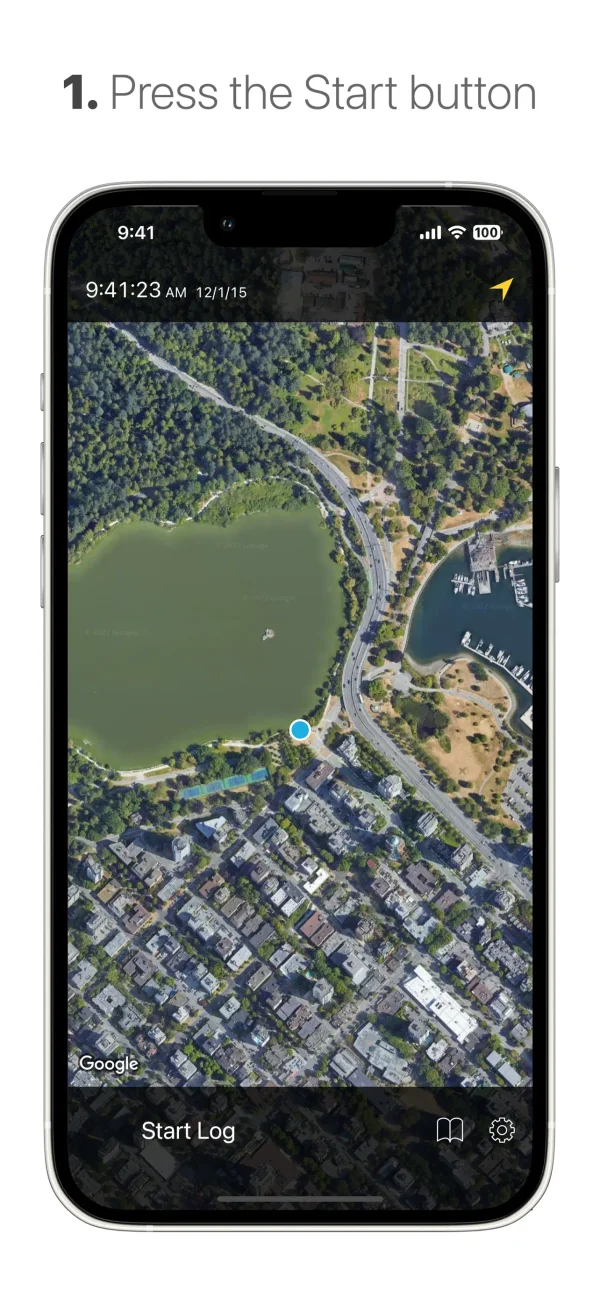
1. Tap the Start button.
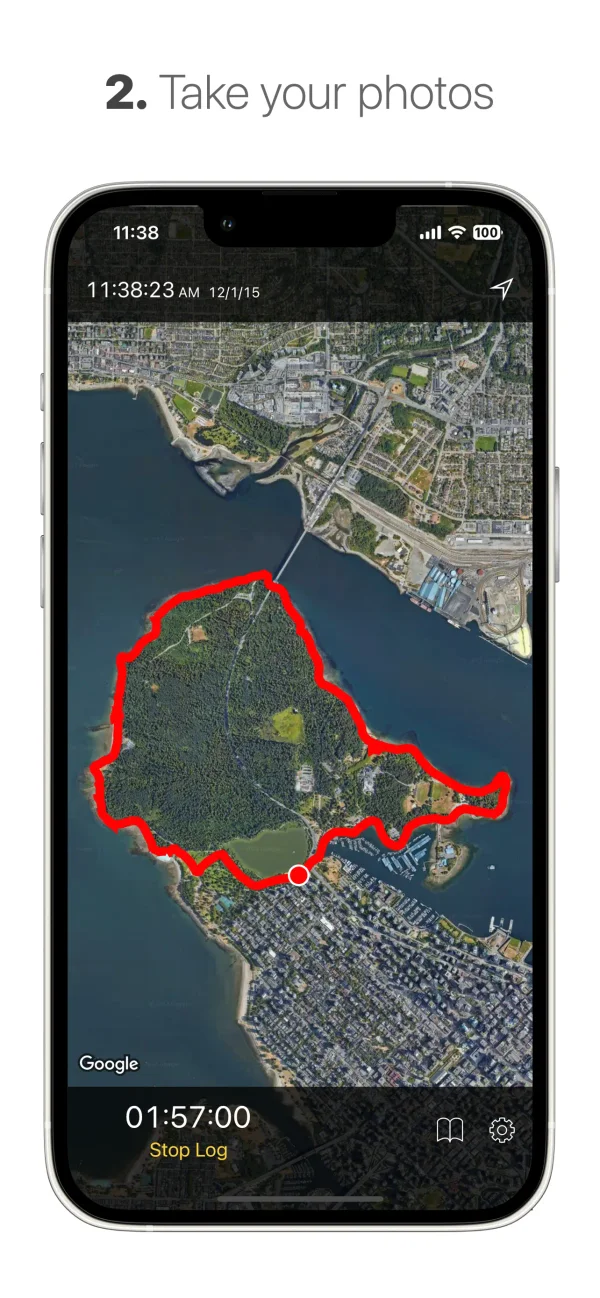
2. Take your photos. PixTrack tracks your progress.
3. Tap the Stop button. PixTrack automatically uploads your tracklog to Dropbox or iCloud Drive.
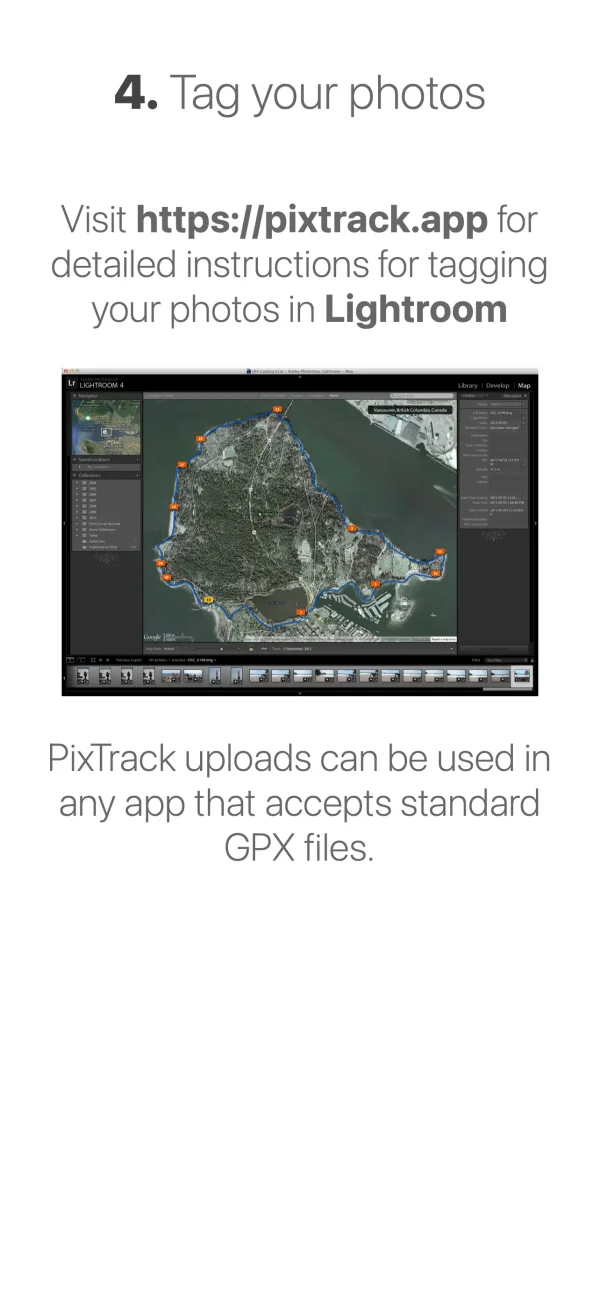
4. Automatically geotag your photos in Lightroom Classic or any other software that uses standard GPX logs.
PixTrack includes handy features:
• To-the-second clock display (to make it easy to sync your clock on your camera)
• Support for Live Activities and the Dynamic Island, in addition to optional notification reminders that it's running.
• History of your previous trips which syncs with Dropbox. Add GPX files on your computer and view them in PixTrack.
• Retracing your route? Show previous tracklogs, or any GPX file, on the map as you record.
• Don't want to use Dropbox? Logs can also be exported to other apps or iCloud Drive using standard iOS functionality.
• Support for iPad - view synced tracklogs, or if you have a GPS-capable iPad use it instead of your phone to save your phone's battery.
• Support for multiple map providers: Choose from Google, Apple, or OpenStreetMap maps
• Dashboard widget: Easily start and stop PixTrack from your homescreen
PixTrack is the easiest way to take advantage of the build-in geotagging functionality in today's photo software.
--
ADOBE LIGHTROOM CLASSIC: STEP-BY-STEP
1. Select the photos you'd like to tag.
Hint: Select All on the latest import works well.
2. Switch to the Map module.
3. Load the tracklog:
Map menu > Tracklog > Load Tracklog...
Your tracklogs are in your Dropbox folder:
Dropbox > Apps > PixTrack
4. After your tracklog is loaded, choose:
Map menu > Tracklog > Auto-Tag Photos
5. That's It!
--
Notes:
• Lightroom tagging requires Adobe Photoshop Lightroom Classic (version 4/2012 or newer) for Windows or Mac.
• Continued use of GPS running in the background can dramatically decrease battery life.
Neue Funktionen
Version 2.4.2 · 17.09.2024
- Support for iOS 18 tinted widgets and icon modes
- Assorted fixes
App-Datenschutz
Was Thinkbitz Software Studio im App Store zum Umgang dieser App mit Daten angibt.
-
Mit Ihnen verknüpfte Daten
Können erfasst und mit Ihrer Identität verknüpft werden.
- Standort
-
Nicht mit Ihnen verknüpfte Daten
Können erfasst werden, sind aber nicht mit Ihrer Identität verknüpft.
- Nutzungsdaten
- Diagnose
Die Datenschutzpraktiken können variieren, zum Beispiel je nach den von Ihnen verwendeten Funktionen oder Ihrem Alter.
Informationen
- Anbieter
- Thinkbitz Software Studio
- Kategorie
- Foto und Video
- Version
- 2.4.2
- Aktualisiert
- 17.09.2024
- Veröffentlicht
- 18.01.2013
- Größe
- 40,2 MB
- Erfordert
- iOS 15.0 oder neuer
- Altersfreigabe
- 4+
- Preis
- Kostenlos
- Sprachen
- Englisch
- Copyright
- © 2012-2022 Thinkbitz Inc
Das könnte Ihnen auch gefallen
-
 GeoTagrFoto geotaggen
-
 Geopix - GPS Photo TaggerFoto und Video
-
 Alpha GPS: Kamera-GeotaggingBluetooth-Standort & Auslöser
-
 CamDE : Multiple ExposureFoto und Video
-
 Mango Exposure: Der RechnerBelichtung & Schärfentiefe
-
 Depth of Field MasterMeistere deinen Fokus
-
 DuoCam - Camera KépFoto und Video
-
 MemeKit - Meme ManagerFoto und Video
-
 Reaction Vault - Meme-SpeicherGIFs und Antworten finden
-
 ImmoStoryAIKI-Videos für Immobilien