
PixTrack Tracklogger
Simple GPX tracklog recording
Dirancang untuk iPhone, iPad, iPod touch
Gratis
- Batasan usia4+
- KategoriFoto & Video
- PengembangThinkbitz Software Studio
- BahasaInggris
- Ukuran40,2 MB
Tertaut ke halaman resmi App Store
Download.org tidak menyimpan file PixTrack Tracklogger apa pun. Tombol ini membuka halaman aplikasi di App Store, tempat Thinkbitz Software Studio menerbitkannya. Halaman terakhir diperiksa pada 12/11/2026.
Tangkapan layar

Tentang
Pengembang belum menyediakan teks ini dalam bahasa Anda.
Want to geotag your digital camera photos? Have Lightroom Classic?
PixTrack is the cloud-syncing GPS tracklogger you need.
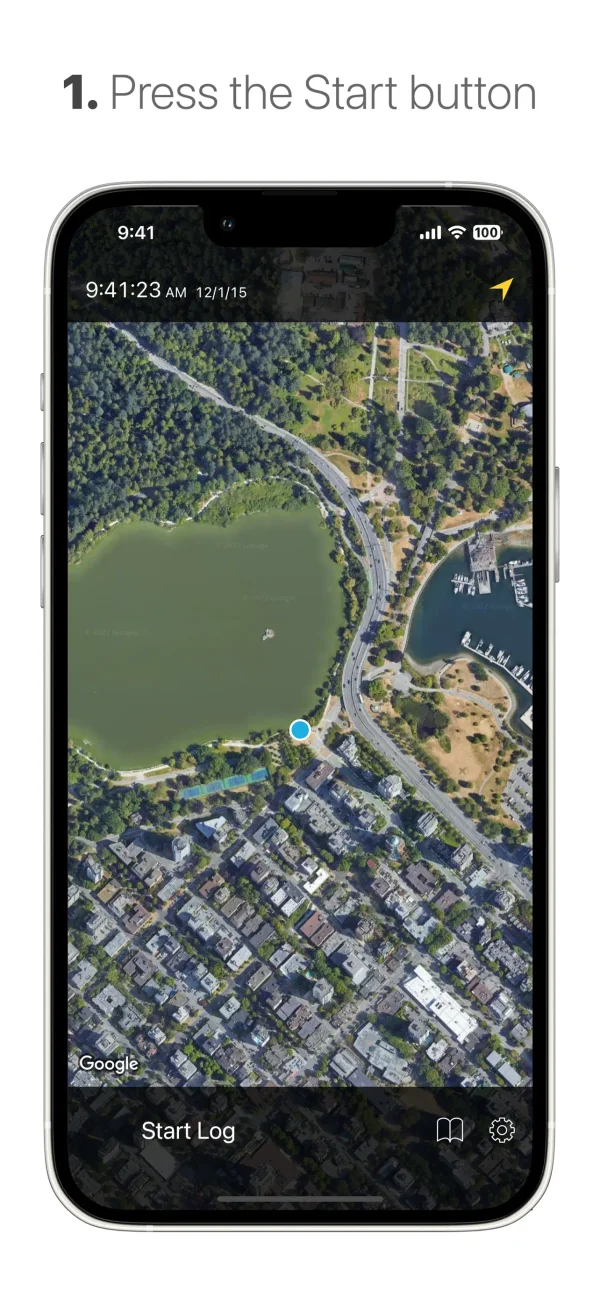
1. Tap the Start button.
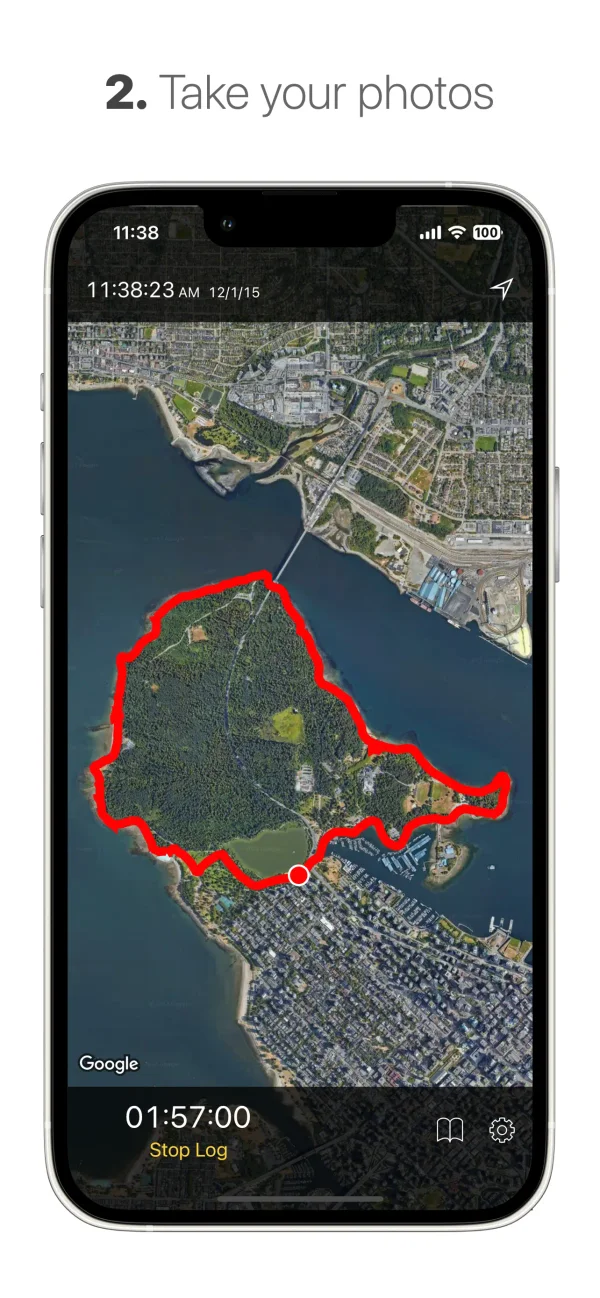
2. Take your photos. PixTrack tracks your progress.
3. Tap the Stop button. PixTrack automatically uploads your tracklog to Dropbox or iCloud Drive.
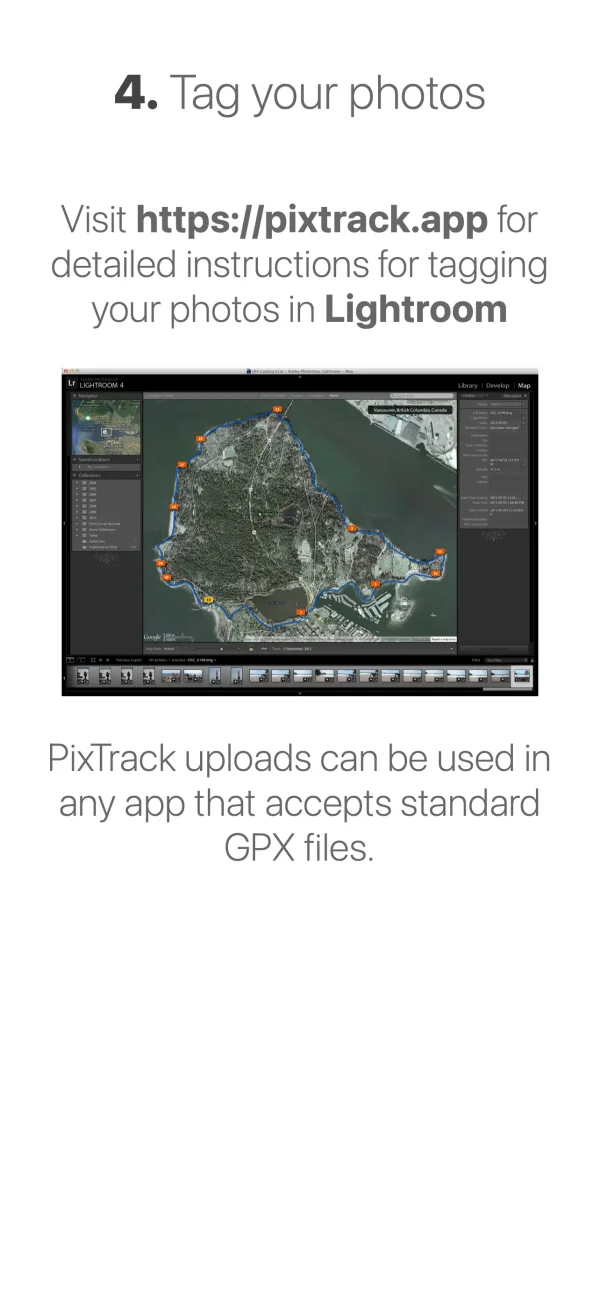
4. Automatically geotag your photos in Lightroom Classic or any other software that uses standard GPX logs.
PixTrack includes handy features:
• To-the-second clock display (to make it easy to sync your clock on your camera)
• Support for Live Activities and the Dynamic Island, in addition to optional notification reminders that it's running.
• History of your previous trips which syncs with Dropbox. Add GPX files on your computer and view them in PixTrack.
• Retracing your route? Show previous tracklogs, or any GPX file, on the map as you record.
• Don't want to use Dropbox? Logs can also be exported to other apps or iCloud Drive using standard iOS functionality.
• Support for iPad - view synced tracklogs, or if you have a GPS-capable iPad use it instead of your phone to save your phone's battery.
• Support for multiple map providers: Choose from Google, Apple, or OpenStreetMap maps
• Dashboard widget: Easily start and stop PixTrack from your homescreen
PixTrack is the easiest way to take advantage of the build-in geotagging functionality in today's photo software.
--
ADOBE LIGHTROOM CLASSIC: STEP-BY-STEP
1. Select the photos you'd like to tag.
Hint: Select All on the latest import works well.
2. Switch to the Map module.
3. Load the tracklog:
Map menu > Tracklog > Load Tracklog...
Your tracklogs are in your Dropbox folder:
Dropbox > Apps > PixTrack
4. After your tracklog is loaded, choose:
Map menu > Tracklog > Auto-Tag Photos
5. That's It!
--
Notes:
• Lightroom tagging requires Adobe Photoshop Lightroom Classic (version 4/2012 or newer) for Windows or Mac.
• Continued use of GPS running in the background can dramatically decrease battery life.
Yang baru
Versi 2.4.2 · 17/9/2024
- Support for iOS 18 tinted widgets and icon modes
- Assorted fixes
Privasi aplikasi
Yang dinyatakan Thinkbitz Software Studio di App Store tentang cara aplikasi ini menangani data.
-
Data yang ditautkan dengan Anda
Dapat dikumpulkan dan ditautkan dengan identitas Anda.
- Lokasi
-
Data yang tidak ditautkan dengan Anda
Dapat dikumpulkan, tetapi tidak ditautkan dengan identitas Anda.
- Data penggunaan
- Diagnostik
Praktik privasi dapat bervariasi, misalnya berdasarkan fitur yang Anda gunakan atau usia Anda.
Informasi
- Penjual
- Thinkbitz Software Studio
- Kategori
- Foto & Video
- Versi
- 2.4.2
- Diperbarui
- 17/9/2024
- Dirilis
- 18/1/2013
- Ukuran
- 40,2 MB
- Memerlukan
- iOS 15.0 atau yang lebih baru
- Batasan usia
- 4+
- Harga
- Gratis
- Bahasa
- Inggris
- Hak cipta
- © 2012-2022 Thinkbitz Inc
Mungkin Anda juga suka
-
 GeoTagrFoto & Video
-
 Geopix - GPS Photo TaggerFoto & Video
-
 Alpha GPS: Camera GeotaggingFoto & Video
-
 CamDE : Multiple ExposureFoto & Video
-
 Mango Exposure: The CalculatorFoto & Video
-
 Depth of Field MasterFoto & Video
-
 DuoCam - Camera KépFoto & Video
-
 MemeKit - Meme ManagerFoto & Video
-
 Reaction Vault - Meme SaverFoto & Video
-
 ImmoStoryAIFoto & Video