
PixTrack Tracklogger
Simple GPX tracklog recording
iPhone, iPad, iPod touch için tasarlandı
Ücretsiz
- Yaş sınırı4+
- KategoriFotoğraf ve Video
- GeliştiriciThinkbitz Software Studio
- Dillerİngilizce
- Boyut40,2 MB
Resmi App Store sayfasına bağlanır
Download.org, PixTrack Tracklogger için hiçbir dosya barındırmaz. Düğme, uygulamanın App Store üzerindeki sayfasını açar; uygulamayı orada Thinkbitz Software Studio yayınlar. Sayfanın son kontrolü: 12.11.2026.
Ekran görüntüleri
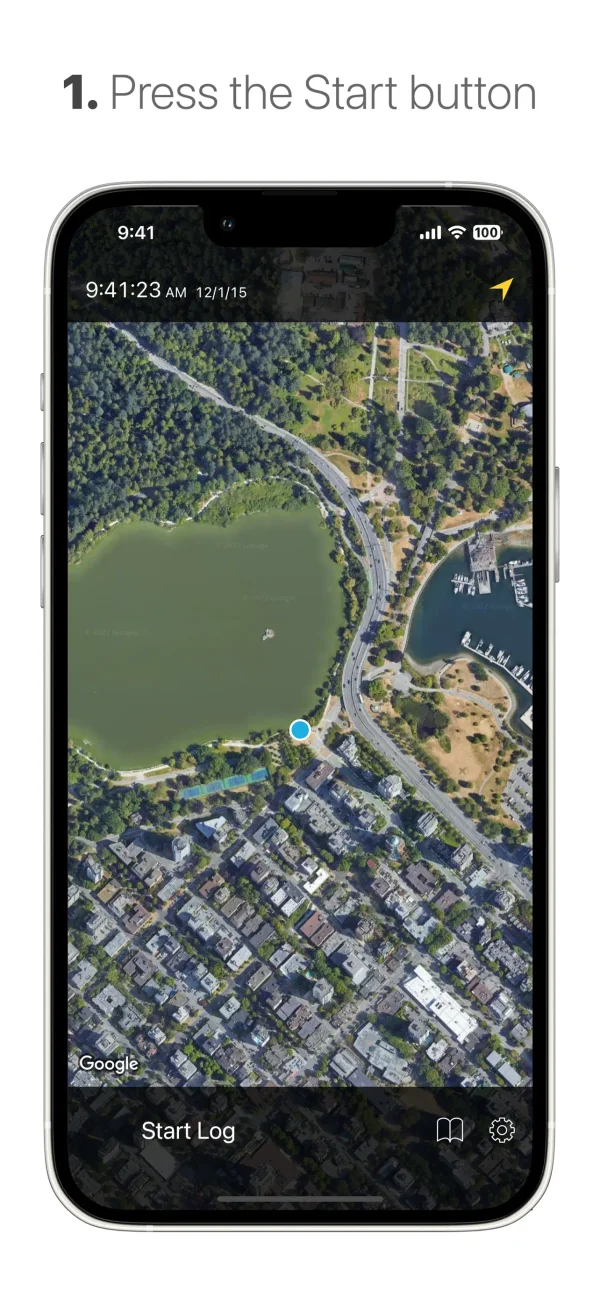
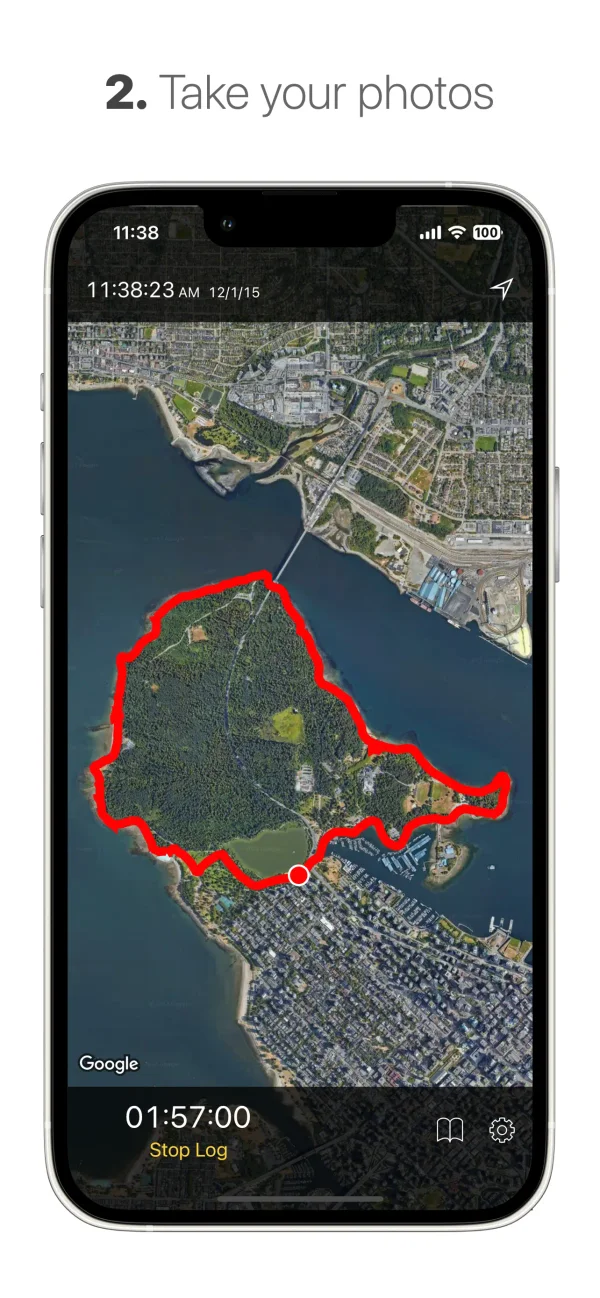

Hakkında
Geliştirici bu metni dilinizde sunmamış.
Want to geotag your digital camera photos? Have Lightroom Classic?
PixTrack is the cloud-syncing GPS tracklogger you need.
1. Tap the Start button.
2. Take your photos. PixTrack tracks your progress.
3. Tap the Stop button. PixTrack automatically uploads your tracklog to Dropbox or iCloud Drive.
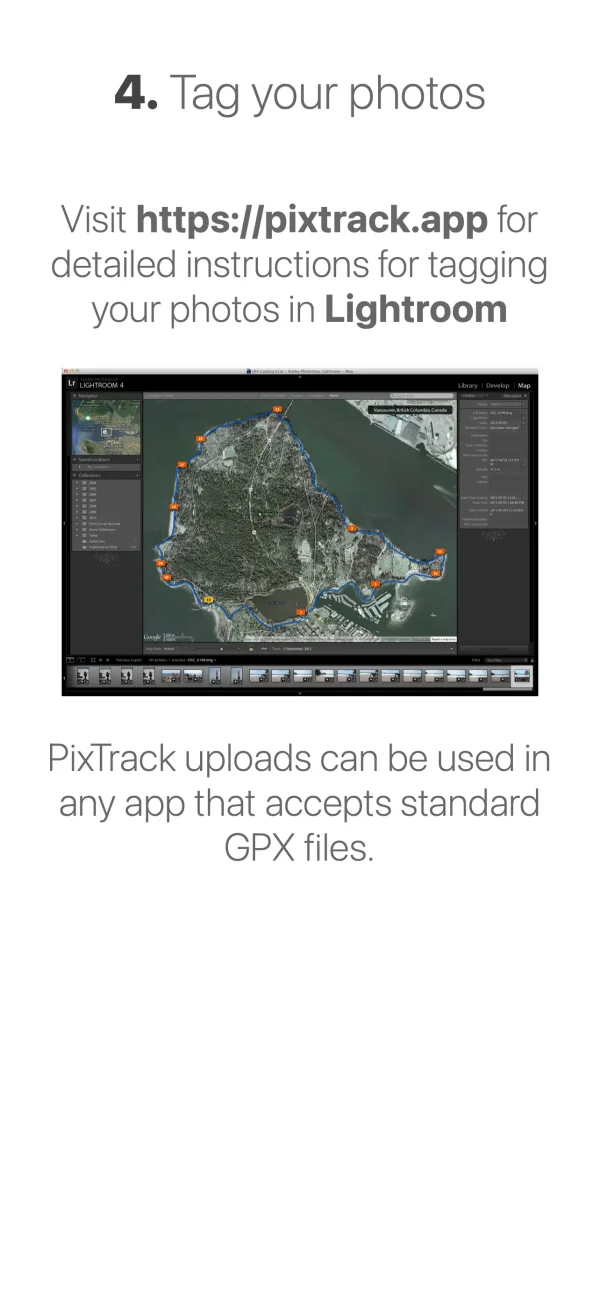
4. Automatically geotag your photos in Lightroom Classic or any other software that uses standard GPX logs.
PixTrack includes handy features:
• To-the-second clock display (to make it easy to sync your clock on your camera)
• Support for Live Activities and the Dynamic Island, in addition to optional notification reminders that it's running.
• History of your previous trips which syncs with Dropbox. Add GPX files on your computer and view them in PixTrack.
• Retracing your route? Show previous tracklogs, or any GPX file, on the map as you record.
• Don't want to use Dropbox? Logs can also be exported to other apps or iCloud Drive using standard iOS functionality.
• Support for iPad - view synced tracklogs, or if you have a GPS-capable iPad use it instead of your phone to save your phone's battery.
• Support for multiple map providers: Choose from Google, Apple, or OpenStreetMap maps
• Dashboard widget: Easily start and stop PixTrack from your homescreen
PixTrack is the easiest way to take advantage of the build-in geotagging functionality in today's photo software.
--
ADOBE LIGHTROOM CLASSIC: STEP-BY-STEP
1. Select the photos you'd like to tag.
Hint: Select All on the latest import works well.
2. Switch to the Map module.
3. Load the tracklog:
Map menu > Tracklog > Load Tracklog...
Your tracklogs are in your Dropbox folder:
Dropbox > Apps > PixTrack
4. After your tracklog is loaded, choose:
Map menu > Tracklog > Auto-Tag Photos
5. That's It!
--
Notes:
• Lightroom tagging requires Adobe Photoshop Lightroom Classic (version 4/2012 or newer) for Windows or Mac.
• Continued use of GPS running in the background can dramatically decrease battery life.
Yenilikler
Sürüm 2.4.2 · 17.09.2024
- Support for iOS 18 tinted widgets and icon modes
- Assorted fixes
Uygulama gizliliği
Bu uygulamanın verileri nasıl işlediği hakkında Thinkbitz Software Studio tarafından App Store üzerinde yapılan beyan.
-
Sizinle ilişkilendirilen veriler
Toplanabilir ve kimliğinizle ilişkilendirilebilir.
- Konum
-
Sizinle ilişkilendirilmeyen veriler
Toplanabilir ancak kimliğinizle ilişkilendirilmez.
- Kullanım verileri
- Tanılama
Gizlilik uygulamaları, örneğin kullandığınız özelliklere veya yaşınıza göre değişiklik gösterebilir.
Bilgiler
- Satıcı
- Thinkbitz Software Studio
- Kategori
- Fotoğraf ve Video
- Sürüm
- 2.4.2
- Güncellendi
- 17.09.2024
- Yayın tarihi
- 18.01.2013
- Boyut
- 40,2 MB
- Gereksinim
- iOS 15.0 veya sonrası
- Yaş sınırı
- 4+
- Fiyat
- Ücretsiz
- Diller
- İngilizce
- Telif hakkı
- © 2012-2022 Thinkbitz Inc
Bunları da beğenebilirsiniz
-
 GeoTagrFotoğraf ve Video
-
 Geopix - GPS Photo TaggerFotoğraf ve Video
-
 Alpha GPS: Camera GeotaggingFotoğraf ve Video
-
 CamDE : Multiple ExposureFotoğraf ve Video
-
 Mango Exposure: The CalculatorFotoğraf ve Video
-
 Depth of Field MasterFotoğraf ve Video
-
 DuoCam - Camera KépFotoğraf ve Video
-
 MemeKit - Meme ManagerFotoğraf ve Video
-
 Reaction Vault - Meme SaverFotoğraf ve Video
-
 ImmoStoryAIFotoğraf ve Video