
PixTrack Tracklogger
Simple GPX tracklog recording
Được thiết kế cho iPhone, iPad, iPod touch
Miễn phí
- Độ tuổi4+
- Danh mụcẢnh & Video
- Nhà phát triểnThinkbitz Software Studio
- Ngôn ngữTiếng Anh
- Kích thước40,2 MB
Liên kết đến trang App Store chính thức
Download.org không lưu trữ tệp nào của PixTrack Tracklogger. Nút này mở trang ứng dụng trên App Store, nơi Thinkbitz Software Studio phát hành ứng dụng. Trang được kiểm tra lần cuối: 12/11/2026.
Ảnh chụp màn hình

Giới thiệu
Nhà phát triển chưa cung cấp nội dung này bằng ngôn ngữ của bạn.
Want to geotag your digital camera photos? Have Lightroom Classic?
PixTrack is the cloud-syncing GPS tracklogger you need.
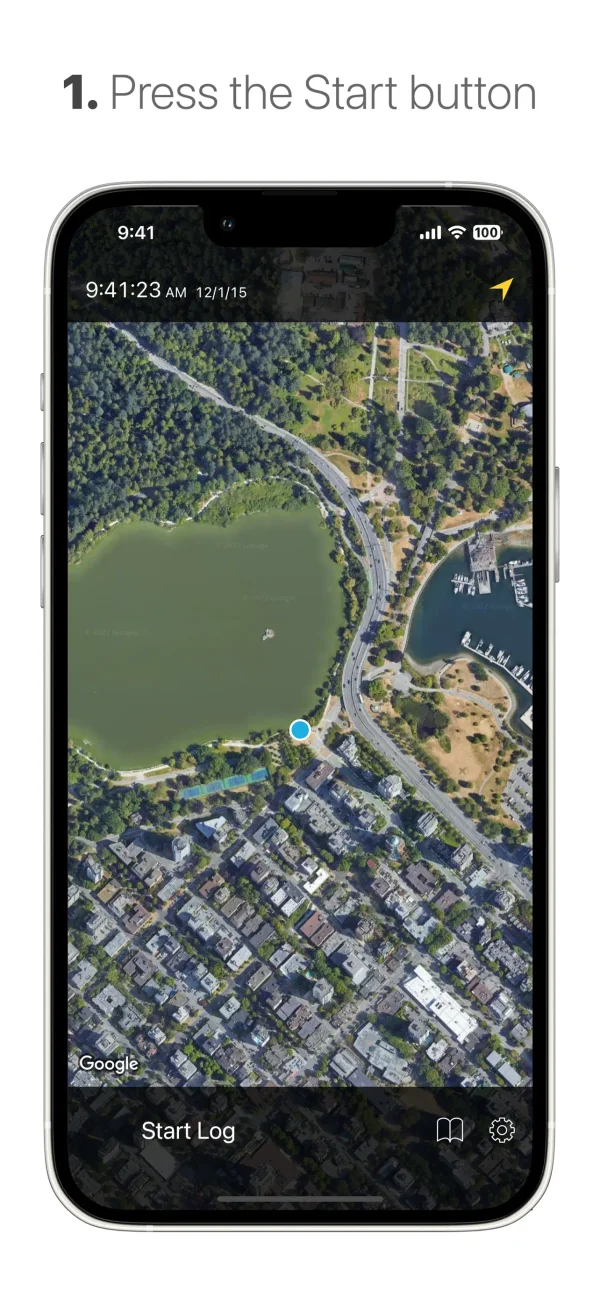
1. Tap the Start button.
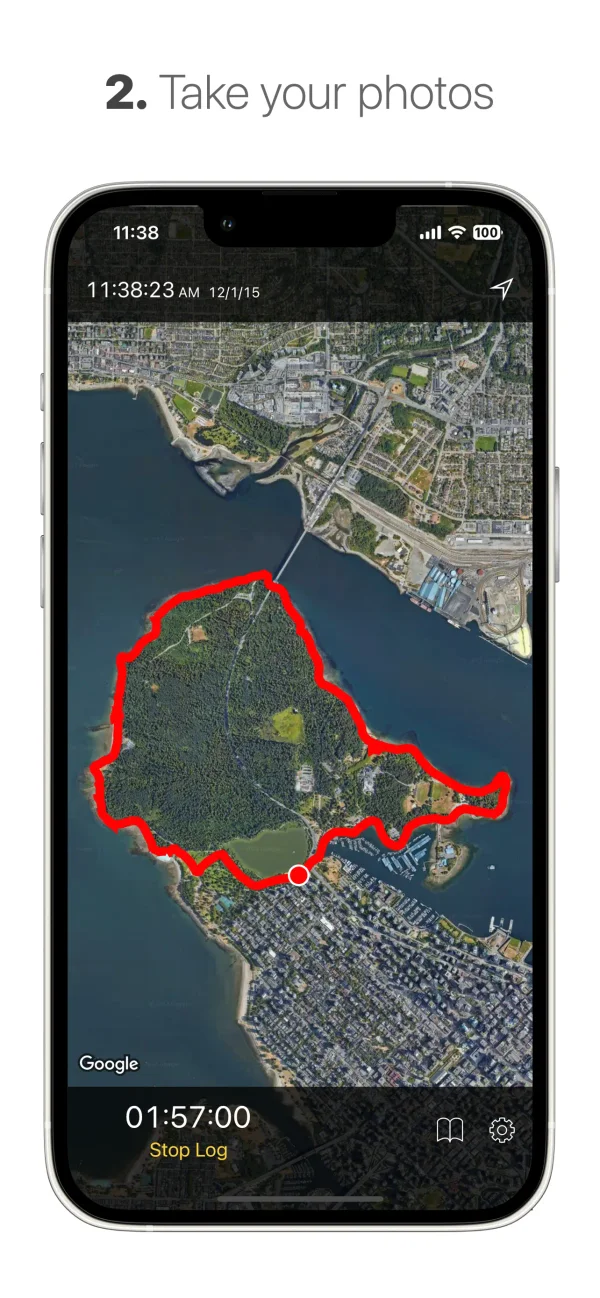
2. Take your photos. PixTrack tracks your progress.
3. Tap the Stop button. PixTrack automatically uploads your tracklog to Dropbox or iCloud Drive.
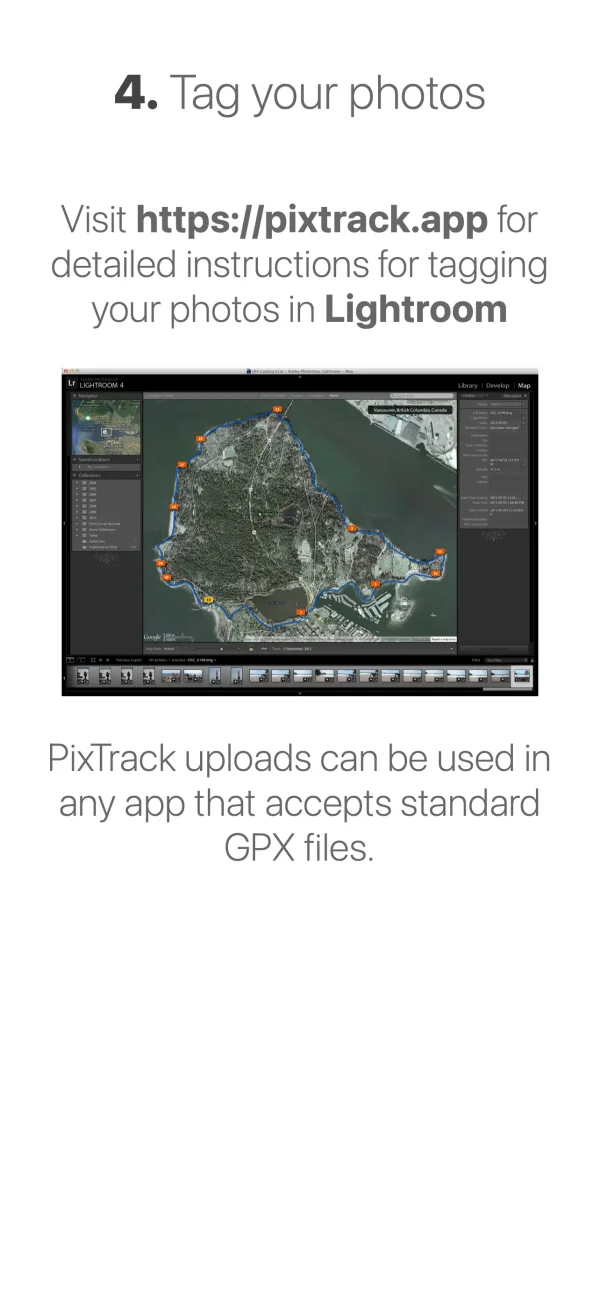
4. Automatically geotag your photos in Lightroom Classic or any other software that uses standard GPX logs.
PixTrack includes handy features:
• To-the-second clock display (to make it easy to sync your clock on your camera)
• Support for Live Activities and the Dynamic Island, in addition to optional notification reminders that it's running.
• History of your previous trips which syncs with Dropbox. Add GPX files on your computer and view them in PixTrack.
• Retracing your route? Show previous tracklogs, or any GPX file, on the map as you record.
• Don't want to use Dropbox? Logs can also be exported to other apps or iCloud Drive using standard iOS functionality.
• Support for iPad - view synced tracklogs, or if you have a GPS-capable iPad use it instead of your phone to save your phone's battery.
• Support for multiple map providers: Choose from Google, Apple, or OpenStreetMap maps
• Dashboard widget: Easily start and stop PixTrack from your homescreen
PixTrack is the easiest way to take advantage of the build-in geotagging functionality in today's photo software.
--
ADOBE LIGHTROOM CLASSIC: STEP-BY-STEP
1. Select the photos you'd like to tag.
Hint: Select All on the latest import works well.
2. Switch to the Map module.
3. Load the tracklog:
Map menu > Tracklog > Load Tracklog...
Your tracklogs are in your Dropbox folder:
Dropbox > Apps > PixTrack
4. After your tracklog is loaded, choose:
Map menu > Tracklog > Auto-Tag Photos
5. That's It!
--
Notes:
• Lightroom tagging requires Adobe Photoshop Lightroom Classic (version 4/2012 or newer) for Windows or Mac.
• Continued use of GPS running in the background can dramatically decrease battery life.
Có gì mới
Phiên bản 2.4.2 · 17/09/2024
- Support for iOS 18 tinted widgets and icon modes
- Assorted fixes
Quyền riêng tư của ứng dụng
Những gì Thinkbitz Software Studio khai báo trên App Store về cách ứng dụng này xử lý dữ liệu.
-
Dữ liệu liên kết với bạn
Có thể được thu thập và liên kết với danh tính của bạn.
- Vị trí
-
Dữ liệu không liên kết với bạn
Có thể được thu thập nhưng không liên kết với danh tính của bạn.
- Dữ liệu sử dụng
- Chẩn đoán
Phương thức đảm bảo quyền riêng tư có thể khác nhau, chẳng hạn như tuỳ theo các tính năng bạn sử dụng hoặc độ tuổi của bạn.
Thông tin
- Người bán
- Thinkbitz Software Studio
- Danh mục
- Ảnh & Video
- Phiên bản
- 2.4.2
- Cập nhật
- 17/09/2024
- Phát hành
- 18/01/2013
- Kích thước
- 40,2 MB
- Yêu cầu
- iOS 15.0 trở lên
- Độ tuổi
- 4+
- Giá
- Miễn phí
- Ngôn ngữ
- Tiếng Anh
- Bản quyền
- © 2012-2022 Thinkbitz Inc
Có thể bạn cũng thích
-
 GeoTagrẢnh & Video
-
 Geopix - GPS Photo TaggerẢnh & Video
-
 Alpha GPS: Camera GeotaggingẢnh & Video
-
 CamDE : Multiple ExposureẢnh & Video
-
 Mango Exposure: The CalculatorẢnh & Video
-
 Depth of Field MasterẢnh & Video
-
 DuoCam - Dual CameraChụp & quay trước sau cùng lúc
-
 MemeKit - Meme ManagerẢnh & Video
-
 Reaction Vault - Meme SaverẢnh & Video
-
 ImmoStoryAIẢnh & Video