Compass PRO
Gamma Play- Rating 3+Batasan usia
- Alat Kategori
- 21/8/2025Diperbarui
- Rp 29.000Harga
Tertaut ke halaman resmi com.gamma.compass2 di Google Play. Terakhir diperiksa pada 13/11/2026.
Tentang aplikasi ini
Terjemahan otomatis oleh Google. Bahasa asli: Inggris (Amerika Serikat).
Tepat, akurat & penting. Bila Anda membutuhkannya, di mana Anda membutuhkannya. Dapatkan SEKARANG!
Ini adalah iklan gratis (tanpa iklan) versi kompas: https://play.google.com/store/apps/details?id=com.gamma.compass
Kompas adalah salah satu yang paling jika tidak aplikasi yang paling penting setiap Android harus diinstal. Kompas adalah aplikasi kompas yang paling tepat di Google Play. Aplikasi Kompas kompas di saku Anda. Gunakan pada perjalanan berkemah, untuk menavigasi di wilayah yang tidak dikenal atau ketika Anda tersesat. Anda tidak pernah tahu kapan itu mungkin akan berguna. Bahkan mungkin menyelamatkan hidup Anda satu hari!
Kompas mudah digunakan; hanya menggunakannya seperti kompas yang nyata. Aplikasi Kompas adalah lebih dari sekedar menunjukkan derajat dan utara, selatan, timur dan barat. Saya telah merancang Kompas dengan pengalaman pengguna dalam pikiran, jumlah besar dan mudah dibaca desain. Kompas juga memungkinkan Anda untuk mengatur arah Anda dengan memutar bezel untuk navigasi lebih mudah dan profesional.
Bagaimana cara menggunakannya?
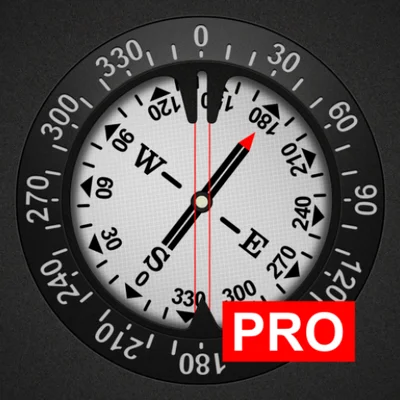
Pertama kita harus menutupi sedikit kompas jargon pertama. Bagian dari Kompas yang bergerak dan selalu menunjuk utara disebut kartu (dengan N, S, E, dan W ditunjukkan, dan tepi miring dengan serangkaian angka di atasnya). Ada cincin bergerak di sekitar tepi kompas, yang disebut bezel. Sebuah garis ganda merah di bagian atas kompas disebut baris kurang tangkas, dan akhirnya, ada sebuah jendela kecil di atas kompas yang sering disebut sebagai sisi-jendela (seperti itu di sisi kompas nyata).
Side-jendela navigasi tidak bisa sederhana. Anda menunjuk baris kurang tangkas di atas kompas di mana Anda ingin pergi. Sekarang selama Anda memegang datar kompas di depan Anda dengan baris kurang tangkas menunjuk ke arah Anda pergi, Anda harus selalu melihat nomor yang sama dalam jendela Anda selama Anda akan dengan cara yang benar. Jika Anda melihat nomor yang berbeda, putar sampai Anda melihat nomor yang sama.
Kelemahan dari metode jendela samping adalah bahwa Anda perlu mengingat nomor Anda.
Menjelajahi dengan bezel bekerja pada dasarnya sama dengan menggunakan jendela samping, tapi bezel Anda ingat nomor Anda untuk Anda. Yang Anda lakukan adalah, titik baris kurang tangkas di atas kompas di mana Anda ingin pergi, dan kemudian menunggu sampai kartu merebahkan diri dan berhenti bergerak. Kemudian putar bezel Anda sampai segitiga ganda di tepi bezel (kedudukan hak dengan jumlah nol pada bezel) yang bracketing utara panah pada kartu. Sekarang selama Anda memegang datar kompas di depan Anda dengan baris kurang tangkas menunjuk ke arah Anda pergi, Anda harus selalu melihat utara panah dalam takik, asalkan Anda akan dengan cara yang benar. Jika tidak, putar sampai Anda melihat panah utara dalam takik.
Perhatikan bahwa jika Anda telah disesuaikan bezel dengan benar, jumlah di jendela samping juga nomor seberang Anda di ujung depan baris kurang tangkas. Dengan kata lain, jika Anda berubah bezel berlawanan sampai takik kurung utara panah, 120 pada panel akan berada di ujung baris kurang tangkas. Perhatikan bahwa pada kartu, nomor yang menunjukkan di jendela samping adalah 120. Jika Anda sedang memegang kompas ini dan pergi ke arah garis kurang tangkas, Anda akan berada di pos dari 120.
Sekarang Anda harus belajar bagaimana untuk pergi ke arah yang diinginkan. Tapi bagaimana Anda mendapatkan kembali? Mudah! Jika Anda berpikir dalam hal bezel, cukup putar sampai utara panah wajah tidak takik, tetapi segitiga tunggal itulah seberang takik. Sekarang Anda menunjuk kembali ke tempat Anda datang.
Benar-benar rumit bagian dari menggunakan kompas Anda tidak belajar apa artinya angka-angka dan cara menyesuaikan bezel. Kesalahan yang paling umum tidak memegang kompas datar, dan tidak benar-benar pergi ke arah baris kurang tangkas Anda menunjuk.
Besar besi dan baja benda dapat mempengaruhi sensor magnetik pada perangkat Android Anda, menyebabkan ia menunjuk ke arah yang salah. Ini disebut penyimpangan. Jika Anda menduga hal ini terjadi, hanya menjauh dari objek beberapa meter dan masalah harus dengan sendirinya.
Tampilkan teks asli
This is ad free (no ads) version of my compass: https://play.google.com/store/apps/details?id=com.gamma.compass
Compass is one of the most if not the most essential app every Android should have installed. Compass is the most precise compass app on Google Play. Compass app is compass in your pocket. Use it on camping trips, to navigate in unknown territory or when you get lost. You never know when it might come handy. It might even save your life one day!
Compass is easy to use; just use it like a real compass. Compass app is more than just showing degrees and north, south, east and west. I have designed Compass with user experience in mind, large numbers and easy to read design. Compass also allows you to set your directions by rotating the bezel for easier and professional navigation.
How to use?
First we’ll need to cover a little bit of compass jargon first. The part of Compass that moves and always points north is called the card (with N,S,E, and W indicated, and a beveled edge with a series of numbers on it). There is a movable ring around the edge of the compass, called the bezel. A red double line across the top of the compass is called the lubber line, and finally, there is a little window above the compass which is often named as side-window (as it is on the side of a real compass).
Side-window navigation couldn’t be simpler. You point the lubber line on top of your compass at where you want to go. Now as long as you hold your compass flat in front of you with the lubber line pointing in the direction you’re going, you should always see the same number in your window as long as you’re going the right way. If you see a different number, turn until you see the same number.
The downside of the side window method is that you need to remember your number.
Navigating with bezel works essentially the same as using the side window, but your bezel remembers your number for you. All you do is, point the lubber line on top of your compass at where you want to go, and then wait until the card settles down and stops moving. Then turn your bezel until the double triangle on the edge of the bezel (the notch right by the number zero on the bezel) is bracketing the north arrow on the card. Now as long as you hold your compass flat in front of you with the lubber line pointing in the direction you’re going, you should always see the north arrow inside the notch, as long as you’re going the right way. If not, turn until you see the north arrow inside the notch.
Notice that if you’ve adjusted the bezel correctly, the number in the side window is also the number directly across from you at the front end of the lubber line. In other words, if you turned the bezel counterclockwise until the notch bracketed the north arrow, the 120 on the bezel would be at the far end of the lubber line. Notice that on the card, the number showing in the side window is 120. If you were holding this compass and going in the direction of the lubber line, you’d be on a heading of 120.
Now you should have learned how to go to desired direction. But how do you get back? Easy! If you’re thinking in terms of the bezel, simply turn until the north arrow faces not to the notch, but to the single triangle that’s exactly across from the notch. Now you’re pointed back where you came.
The really tricky part of using your compass isn’t learning what the numbers mean and how to adjust the bezel. The most common mistakes are not holding your compass flat, and not actually going in the direction your lubber line is pointing.
Large iron and steel objects can influence the magnetic sensor in your Android device, causing it to point in the wrong direction. This is called deviation. If you suspect this is happening, simply move away from the object several feet and the problem should correct itself.
Keamanan data
Yang dinyatakan Gamma Play di Google Play tentang data yang dikumpulkan dan dibagikan aplikasi ini.
- Tidak ada data yang dibagikan kepada pihak ketigaPelajari lebih lanjut cara developer menyatakan pembagian data
- Tidak ada data yang dikumpulkanPelajari lebih lanjut cara developer menyatakan pengumpulan data
Yang baru
Versi 3.9 · 21/8/2025
Thanks for using Compass PRO! We bring updates to Google Play regularly to constantly improve speed, reliability, performance and fix bugs.
Kontak pengembang
- Emailgammaplay.com@gmail.com
- Kebijakan Privasigammaplay.com
- AlamatRm 1203 12/F China Hong Kong City Twr 3 33 Canton Rd 尖沙咀 九龍 Hong Kong
Informasi
- Ditawarkan oleh
- Gamma Play
- Kategori
- Alat
- Versi
- 3.9
- Diperbarui
- 21/8/2025
- Dirilis
- 10/3/2015
- Memerlukan
- Android 6.0 atau yang lebih baru
- Batasan usia
- Rating 3+
- Harga
- Rp 29.000
- Nama paket
- com.gamma.compass2