PDF Extractor: Split Pages
Extract & save chapters
Dirancang untuk iPhone, iPad, Mac
Gratis
- Batasan usia4+
- KategoriProduktivitas
- PengembangChristoffer Buusmann
- BahasaInggris
- Ukuran5,6 MB
Tertaut ke halaman resmi App Store
Download.org tidak menyimpan file PDF Extractor: Split Pages apa pun. Tombol ini membuka halaman aplikasi di App Store, tempat Christoffer Buusmann menerbitkannya. Halaman terakhir diperiksa pada 13/11/2026.
Tangkapan layar


Tentang
Pengembang belum menyediakan teks ini dalam bahasa Anda.
Extract pages from a PDF or split it by chapter, then save, share or print them as a new PDF. PDF Extractor is free, works offline on Mac, iPhone and iPad, and never uploads your documents.
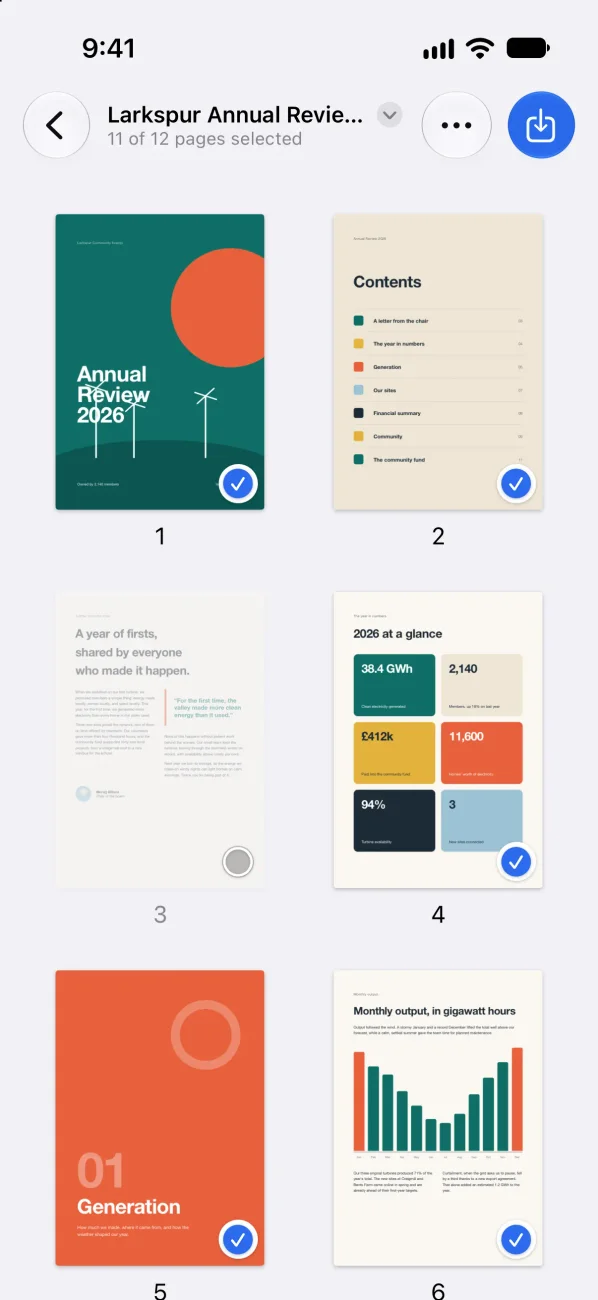
Pick pages at a glance
See every page as a thumbnail. Click or tap the pages you want, type a range such as 1-3, 5, 8-10, or select all, odd or even pages. Find Text shows which pages contain a word or phrase. Show only your selection to check it before exporting.
Split a PDF by chapter
If the PDF has bookmarks, choose chapters and sections from its table of contents and their pages are selected for you. Search long manuals by name and combine as many sections as you need.
Keep what matters
Bookmarks for the pages you keep come along, renumbered for the new document. Web links still work, and links between the pages you keep point to the right place. Text stays selectable, graphics stay sharp and rotated pages keep their orientation. Your original file never changes.
Save, share or print
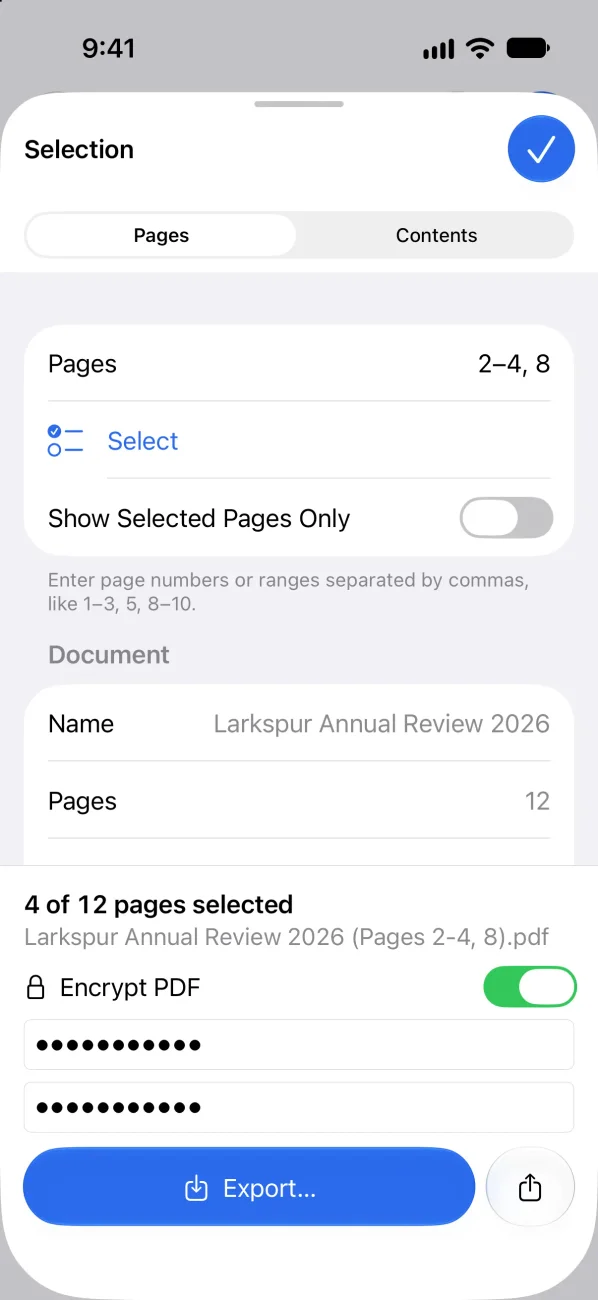
Export a new PDF named after what's inside, such as "Report (Pages 1-3)" or the chapter's title. Share it with another app, print just those pages or preview them with Quick Look.
Password protection
Open locked PDFs with their password. Turn on Encrypt PDF to protect the new file with a password of its own.
Private by design
Everything happens on your device. There are no accounts, ads or analytics, and your PDFs are never uploaded.
Requires macOS 26, iOS 26 or iPadOS 26 or later.
Yang baru
Versi 1.2 · 6/11/2026
New: Find Text. Search every page for a word or phrase, see where it appears, and add the matching pages to your selection or replace it. Searching on its own never changes your selection.
Privasi aplikasi
Yang dinyatakan Christoffer Buusmann di App Store tentang cara aplikasi ini menangani data.
-
Data tidak dikumpulkan
Pengembang tidak mengumpulkan data apa pun dari aplikasi ini.
Praktik privasi dapat bervariasi, misalnya berdasarkan fitur yang Anda gunakan atau usia Anda.
Informasi
- Penjual
- Christoffer Buusmann
- Kategori
- Produktivitas
- Versi
- 1.2
- Diperbarui
- 6/11/2026
- Dirilis
- 7/10/2026
- Ukuran
- 5,6 MB
- Memerlukan
- iOS 26.0 atau yang lebih baru
- Batasan usia
- 4+
- Harga
- Gratis
- Bahasa
- Inggris
- Hak cipta
- © 2026 Christoffer Buusmann
Mungkin Anda juga suka
-
 Paradoc: PDF Document ScannerProduktivitas
-
 PDF Simple – Compress & MergeProduktivitas
-
 QuietScan: PDF ScannerProduktivitas
-
 Leaf - PDF EditorProduktivitas
-
 PDF Split & ExtractProduktivitas
-
 PurePDF - Merge & ExtractProduktivitas
-
 PDF Splitter - Pisah PDFEkstrak & pisahkan halaman
-
 Copy Note: Copy with one touchProduktivitas
-
 HonestPDF: Private PDF ToolsProduktivitas
-
 PDF Extractor & ConverterProduktivitas