PDF Extractor: Split Pages
Extract & save chapters
iPhone, iPad, Mac için tasarlandı
Ücretsiz
- Yaş sınırı4+
- KategoriÜretkenlik
- GeliştiriciChristoffer Buusmann
- Dillerİngilizce
- Boyut5,6 MB
Resmi App Store sayfasına bağlanır
Download.org, PDF Extractor: Split Pages için hiçbir dosya barındırmaz. Düğme, uygulamanın App Store üzerindeki sayfasını açar; uygulamayı orada Christoffer Buusmann yayınlar. Sayfanın son kontrolü: 13.11.2026.
Ekran görüntüleri


Hakkında
Geliştirici bu metni dilinizde sunmamış.
Extract pages from a PDF or split it by chapter, then save, share or print them as a new PDF. PDF Extractor is free, works offline on Mac, iPhone and iPad, and never uploads your documents.
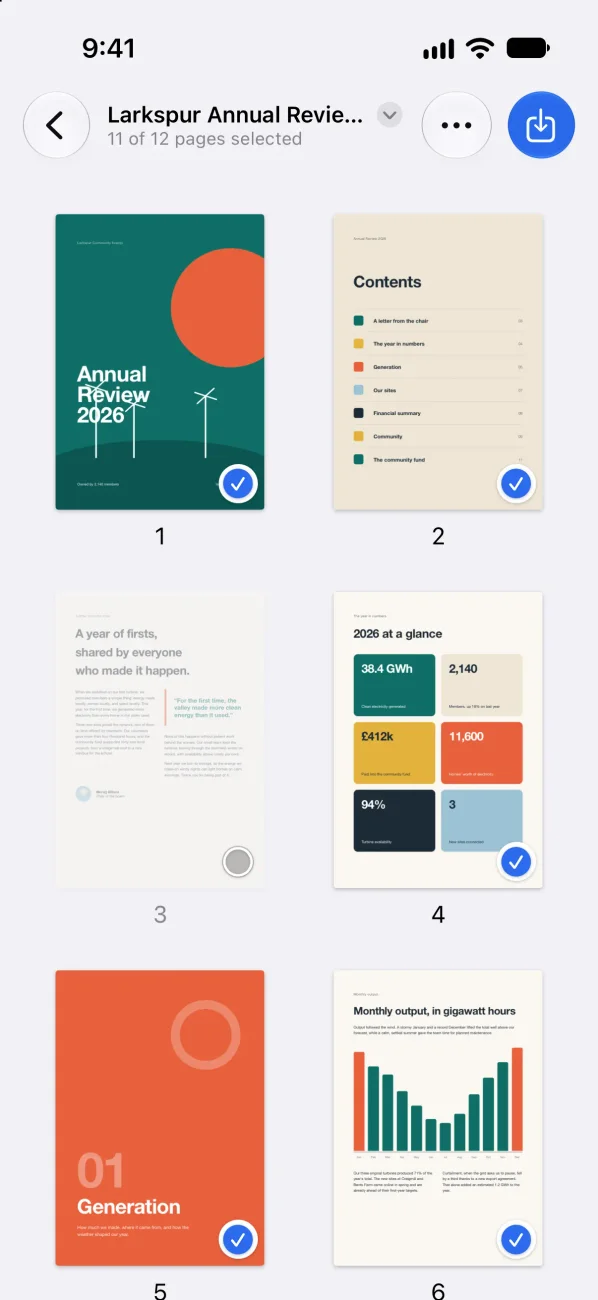
Pick pages at a glance
See every page as a thumbnail. Click or tap the pages you want, type a range such as 1-3, 5, 8-10, or select all, odd or even pages. Find Text shows which pages contain a word or phrase. Show only your selection to check it before exporting.
Split a PDF by chapter
If the PDF has bookmarks, choose chapters and sections from its table of contents and their pages are selected for you. Search long manuals by name and combine as many sections as you need.
Keep what matters
Bookmarks for the pages you keep come along, renumbered for the new document. Web links still work, and links between the pages you keep point to the right place. Text stays selectable, graphics stay sharp and rotated pages keep their orientation. Your original file never changes.
Save, share or print
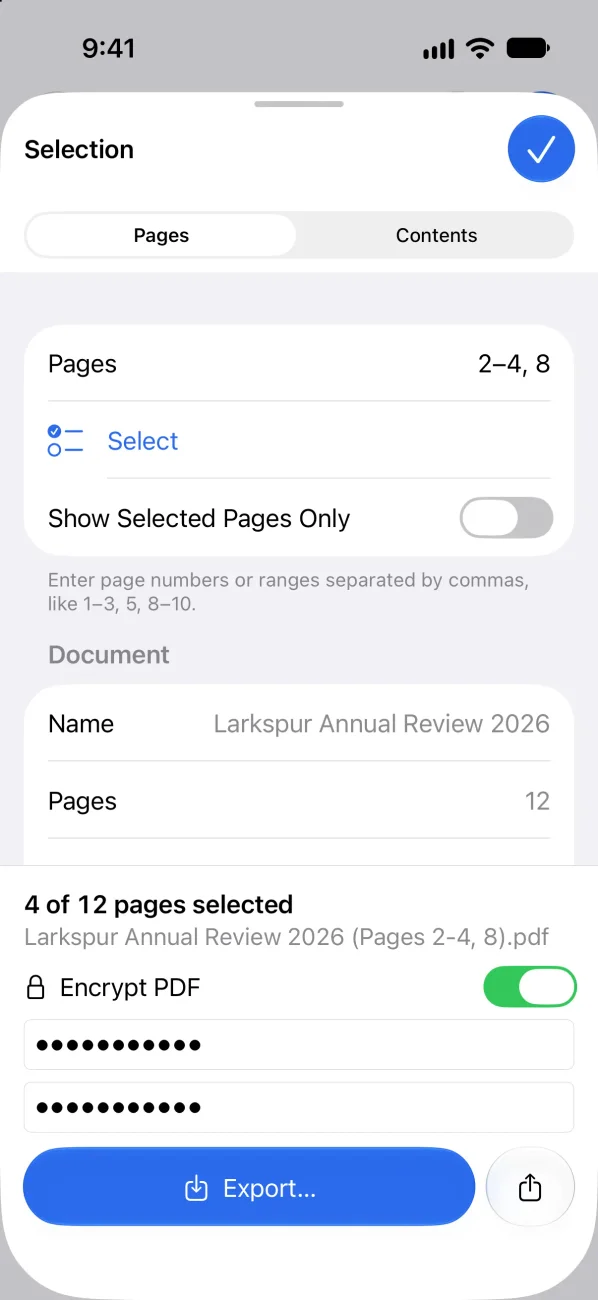
Export a new PDF named after what's inside, such as "Report (Pages 1-3)" or the chapter's title. Share it with another app, print just those pages or preview them with Quick Look.
Password protection
Open locked PDFs with their password. Turn on Encrypt PDF to protect the new file with a password of its own.
Private by design
Everything happens on your device. There are no accounts, ads or analytics, and your PDFs are never uploaded.
Requires macOS 26, iOS 26 or iPadOS 26 or later.
Yenilikler
Sürüm 1.2 · 06.11.2026
New: Find Text. Search every page for a word or phrase, see where it appears, and add the matching pages to your selection or replace it. Searching on its own never changes your selection.
Uygulama gizliliği
Bu uygulamanın verileri nasıl işlediği hakkında Christoffer Buusmann tarafından App Store üzerinde yapılan beyan.
-
Veri toplanmıyor
Geliştirici bu uygulamadan hiçbir veri toplamıyor.
Gizlilik uygulamaları, örneğin kullandığınız özelliklere veya yaşınıza göre değişiklik gösterebilir.
Bilgiler
- Satıcı
- Christoffer Buusmann
- Kategori
- Üretkenlik
- Sürüm
- 1.2
- Güncellendi
- 06.11.2026
- Yayın tarihi
- 07.10.2026
- Boyut
- 5,6 MB
- Gereksinim
- iOS 26.0 veya sonrası
- Yaş sınırı
- 4+
- Fiyat
- Ücretsiz
- Diller
- İngilizce
- Telif hakkı
- © 2026 Christoffer Buusmann
Bunları da beğenebilirsiniz
-
 Paradoc: PDF Document ScannerÜretkenlik
-
 PDF Simple – Compress & MergeÜretkenlik
-
 QuietScan: PDF ScannerÜretkenlik
-
 Leaf - PDF EditorÜretkenlik
-
 PDF Split & ExtractÜretkenlik
-
 PurePDF - Merge & ExtractÜretkenlik
-
 PDF Splitter - Split & ExtractÜretkenlik
-
 Copy Note: Copy with one touchÜretkenlik
-
 HonestPDF: Private PDF ToolsÜretkenlik
-
 PDF Extractor & ConverterÜretkenlik