- 対象年齢4+
- カテゴリ仕事効率化
- 開発元Christoffer Buusmann
- 言語英語
- サイズ5.6 MB
App Storeの公式ページにリンクしています
Download.orgはPDF Extractor: Split Pagesのファイルを一切ホストしていません。ボタンを押すと、Christoffer Buusmannが公開しているApp Storeのアプリページが開きます。ページの最終確認:2026/11/13。
スクリーンショット


概要
開発元はこのテキストをお使いの言語で提供していません。
Extract pages from a PDF or split it by chapter, then save, share or print them as a new PDF. PDF Extractor is free, works offline on Mac, iPhone and iPad, and never uploads your documents.
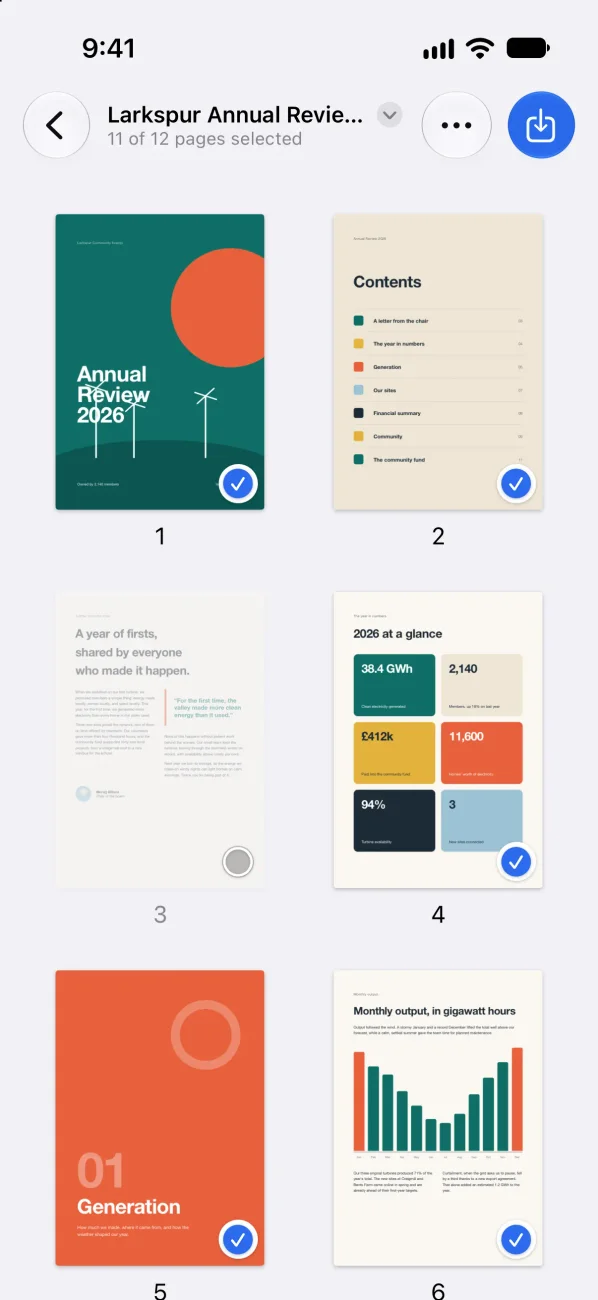
Pick pages at a glance
See every page as a thumbnail. Click or tap the pages you want, type a range such as 1-3, 5, 8-10, or select all, odd or even pages. Find Text shows which pages contain a word or phrase. Show only your selection to check it before exporting.
Split a PDF by chapter
If the PDF has bookmarks, choose chapters and sections from its table of contents and their pages are selected for you. Search long manuals by name and combine as many sections as you need.
Keep what matters
Bookmarks for the pages you keep come along, renumbered for the new document. Web links still work, and links between the pages you keep point to the right place. Text stays selectable, graphics stay sharp and rotated pages keep their orientation. Your original file never changes.
Save, share or print
Export a new PDF named after what's inside, such as "Report (Pages 1-3)" or the chapter's title. Share it with another app, print just those pages or preview them with Quick Look.
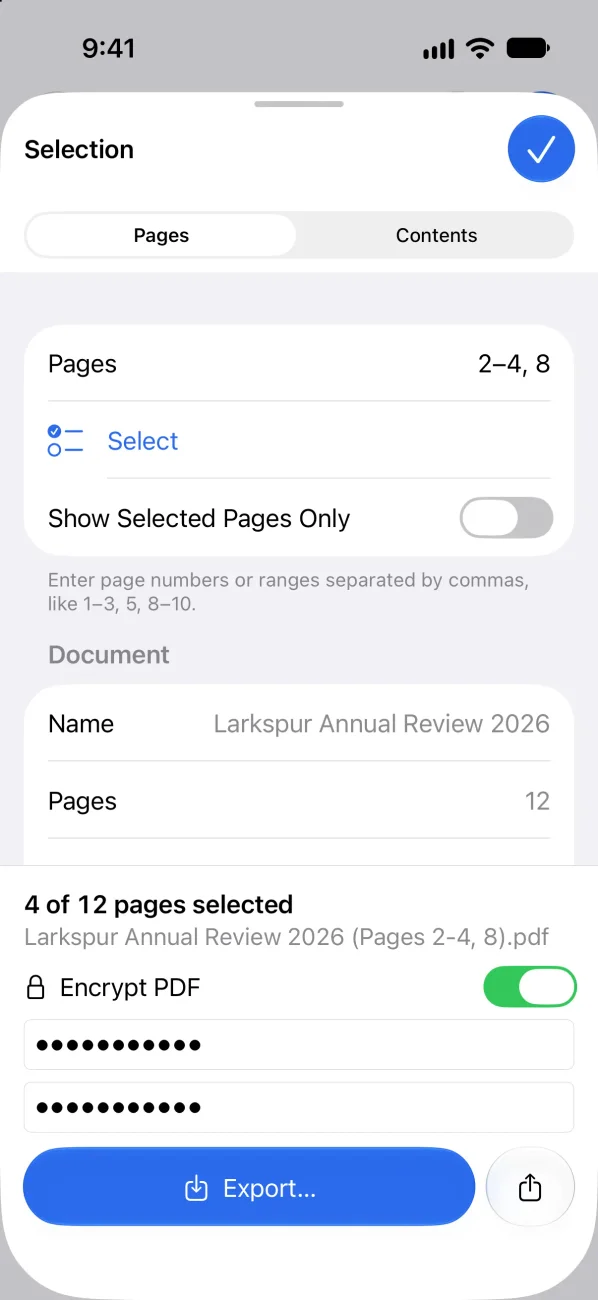
Password protection
Open locked PDFs with their password. Turn on Encrypt PDF to protect the new file with a password of its own.
Private by design
Everything happens on your device. There are no accounts, ads or analytics, and your PDFs are never uploaded.
Requires macOS 26, iOS 26 or iPadOS 26 or later.
新機能
バージョン 1.2 · 2026/11/6
New: Find Text. Search every page for a word or phrase, see where it appears, and add the matching pages to your selection or replace it. Searching on its own never changes your selection.
アプリのプライバシー
このアプリのデータの取り扱いについて、Christoffer BuusmannがApp Storeで申告している内容です。
-
データの収集なし
開発元はこのアプリからデータを収集しません。
プライバシーの取り扱いは、ご利用の機能やお客様の年齢などに応じて異なる場合があります。
情報
- 販売元
- Christoffer Buusmann
- カテゴリ
- 仕事効率化
- バージョン
- 1.2
- 更新日
- 2026/11/6
- リリース
- 2026/10/7
- サイズ
- 5.6 MB
- 必要条件
- iOS 26.0以降
- 対象年齢
- 4+
- 価格
- 無料
- 言語
- 英語
- 著作権
- © 2026 Christoffer Buusmann
こちらもおすすめ
-
 Paradoc: PDF Document Scanner仕事効率化
-
 PDF Simple – Compress & Merge仕事効率化
-
 QuietScan: PDFスキャナローカルで完結する書類スキャナ
-
 Leaf - PDF Editor仕事効率化
-
 PDF分割ツール - シンプルに分けるページ範囲で抜き出し・全ページ分割
-
 PurePDF - Merge & Extract仕事効率化
-
 PDF分割 - ページ抽出・切り出し範囲・奇数偶数・Nページで分ける
-
 Copy Note: Copy with one touch仕事効率化
-
 HonestPDF: Private PDF Tools仕事効率化
-
 PDF Extractor & Converter仕事効率化