
CutKit 2
Layout optimizer
Designed for iPhone, iPad, iPod touch
Free · In-app purchases
- Age rating4+
- CategoryUtilities
- DeveloperAndrii Kostiushyn
- LanguagesEnglish
- Size24.7 MB
Links to the official App Store page
Download.org hosts no file of CutKit 2. The button opens its official App Store page, published by Andrii Kostiushyn. Listing last checked on Nov 18, 2026.
Screenshots



About
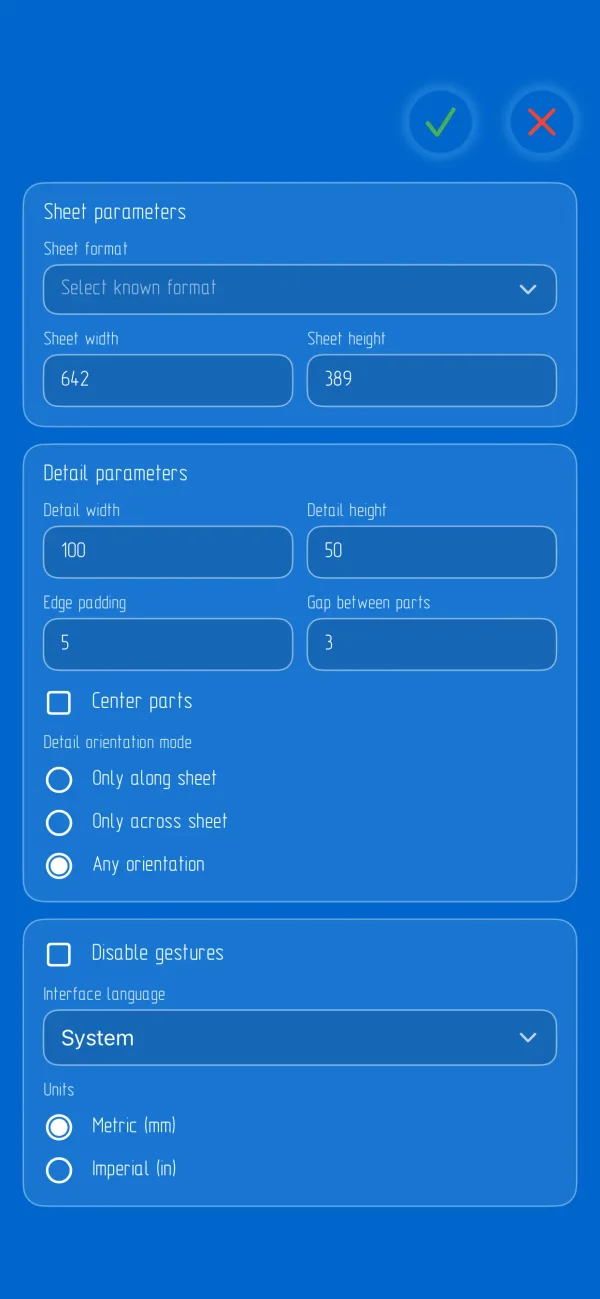
CutKit 2 is a precision layout optimizer designed for engineers, makers, and professionals who work with sheet materials. Whether you are cutting wood, metal, acrylic, vinyl, or PCB panels, CutKit helps you arrange parts efficiently and reduce waste.
Instead of manually placing elements and guessing the best layout, CutKit automatically calculates optimal arrangements based on your input. The result is faster workflows, cleaner layouts, and measurable material savings.
KEY FEATURES
• Automatic layout optimization
Quickly arrange parts on a sheet with minimal waste. Focus on your work, not on manual positioning.
• Real-world use cases
Perfect for CNC cutting, PCB panelization, laser cutting, vinyl production, and workshop planning.
• Precision and control
Define exact dimensions, spacing, and constraints. Designed for engineering-grade accuracy.
• Metric and imperial units
Work seamlessly in millimeters or inches depending on your workflow.
• Clean and practical interface
No unnecessary complexity. Built for speed and clarity in real production environments.
• Multi-language support
Use the app in your preferred language, including extended and custom localizations.
WHY CUTKIT 2
Material cost is a hidden expense in many workflows. Even small inefficiencies scale quickly when repeated across multiple sheets and jobs. CutKit is built to minimize those losses.
Instead of spending time on manual trial-and-error layouts, you get a deterministic, repeatable process that delivers consistent results.
WHO IS IT FOR
• CNC operators
• Engineers and hardware developers
• PCB designers and manufacturers
• Makers and workshop owners
• Advertising and vinyl production specialists
If you work with rectangular parts and sheet materials, CutKit helps you do it faster and more efficiently.
WORKFLOW
1. Define your sheet size
2. Add parts with dimensions
3. Run optimization
4. Get a ready-to-use layout
No complex setup. No learning curve.
CUTKIT PHILOSOPHY
CutKit is built as a tool, not a toy. It prioritizes precision, speed, and practical value over visual noise or unnecessary features. Every function exists to solve a real problem.
Start optimizing your layouts today and reduce material waste from the very first sheet.
Terms of Use: https://www.apple.com/legal/internet-services/itunes/dev/stdeula/
Privacy Policy: https://kaboom420.github.io/cutkit2-privacy/
What’s new
Version 2.1.2 · Jun 15, 2026
CutKit 2.1.2 adds Advanced Mode for real cutting projects with multiple sheets, multiple part sizes, algorithm benchmarking, richer summaries, QR sharing, and PDF/DXF exports. You can also switch between the standard navigation menu and the floating menu. This update improves the guide, page swiping, localization, and overall polish.
App privacy
What Andrii Kostiushyn declares on the App Store about how this app handles data.
-
Data not linked to you
May be collected but is not linked to your identity.
- Identifiers
- Usage data
- Diagnostics
Privacy practices may vary, for example with the features you use or your age.
Information
- Seller
- Andrii Kostiushyn
- Category
- Utilities
- Version
- 2.1.2
- Updated
- Jun 15, 2026
- Released
- Apr 21, 2026
- Size
- 24.7 MB
- Requires
- iOS 15.0 or later
- Age rating
- 4+
- Price
- Free
- In-app purchases
- Yes
- Languages
- English
- Copyright
- © 2026 KaBoom Software
You might also like
-
 RollCut PanelSheet cutting & remnant stock
-
 Cut-O-MatPlan the cut and cut the plan.
-
 MidiTX EditorMIDI editor for TONEX Pedal
-
 Axialmark: 3D CAD Model ViewerSTEP, IGES, STL, GLTF & OBJ 3D
-
 RollCut Metal Cut CalculatorSheet and coil cutting plans
-
 Woodwork Cut List: CutlistTimber Calculator & Saw Kerf
-
 Glessio: Cut List OptimizerOptimized Wood Cutting Plans
-
 CutFlow: Cut List OptimizerSheet Cutting Optimizer Tool
-
 LumberFitCut List Optimizer
-
 Presentation Maker - SlideDeckPPT Creator, Editor & Viewer