- Age rating4+
- CategoryUtilities
- DeveloperGabriel Thibault
- LanguagesEnglish
- Size1.4 MB
Links to the official App Store page
Download.org hosts no file of Nearscreen. The button opens its official App Store page, published by Gabriel Thibault. Listing last checked on Nov 16, 2026.
Screenshots


About
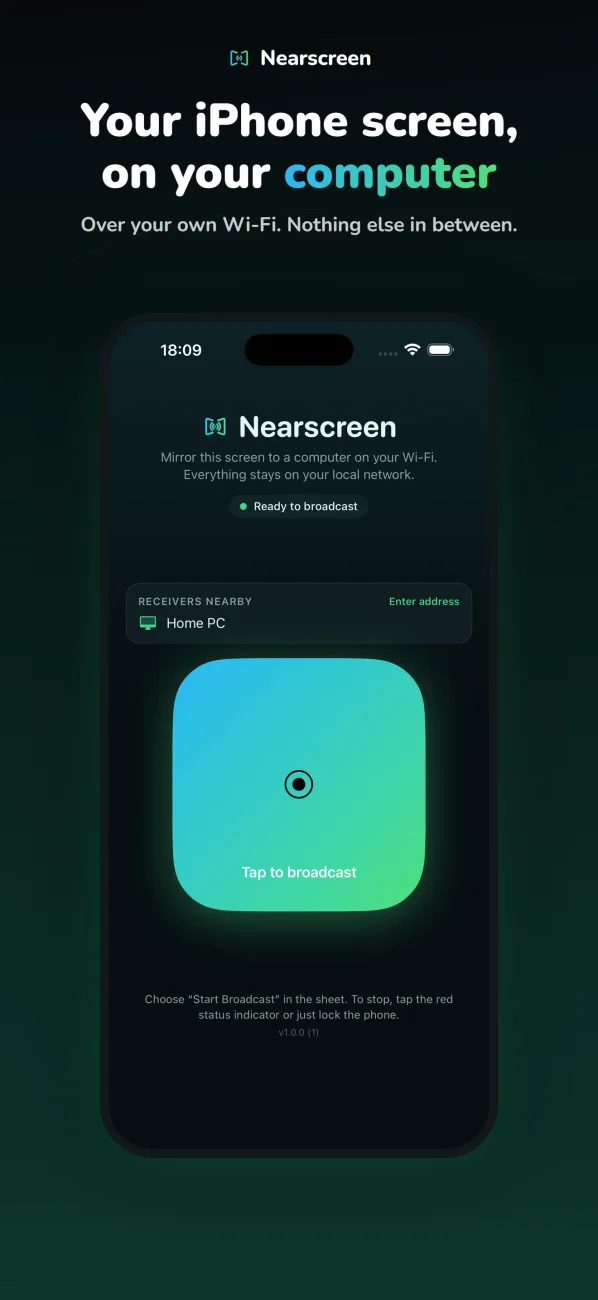
Nearscreen mirrors your iPhone screen to a computer on the same Wi-Fi network. One tap — and your screen appears on your desktop. Nothing ever leaves your local network.
HOW IT WORKS
1. Run the free Nearscreen receiver on your computer (download at https://nearscreen.app/receiver).
2. Open Nearscreen on your iPhone — it finds receivers on your network automatically.
3. Tap the broadcast button and choose "Start Broadcast".
To stop, tap the red status indicator or simply lock your phone.
ON A NETWORK THAT HIDES DEVICES
Offices, dorms and guest Wi-Fi often block the discovery traffic that lets the
phone find your computer. The receiver shows a QR code for exactly this: point
the Camera app at it and Nearscreen opens pointed straight at that computer. You
can also type the address by hand.
PRIVATE BY DESIGN
• Your video is streamed only to a receiver on your own network
• No cloud, no servers, no accounts
• No analytics, no tracking — we collect no data at all
FAST AND EFFICIENT
• Hardware H.264 encoding — smooth motion, low battery drain
• Low-latency streaming over your local network
• Keeps broadcasting while you use other apps or lock into a game
GOOD FOR
• Showing your phone on a bigger screen in meetings and classrooms
• Demoing and testing apps
• Streaming mobile gameplay to your desktop setup
• Any moment when screen mirroring should stay strictly on your own network
Nearscreen requires the Nearscreen receiver application on your computer (Windows and macOS, free): https://nearscreen.app/receiver
What’s new
Version 1.1.0 · Sep 26, 2026
Improved streaming reliability: if iOS resets the hardware video encoder, Nearscreen now rebuilds it automatically instead of leaving a frozen picture on the receiver. General stability improvements.
App privacy
What Gabriel Thibault declares on the App Store about how this app handles data.
-
Data not collected
The developer does not collect any data from this app.
Privacy practices may vary, for example with the features you use or your age.
Information
- Seller
- Gabriel Thibault
- Category
- Utilities
- Version
- 1.1.0
- Updated
- Sep 26, 2026
- Released
- Sep 10, 2026
- Size
- 1.4 MB
- Requires
- iOS 16.0 or later
- Age rating
- 4+
- Price
- Free
- Languages
- English
- Copyright
- © 2026 Gabriel Thibault
You might also like
-
 PhoneStage: Screen Mirroring3D Demos in Your Browser
-
 Monitor MirrorUtilities
-
 Mirror: Control Your MacControl your Mac over Wi-Fi
-
 LensGuard: AI Glasses DetectorSpot smart & camera glasses
-
 BeamRight: Mirror & Cast TVScreen mirror to Google TV
-
 Screen FlickScreen Flick
-
 Desktop MirroringScreen Share & Second Screen
-
 Quick Settings LauncherSmart shortcuts for settings
-
 Switch Always OnSwitch Always On
-
 Remotly – Remote DesktopLow-latency PC access & games