
PaperFlow: Handwritten Notes
Links, backlinks and a graph
Designed for iPhone, iPad, iPod touch
Free · In-app purchases
- Age rating4+
- CategoryProductivity
- DeveloperFreedom It
- LanguagesEnglish+ 1 more
- Size85.0 MB
Links to the official App Store page
Download.org hosts no file of PaperFlow: Handwritten Notes. The button opens its official App Store page, published by Freedom It. Listing last checked on Nov 17, 2026.
Screenshots

About
Write by hand and link like you type. A word you wrote becomes a link, your handwritten pages sit in the same graph as the notes you type, and one search reads both.
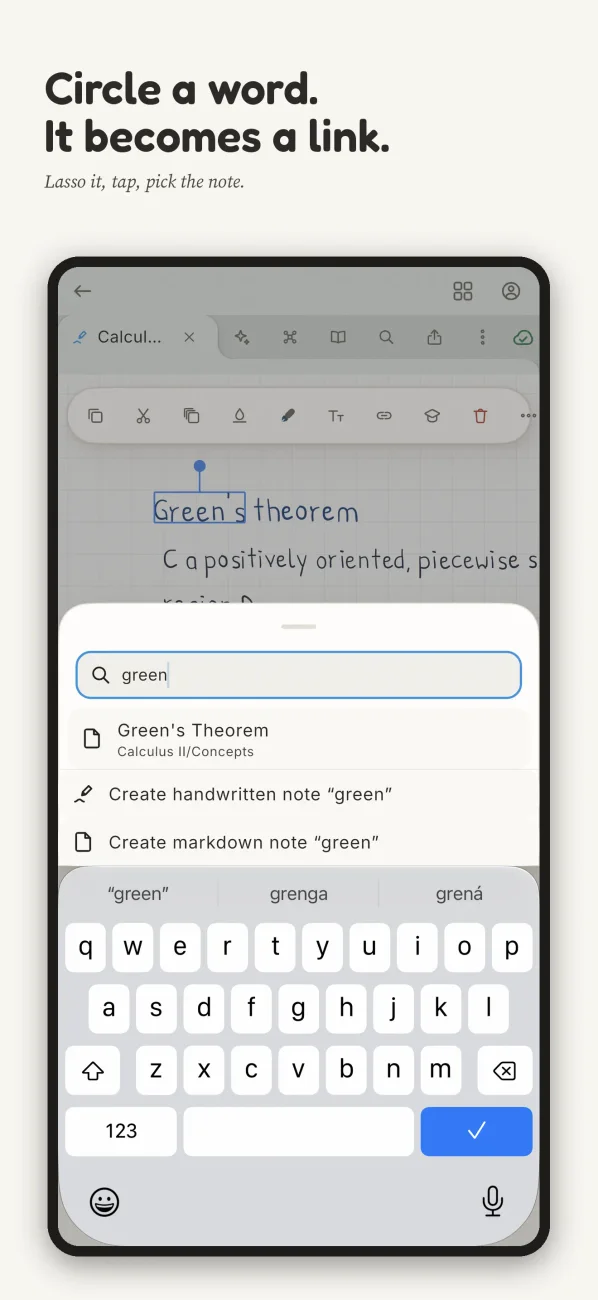
CIRCLE A WORD. IT BECOMES A LINK.
Lasso a word on the page, tap "Link to a note" and pick the note. That note lists the page under "Mentioned in". A link like [[Calculus II - notebook#page=12]] opens your handwriting on page 12.
HANDWRITTEN AND TYPED, ONE GRAPH
Every notebook you write is a node beside the notes you type, with links and backlinks both ways. Tap a node to see what it connects to.
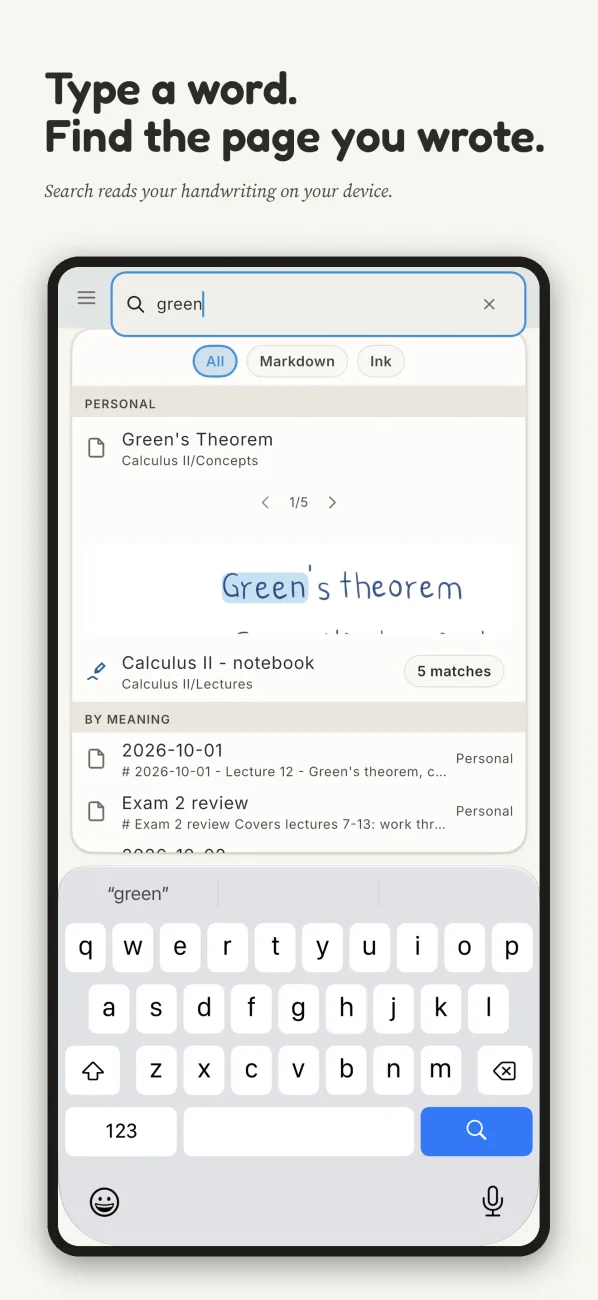
TYPE A WORD. FIND THE PAGE YOU WROTE.
One search covers your handwriting, the notes you type and the text inside your PDFs. Your handwriting is read on your device, and it stays handwriting: it turns into text only when you ask.
THE SYNTAX YOU ALREADY TYPE
Wikilinks with autocomplete, note embeds, callouts, YAML properties, a templates folder, a daily note, LaTeX, Mermaid flowcharts and code blocks. Tabs, split panes, floating windows, a command palette and a quick switcher.
PLAIN FILES, ON YOUR DEVICE
Your notes are files: .md for what you type, .ink for what you write. The vault shows up in the Files app, every notebook exports to PDF or PNG, and the whole vault exports as a zip. Everything works offline, and two devices writing on the same page don't erase each other.
A PEN WORTH WRITING WITH
Press and the line thickens; tilt the pencil and it shades. Squeeze or double-tap Apple Pencil to switch tools, hover shows where the tip will land, and Pencil Pro's barrel roll turns the nib. Your palm leaves no mark. A different paper on every page.
PDFS AND GOODNOTES NOTEBOOKS COME IN
Import a PDF and write on top of it. Goodnotes notebooks open as PaperFlow notebooks.
WHAT'S FREE, WHAT'S PLUS
The notebook is free forever, with no page limit: writing, linking, search, the graph, import and export. That list doesn't shrink. PaperFlow Plus adds sync across your devices with a copy in the cloud, AI that suggests links up to a monthly allowance, and MCP access so your own AI assistant can read and write the vault once you allow it. 7 days free for new subscribers.
PAPERFLOW PLUS
Monthly or annual subscription with a free trial, renewed automatically until you cancel in your device Settings. The price is shown in the app before you confirm.
Terms of Use (EULA): https://www.apple.com/legal/internet-services/itunes/dev/stdeula/
Privacy Policy: https://paperflow.dev/privacy/en
Support: https://paperflow.dev/support
What’s new
Version 1.4.2 · Oct 6, 2026
Nothing changed in the app since 1.4.1. We rewrote this App Store page in English.
App privacy
What Freedom It declares on the App Store about how this app handles data.
-
Data linked to you
May be collected and linked to your identity.
- Contact info
- Identifiers
- Usage data
- Diagnostics
-
Data not linked to you
May be collected but is not linked to your identity.
- User content
Privacy practices may vary, for example with the features you use or your age.
Information
- Seller
- FREEDOM IT - TECHNOLOGY SOLUTIONS LTDA
- Category
- Productivity
- Version
- 1.4.2
- Updated
- Oct 6, 2026
- Released
- Sep 8, 2026
- Size
- 85.0 MB
- Requires
- iOS 15.0 or later
- Age rating
- 4+
- Price
- Free
- In-app purchases
- Yes
- Languages
- English, Portuguese
- Copyright
- © 2026 FREEDOM IT - TECHNOLOGY SOLUTIONS LTDA
You might also like
-
 AINotes: Note Taking & PDFHandwriting & Infinite Canvas
-
 Pencil - PDF Notes with PencilHandwrite, Type, Draw, Mark Up
-
 StarNote: Notes & PDF MarkupAI Note-Taking & Handwriting
-
 Digital Notebook - Note TakingFreeform PDF annotation w/ Pen
-
 Notes: Note taking & writingGood quick notes & planner
-
 Notes for iPad - Pencil NotesQuick Note Taking & Notepad
-
 MyScript Notes: AI HandwritingSmart note taking, PDF & study
-
 Wellnote: AI Notes, PDF, DocsMemo, Planner, Note taking
-
 Noteshelf: AI Notes & PDFHandwriting, Planner & Journal
-
 Feenote - Notes and listsNote-taking & handwriting