
RoboOCR for Windows
Grabs text from anything on your screen and turns it into editable copy
Screenshots
Description
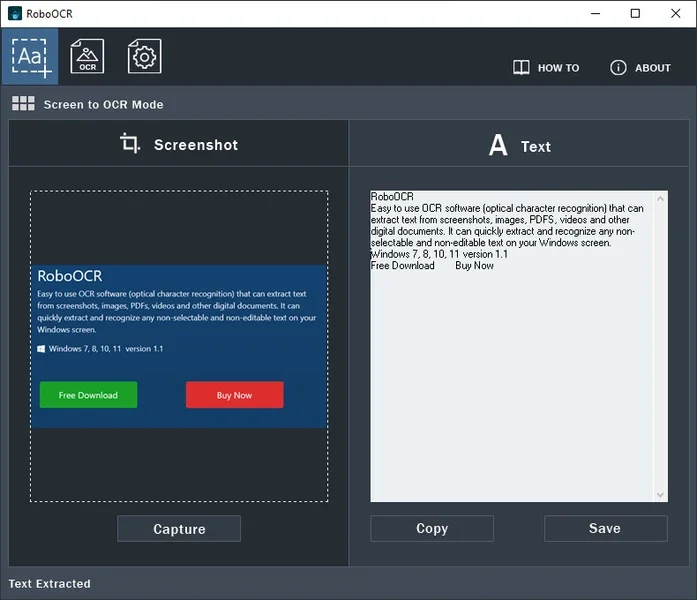
RoboOCR takes text off a screen. You drag a selection over part of an image, a PDF or whatever is showing on the desktop, and it recognizes the characters inside that box. Nothing has to be selectable or editable first. The text it finds goes straight to the clipboard, so you can paste it into Notepad or another program.
The reader knows over 30 languages. Among them are English, Spanish, French, German, Italian, Korean and Japanese, plus Simplified and Traditional Chinese. It also recognizes bar codes. Sources include JPEG, BMP and PNG images, PDFs, videos and other digital documents, and it works without an internet connection. Results can be saved as PDF, RTF, XML, ASCII or Unicode Text. When you choose RTF or PDF you can adjust the quality of the output.
It runs on Windows.
Download files
82002f2385e7bbb38ba88a6479937566d1471e48dd4fa4cc63d9d954c6c64783
Signed by Softdiv Software Sdn Bhd · valid until Oct 3, 2023dad78ef5de6e72bf23b26486350026deef8371b16dddc7b53d2d3fed35adff41
System requirements
Available on:
Additional information
Developer
Size
Category
File type
SHA-256
82002f2385e7bbb38ba88a6479937566d1471e48dd4fa4cc63d9d954c6c64783





