
ScreenGrab 0.96.3 for Windows
SHA-256 listed
Firefox extension that saves the visible view, the full window or the whole page as PNG
All ages
Age rating
Screenshots
Description
ScreenGrab saves the part of the page you can see right now. It also saves the complete browser window, and it can save the entire web page from top to bottom without omitting any element. Captures come out as PNG files.
How you pick a capture
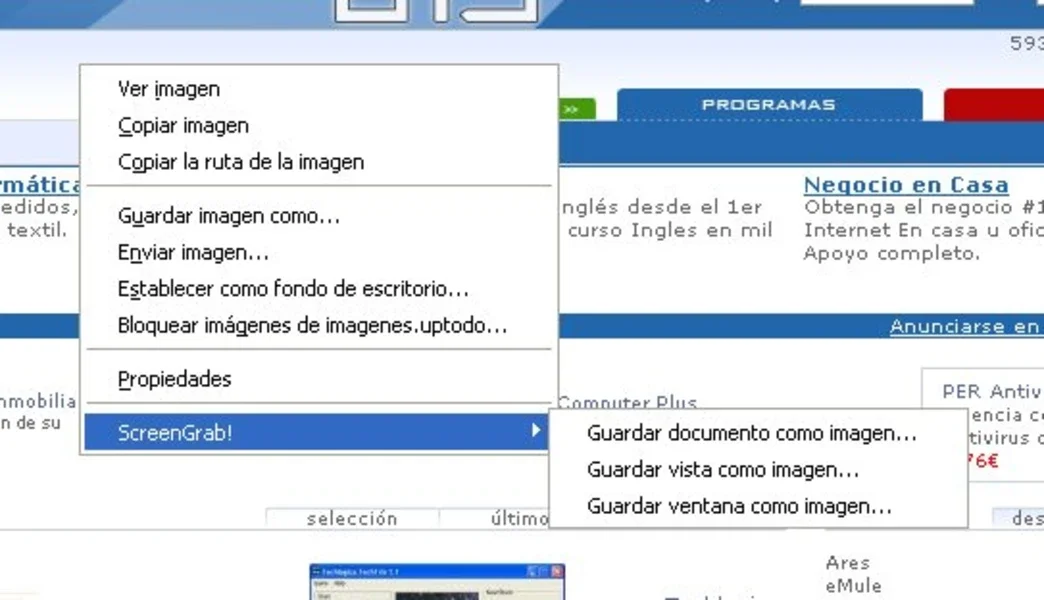
The extension adds a screenshot tool to the browser's context menu. You select one of the options there, then choose the location for the resulting file.
Download files
File0.96.3XPI
Version0.96.3
ReleasedMar 25, 2010
Size76.0 KB
SHA-256
Get
6c992f4989661ba4d3c4e76616bf615c6a478af5d208813631b0be06b33e1d78
Filescreengrab-firefox-0.96.2.xpiXPI
Version0.96.2
ReleasedUnknown
Size81.8 KB
SHA-256
Get
a71fe454e58d5f204a6bdccc7f06ea57bda0a98d90c525a80bbc86b925d91198
Filescreengrab-firefox-0.96.1.xpiXPI
Version0.96.1
ReleasedUnknown
Size81.9 KB
SHA-256
Get
c4eb81f6641ad0eeb00308261c38b095905382d54369565a0fa7a1ccde70ac63
Filescreengrab-firefox-0.9.5.xpiXPI
Version0.9.5
ReleasedUnknown
Size44.4 KB
SHA-256
Get
bf4bbc584a12f75f267a1c2d0f1bc7acce9a451ea0e85b9d1d501f61629e5812
Filescreengrab-firefox-0.9.6.xpiXPI
Version0.9.6
ReleasedUnknown
Size81.9 KB
SHA-256
Get
f5c7e286d5208d4a232387930faabb8a2acf244fe32d3cc0572f5881a94b3234
System requirements
Available on:
Minimum OS:
Windows Windows 8 or later
Additional information
Developer
Latest release
0.96.3 · Mar 25, 2010
Size
76.0 KB
Category
File type
XPI
SHA-256
6c992f4989661ba4d3c4e76616bf615c6a478af5d208813631b0be06b33e1d78





