
Formula Conversion
Simple and Practical
Entwickelt für iPhone, iPad, iPod touch
Kostenlos · In-App-Käufe
- Altersfreigabe4+
- KategorieBildung
- EntwicklerJanek Soomets
- SprachenEnglisch
- Größe1,6 MB
Verlinkt auf die offizielle App Store-Seite
Download.org hostet keine Datei von Formula Conversion. Die Schaltfläche öffnet die App-Seite bei App Store, wo Janek Soomets die App veröffentlicht. Eintrag zuletzt geprüft am 17.11.2026.
Screenshots


Info
Der Entwickler hat diesen Text nicht in Ihrer Sprache bereitgestellt.
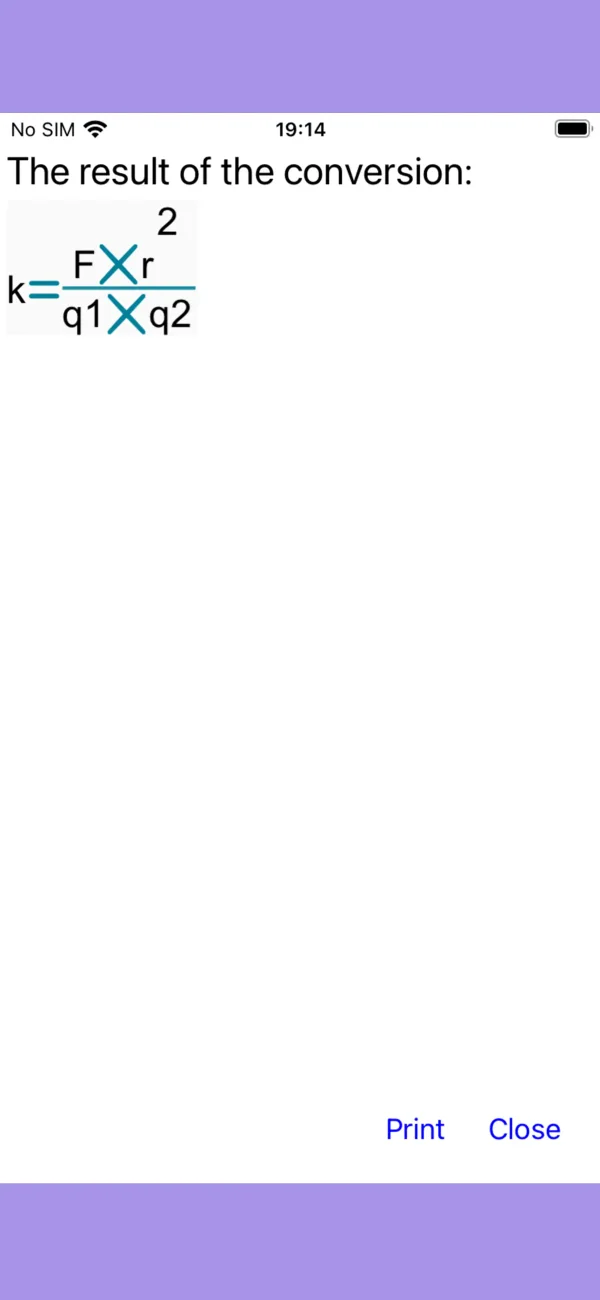
It is a formula conversion application. You can print a formula or a modified formula. You can save unmodified formulas to your phone's storage medium and then open it if necessary.
Upgrading
An application without an upgrade is limited to 24 formula conversions. If you want to convert the formula more than ten times, you must make an in-app purchase.
Creating and opening a formula
You can open the formula by clicking the first button on the toolbar.
You can create a new formula using the symbols, symbols, numbers, and letters on the keyboard. You can change the font size of letters and symbols by pressing the "alp." Or "ALP." And "sym." Or "SYM." Buttons on the toolbar. If you wish, you can delete the characters by pressing the "del." Key. And use the arrows to move between the elements of the formula.
Formatting the formula
You can format the formula by first selecting the characters you want to change. The selection key is "Sel.", And you can then select by scrolling between the elements of the formula or by pressing the finger on the desired character. You can format the selected formula by pressing the second button on the toolbar from the back. You can change the font, font size, font, and font color
Saving and printing the sample
You can save the formula by pressing another button on the toolbar. Press the third button on the toolbar to print. If you want to delete the saved formulas, press the fourth button on the toolbar.
Converting a formula
When the formula is ready, you can publish parts of the formula. To publish part of a formula, select the item with the cursor. Press the fifth button on the toolbar to publish the formula. You can also print the converted formula by clicking the "Print" button.
Zoom a formula
If you want to increase or decrease the formula, press the third button on the back of the toolbar.
Neue Funktionen
Version 1.2 · 27.12.2025
Update age ratings question.
App-Datenschutz
Was Janek Soomets im App Store zum Umgang dieser App mit Daten angibt.
-
Keine Daten erfasst
Der Entwickler erfasst keine Daten von dieser App.
Die Datenschutzpraktiken können variieren, zum Beispiel je nach den von Ihnen verwendeten Funktionen oder Ihrem Alter.
Informationen
- Anbieter
- Janek Soomets
- Kategorie
- Bildung
- Version
- 1.2
- Aktualisiert
- 27.12.2025
- Veröffentlicht
- 20.09.2021
- Größe
- 1,6 MB
- Erfordert
- iOS 14.1 oder neuer
- Altersfreigabe
- 4+
- Preis
- Kostenlos
- In-App-Käufe
- Ja
- Sprachen
- Englisch
- Copyright
- © 2025 Janek Soomets
Das könnte Ihnen auch gefallen
-
 Element OTGBildung
-
 MathDrillFourthGradeBildung
-
 Math Assist+Nachschlagewerke
-
 MathPrint: Mathe-BlätterArbeitsblätter & PDF Übungen
-
 Periodic Table All ElementsBildung
-
 CalculateVolumeProVolume calculator
-
 Periodic Table of ChemistryBildung
-
 SAT Practice ExamBildung
-
 iformulaThe Math learning Platform !
-
 ACT Math : Super Edition LiteBildung