
Formula Conversion
Simple and Practical
Dirancang untuk iPhone, iPad, iPod touch
Gratis · Pembelian dalam aplikasi
- Batasan usia4+
- KategoriPendidikan
- PengembangJanek Soomets
- BahasaInggris
- Ukuran1,6 MB
Tertaut ke halaman resmi App Store
Download.org tidak menyimpan file Formula Conversion apa pun. Tombol ini membuka halaman aplikasi di App Store, tempat Janek Soomets menerbitkannya. Halaman terakhir diperiksa pada 17/11/2026.
Tangkapan layar


Tentang
Pengembang belum menyediakan teks ini dalam bahasa Anda.
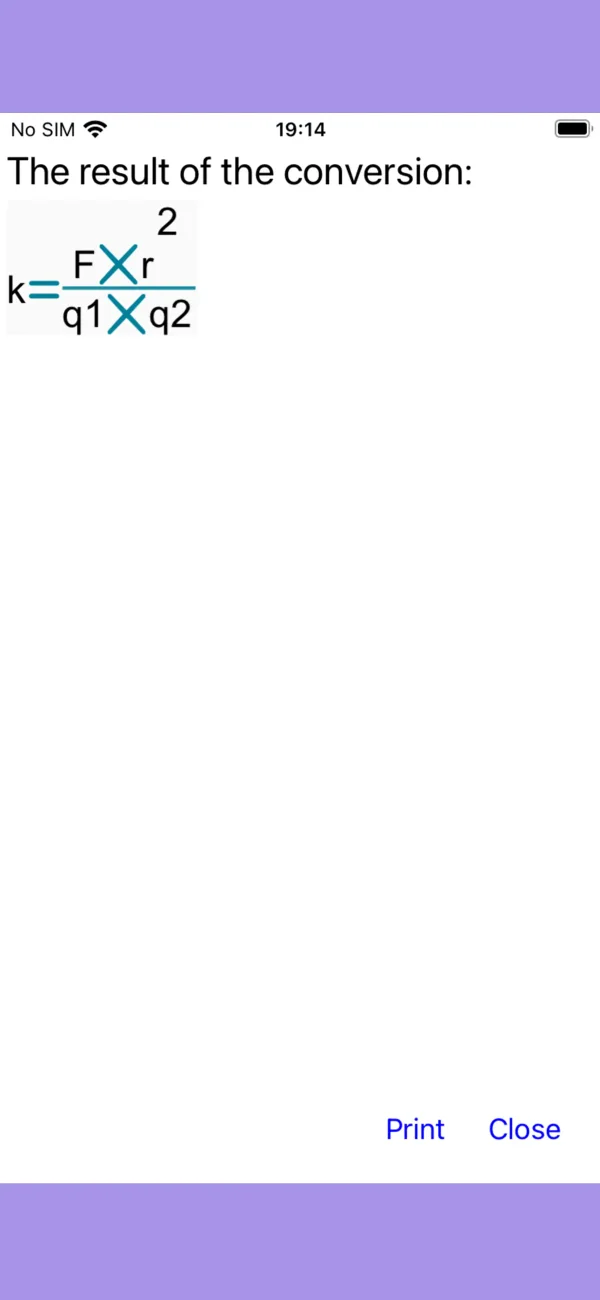
It is a formula conversion application. You can print a formula or a modified formula. You can save unmodified formulas to your phone's storage medium and then open it if necessary.
Upgrading
An application without an upgrade is limited to 24 formula conversions. If you want to convert the formula more than ten times, you must make an in-app purchase.
Creating and opening a formula
You can open the formula by clicking the first button on the toolbar.
You can create a new formula using the symbols, symbols, numbers, and letters on the keyboard. You can change the font size of letters and symbols by pressing the "alp." Or "ALP." And "sym." Or "SYM." Buttons on the toolbar. If you wish, you can delete the characters by pressing the "del." Key. And use the arrows to move between the elements of the formula.
Formatting the formula
You can format the formula by first selecting the characters you want to change. The selection key is "Sel.", And you can then select by scrolling between the elements of the formula or by pressing the finger on the desired character. You can format the selected formula by pressing the second button on the toolbar from the back. You can change the font, font size, font, and font color
Saving and printing the sample
You can save the formula by pressing another button on the toolbar. Press the third button on the toolbar to print. If you want to delete the saved formulas, press the fourth button on the toolbar.
Converting a formula
When the formula is ready, you can publish parts of the formula. To publish part of a formula, select the item with the cursor. Press the fifth button on the toolbar to publish the formula. You can also print the converted formula by clicking the "Print" button.
Zoom a formula
If you want to increase or decrease the formula, press the third button on the back of the toolbar.
Yang baru
Versi 1.2 · 27/12/2025
Update age ratings question.
Privasi aplikasi
Yang dinyatakan Janek Soomets di App Store tentang cara aplikasi ini menangani data.
-
Data tidak dikumpulkan
Pengembang tidak mengumpulkan data apa pun dari aplikasi ini.
Praktik privasi dapat bervariasi, misalnya berdasarkan fitur yang Anda gunakan atau usia Anda.
Informasi
- Penjual
- Janek Soomets
- Kategori
- Pendidikan
- Versi
- 1.2
- Diperbarui
- 27/12/2025
- Dirilis
- 20/9/2021
- Ukuran
- 1,6 MB
- Memerlukan
- iOS 14.1 atau yang lebih baru
- Batasan usia
- 4+
- Harga
- Gratis
- Pembelian dalam aplikasi
- Ya
- Bahasa
- Inggris
- Hak cipta
- © 2025 Janek Soomets
Mungkin Anda juga suka
-
 Element OTGPendidikan
-
 MathDrillFourthGradePendidikan
-
 Math Assist+Referensi
-
 MathPrint: Soal MatematikaBuat & Cetak Soal MTK ke PDF
-
 Periodic Table All ElementsPendidikan
-
 CalculateVolumeProPendidikan
-
 Periodic Table of ChemistryPendidikan
-
 SAT Practice ExamPendidikan
-
 iformulaPendidikan
-
 ACT Math : Super Edition LitePendidikan