
Formula Conversion
Simple and Practical
Diseñada para iPhone, iPad, iPod touch
Gratis · Compras en la aplicación
- Clasificación por edad4+
- CategoríaEducación
- DesarrolladorJanek Soomets
- IdiomasInglés
- Tamaño1,6 MB
Enlaza a la página oficial de App Store
Download.org no aloja ningún archivo de Formula Conversion. El botón abre la página de la aplicación en App Store, donde la publica Janek Soomets. Ficha comprobada por última vez el 17/11/2026.
Capturas de pantalla


Acerca de
El desarrollador no ha proporcionado este texto en tu idioma.
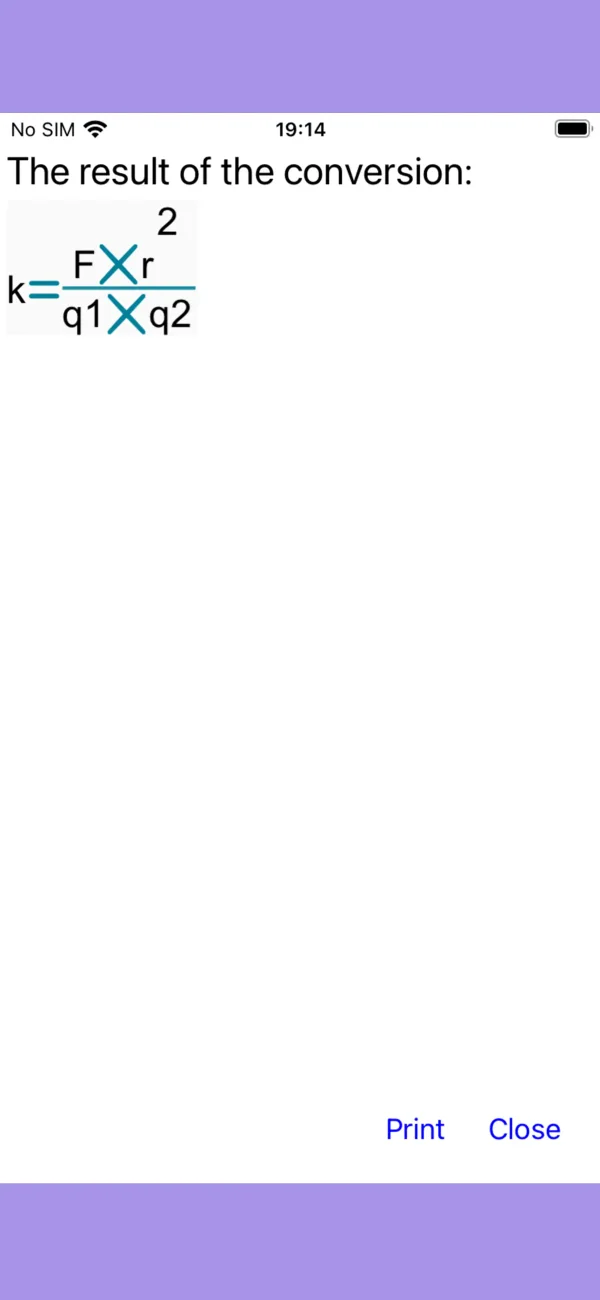
It is a formula conversion application. You can print a formula or a modified formula. You can save unmodified formulas to your phone's storage medium and then open it if necessary.
Upgrading
An application without an upgrade is limited to 24 formula conversions. If you want to convert the formula more than ten times, you must make an in-app purchase.
Creating and opening a formula
You can open the formula by clicking the first button on the toolbar.
You can create a new formula using the symbols, symbols, numbers, and letters on the keyboard. You can change the font size of letters and symbols by pressing the "alp." Or "ALP." And "sym." Or "SYM." Buttons on the toolbar. If you wish, you can delete the characters by pressing the "del." Key. And use the arrows to move between the elements of the formula.
Formatting the formula
You can format the formula by first selecting the characters you want to change. The selection key is "Sel.", And you can then select by scrolling between the elements of the formula or by pressing the finger on the desired character. You can format the selected formula by pressing the second button on the toolbar from the back. You can change the font, font size, font, and font color
Saving and printing the sample
You can save the formula by pressing another button on the toolbar. Press the third button on the toolbar to print. If you want to delete the saved formulas, press the fourth button on the toolbar.
Converting a formula
When the formula is ready, you can publish parts of the formula. To publish part of a formula, select the item with the cursor. Press the fifth button on the toolbar to publish the formula. You can also print the converted formula by clicking the "Print" button.
Zoom a formula
If you want to increase or decrease the formula, press the third button on the back of the toolbar.
Novedades
Versión 1.2 · 27/12/2025
Update age ratings question.
Privacidad de la aplicación
Lo que Janek Soomets declara en App Store sobre cómo esta aplicación gestiona los datos.
-
No se recopilan datos
El desarrollador no recopila ningún dato de esta aplicación.
Las prácticas de privacidad pueden variar, por ejemplo, según las funciones que uses o tu edad.
Información
- Vendedor
- Janek Soomets
- Categoría
- Educación
- Versión
- 1.2
- Actualizado
- 27/12/2025
- Publicado
- 20/9/2021
- Tamaño
- 1,6 MB
- Requiere
- iOS 14.1 o posterior
- Clasificación por edad
- 4+
- Precio
- Gratis
- Compras en la aplicación
- Sí
- Idiomas
- Inglés
- Copyright
- © 2025 Janek Soomets
Quizá también te guste
-
 Element OTGEducación
-
 MathDrillFourthGradeEducación
-
 Math Assist+Referencia
-
 MathPrint: Fichas de MatesGenerador de Ejercicios y PDF
-
 Periodic Table All ElementsEducación
-
 CalculateVolumeProEducación
-
 Periodic Table of ChemistryEducación
-
 SAT Practice ExamEducación
-
 iformulaEducación
-
 ACT Math : Super Edition LiteEducación