
Formula Conversion
Simple and Practical
Conçue pour iPhone, iPad, iPod touch
Gratuit · Achats intégrés
- Classification d’âge4+
- CatégorieÉducation
- DéveloppeurJanek Soomets
- LanguesAnglais
- Taille1,6 Mo
Renvoie vers la page App Store officielle
Download.org n’héberge aucun fichier de Formula Conversion. Le bouton ouvre la page de l’application sur App Store, où Janek Soomets la publie. Fiche vérifiée pour la dernière fois le 17/11/2026.
Captures d’écran


À propos
Le développeur n’a pas fourni ce texte dans votre langue.
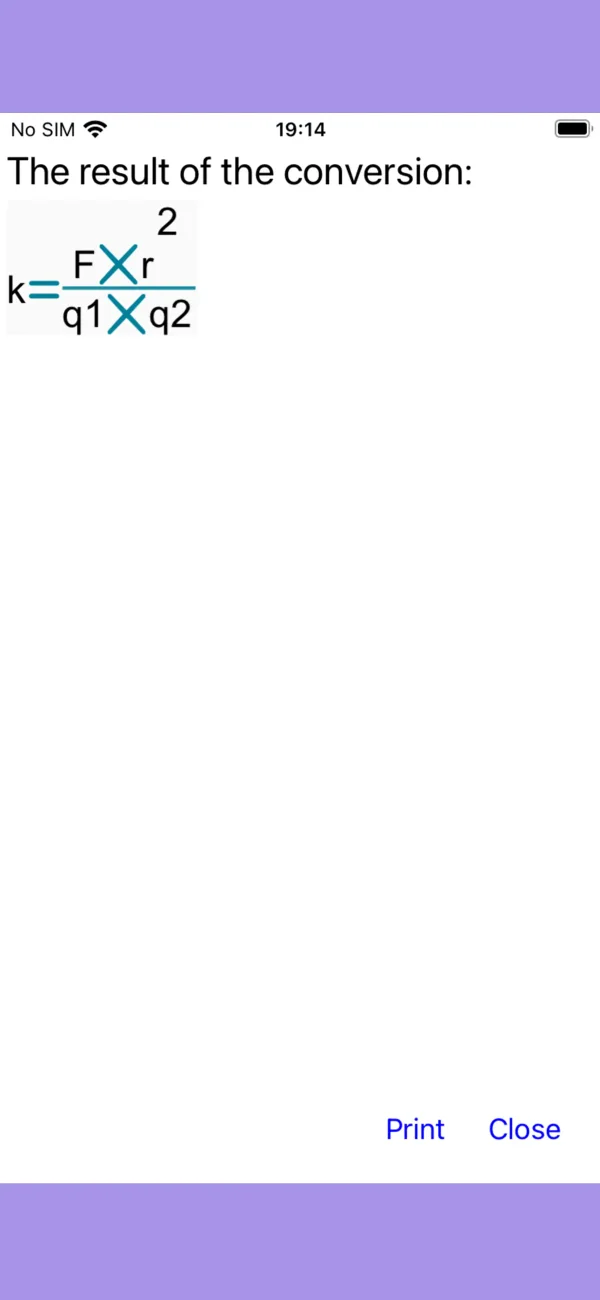
It is a formula conversion application. You can print a formula or a modified formula. You can save unmodified formulas to your phone's storage medium and then open it if necessary.
Upgrading
An application without an upgrade is limited to 24 formula conversions. If you want to convert the formula more than ten times, you must make an in-app purchase.
Creating and opening a formula
You can open the formula by clicking the first button on the toolbar.
You can create a new formula using the symbols, symbols, numbers, and letters on the keyboard. You can change the font size of letters and symbols by pressing the "alp." Or "ALP." And "sym." Or "SYM." Buttons on the toolbar. If you wish, you can delete the characters by pressing the "del." Key. And use the arrows to move between the elements of the formula.
Formatting the formula
You can format the formula by first selecting the characters you want to change. The selection key is "Sel.", And you can then select by scrolling between the elements of the formula or by pressing the finger on the desired character. You can format the selected formula by pressing the second button on the toolbar from the back. You can change the font, font size, font, and font color
Saving and printing the sample
You can save the formula by pressing another button on the toolbar. Press the third button on the toolbar to print. If you want to delete the saved formulas, press the fourth button on the toolbar.
Converting a formula
When the formula is ready, you can publish parts of the formula. To publish part of a formula, select the item with the cursor. Press the fifth button on the toolbar to publish the formula. You can also print the converted formula by clicking the "Print" button.
Zoom a formula
If you want to increase or decrease the formula, press the third button on the back of the toolbar.
Nouveautés
Version 1.2 · 27/12/2025
Update age ratings question.
Confidentialité de l’application
Ce que Janek Soomets déclare sur l’App Store au sujet du traitement des données par cette application.
-
Données non collectées
Le développeur ne collecte aucune donnée à partir de cette application.
Les pratiques en matière de confidentialité peuvent varier, notamment en fonction des fonctionnalités que vous utilisez ou de votre âge.
Informations
- Vendeur
- Janek Soomets
- Catégorie
- Éducation
- Version
- 1.2
- Mis à jour
- 27/12/2025
- Publié
- 20/09/2021
- Taille
- 1,6 Mo
- Nécessite
- iOS 14.1 ou version ultérieure
- Classification d’âge
- 4+
- Prix
- Gratuit
- Achats intégrés
- Oui
- Langues
- Anglais
- Copyright
- © 2025 Janek Soomets
Vous aimerez peut-être aussi
-
 Element OTGÉducation
-
 MathDrillFourthGradeÉducation
-
 Math Assist+Références
-
 MathPrint: Fiche d'ExercicesGénérateur Maths PDF Imprimer
-
 Periodic Table All ElementsÉducation
-
 CalculateVolumeProVolume calculator
-
 Periodic Table of ChemistryÉducation
-
 SAT Practice ExamÉducation
-
 iformulaÉducation
-
 ACT Math : Super Edition LiteÉducation