
Formula Conversion
Simple and Practical
Designed for iPhone, iPad, iPod touch
Free · In-app purchases
- Age rating4+
- CategoryEducation
- DeveloperJanek Soomets
- LanguagesEnglish
- Size1.6 MB
Links to the official App Store page
Download.org hosts no file of Formula Conversion. The button opens its official App Store page, published by Janek Soomets. Listing last checked on Nov 17, 2026.
Screenshots


About
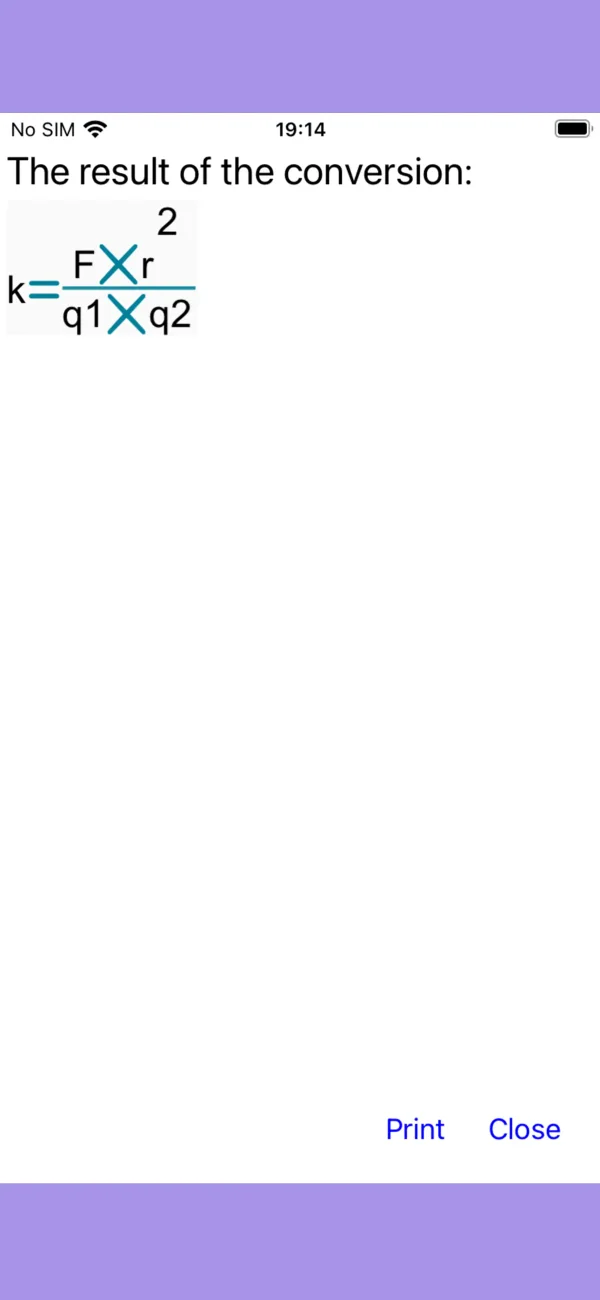
It is a formula conversion application. You can print a formula or a modified formula. You can save unmodified formulas to your phone's storage medium and then open it if necessary.
Upgrading
An application without an upgrade is limited to 24 formula conversions. If you want to convert the formula more than ten times, you must make an in-app purchase.
Creating and opening a formula
You can open the formula by clicking the first button on the toolbar.
You can create a new formula using the symbols, symbols, numbers, and letters on the keyboard. You can change the font size of letters and symbols by pressing the "alp." Or "ALP." And "sym." Or "SYM." Buttons on the toolbar. If you wish, you can delete the characters by pressing the "del." Key. And use the arrows to move between the elements of the formula.
Formatting the formula
You can format the formula by first selecting the characters you want to change. The selection key is "Sel.", And you can then select by scrolling between the elements of the formula or by pressing the finger on the desired character. You can format the selected formula by pressing the second button on the toolbar from the back. You can change the font, font size, font, and font color
Saving and printing the sample
You can save the formula by pressing another button on the toolbar. Press the third button on the toolbar to print. If you want to delete the saved formulas, press the fourth button on the toolbar.
Converting a formula
When the formula is ready, you can publish parts of the formula. To publish part of a formula, select the item with the cursor. Press the fifth button on the toolbar to publish the formula. You can also print the converted formula by clicking the "Print" button.
Zoom a formula
If you want to increase or decrease the formula, press the third button on the back of the toolbar.
What’s new
Version 1.2 · Dec 27, 2025
Update age ratings question.
App privacy
What Janek Soomets declares on the App Store about how this app handles data.
-
Data not collected
The developer does not collect any data from this app.
Privacy practices may vary, for example with the features you use or your age.
Information
- Seller
- Janek Soomets
- Category
- Education
- Version
- 1.2
- Updated
- Dec 27, 2025
- Released
- Sep 20, 2021
- Size
- 1.6 MB
- Requires
- iOS 14.1 or later
- Age rating
- 4+
- Price
- Free
- In-app purchases
- Yes
- Languages
- English
- Copyright
- © 2025 Janek Soomets
You might also like
-
 Element OTGChemistry Learning Made Easy
-
 MathDrillFourthGradeFourth Grade Math
-
 Math Assist+Fast math formula reference
-
 MathPrint: Worksheet GeneratorPrintable Math Practice & PDF
-
 Periodic Table All ElementsTiwari Academy
-
 CalculateVolumeProVolume calculator
-
 Periodic Table of ChemistryChemistry terms & dictionary
-
 SAT Practice ExamSAT 100% Accurate Questions
-
 iformulaThe Math learning Platform !
-
 ACT Math : Super Edition LiteComprehensive ACT Math App