
Formula Conversion
Simple and Practical
Được thiết kế cho iPhone, iPad, iPod touch
Miễn phí · Mua hàng trong ứng dụng
- Độ tuổi4+
- Danh mụcGiáo Dục
- Nhà phát triểnJanek Soomets
- Ngôn ngữTiếng Anh
- Kích thước1,6 MB
Liên kết đến trang App Store chính thức
Download.org không lưu trữ tệp nào của Formula Conversion. Nút này mở trang ứng dụng trên App Store, nơi Janek Soomets phát hành ứng dụng. Trang được kiểm tra lần cuối: 17/11/2026.
Ảnh chụp màn hình

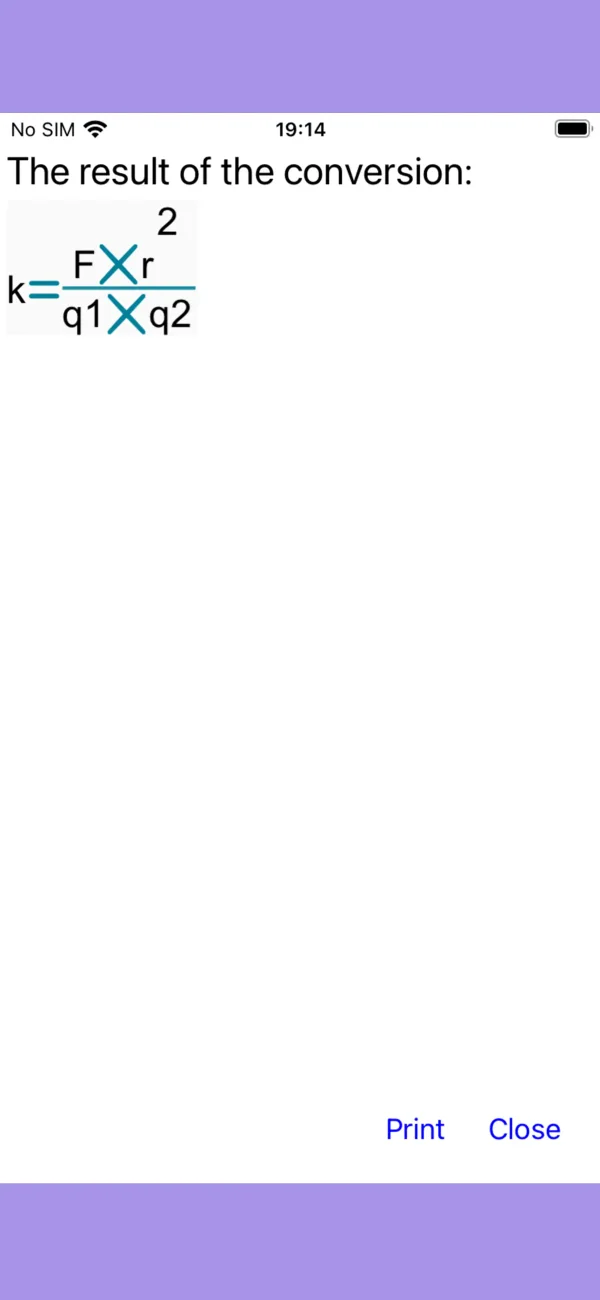

Giới thiệu
Nhà phát triển chưa cung cấp nội dung này bằng ngôn ngữ của bạn.
It is a formula conversion application. You can print a formula or a modified formula. You can save unmodified formulas to your phone's storage medium and then open it if necessary.
Upgrading
An application without an upgrade is limited to 24 formula conversions. If you want to convert the formula more than ten times, you must make an in-app purchase.
Creating and opening a formula
You can open the formula by clicking the first button on the toolbar.
You can create a new formula using the symbols, symbols, numbers, and letters on the keyboard. You can change the font size of letters and symbols by pressing the "alp." Or "ALP." And "sym." Or "SYM." Buttons on the toolbar. If you wish, you can delete the characters by pressing the "del." Key. And use the arrows to move between the elements of the formula.
Formatting the formula
You can format the formula by first selecting the characters you want to change. The selection key is "Sel.", And you can then select by scrolling between the elements of the formula or by pressing the finger on the desired character. You can format the selected formula by pressing the second button on the toolbar from the back. You can change the font, font size, font, and font color
Saving and printing the sample
You can save the formula by pressing another button on the toolbar. Press the third button on the toolbar to print. If you want to delete the saved formulas, press the fourth button on the toolbar.
Converting a formula
When the formula is ready, you can publish parts of the formula. To publish part of a formula, select the item with the cursor. Press the fifth button on the toolbar to publish the formula. You can also print the converted formula by clicking the "Print" button.
Zoom a formula
If you want to increase or decrease the formula, press the third button on the back of the toolbar.
Có gì mới
Phiên bản 1.2 · 27/12/2025
Update age ratings question.
Quyền riêng tư của ứng dụng
Những gì Janek Soomets khai báo trên App Store về cách ứng dụng này xử lý dữ liệu.
-
Dữ liệu không được thu thập
Nhà phát triển không thu thập bất kỳ dữ liệu nào từ ứng dụng này.
Phương thức đảm bảo quyền riêng tư có thể khác nhau, chẳng hạn như tuỳ theo các tính năng bạn sử dụng hoặc độ tuổi của bạn.
Thông tin
- Người bán
- Janek Soomets
- Danh mục
- Giáo Dục
- Phiên bản
- 1.2
- Cập nhật
- 27/12/2025
- Phát hành
- 20/09/2021
- Kích thước
- 1,6 MB
- Yêu cầu
- iOS 14.1 trở lên
- Độ tuổi
- 4+
- Giá
- Miễn phí
- Mua hàng trong ứng dụng
- Có
- Ngôn ngữ
- Tiếng Anh
- Bản quyền
- © 2025 Janek Soomets
Có thể bạn cũng thích
-
 Element OTGGiáo Dục
-
 MathDrillFourthGradeGiáo Dục
-
 Math Assist+Tham Khảo
-
 MathPrint: Tạo Đề Toán PDFBài Tập Toán & In Phiếu In PDF
-
 Periodic Table All ElementsGiáo Dục
-
 CalculateVolumeProGiáo Dục
-
 Periodic Table of ChemistryGiáo Dục
-
 SAT Practice ExamGiáo Dục
-
 iformulaGiáo Dục
-
 ACT Math : Super Edition LiteGiáo Dục